Dell Latitude E7270 Quick User Guide - Windows 10
Summary
Dell Latitude 12 7000 Series Quick Start Guide with multilingual setup covering power adapter connection, Windows 10 setup, Dell apps location, SupportAssist system check, network connectivity with wireless password entry, Microsoft account sign-in, Taiwan RoHS compliance table, and feature overview including Mini DisplayPort, contactless smart card reader, and fingerprint reader.
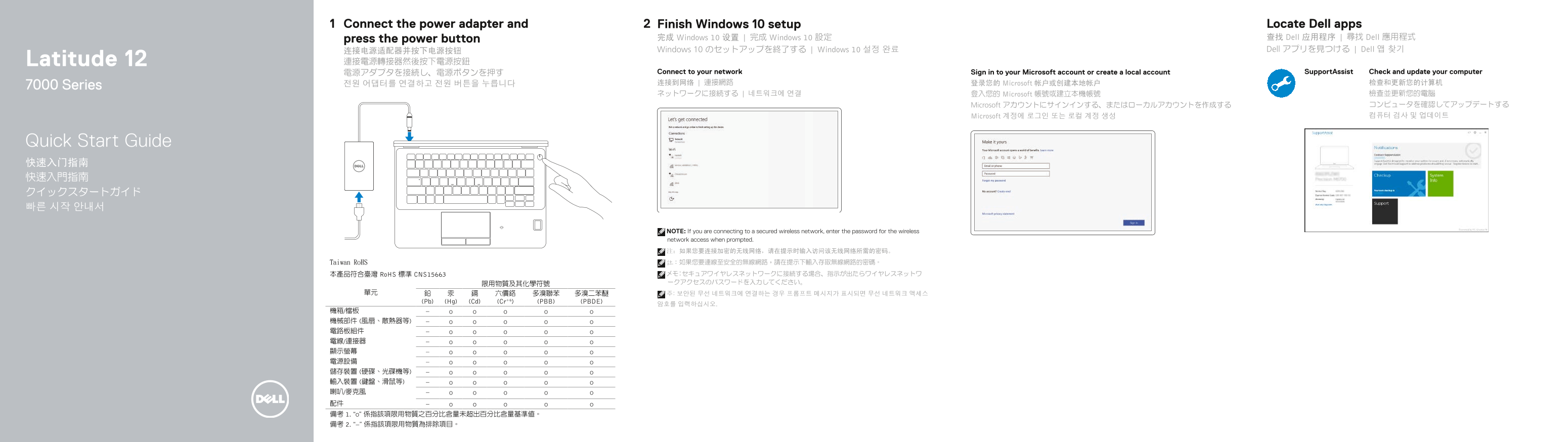
Page 1 Text Content
Connect the power adapter and Finish Windows 10 setup Locate Dell apps
press the power button 完成 Windows 10 设置 | 完成 Windows 10 設定 查找 Dell 应用程序 | 尋找 Dell 應用程式 连接电源适配器并按下电源按钮 Windows 10 のセットアップを終了する | Windows 10 설정 완료 Dell アプリを見つける | Dell 앱 찾기
Latitude 12 連接電源轉接器然後按下電源按鈕
電源アダプタを接続し、電源ボタンを押す Connect to your network Sign in to your Microsoft account or create a local account Support Assist Check and update your computer 전원 어댑터를 연결하고 전원 버튼을 누릅니다 连接到网络 | 連接網路 登录您的 Microsoft 帐户或创建本地帐户 检查和更新您的计算机
7000 Series
ネットワークに接続する | 네트워크에 연결 登入您的 Microsoft 帳號或建立本機帳號 檢查並更新您的電腦
Microsoft アカウントにサインインする、またはローカルアカウントを作成する コンピュータを確認してアップデートする Microsoft 계정에 로그인 또는 로컬 계정 생성 컴퓨터 검사 및 업데이트
Quick Start Guide 快速入门指南 快速入門指南 クイックスタートガイド 빠른 시작 안내서
NOTE: If you are connecting to a secured wireless network, enter the password for the wireless network access when prompted. 注:如果您要连接加密的无线网络,请在提示时输入访问该无线网络所需的密码。
Taiwan Ro HS 註:如果您要連線至安全的無線網路,請在提示下輸入存取無線網路的密碼。
本產品符合臺灣 Ro HS 標準 CNS15663 メモ:セキュアワイヤレスネットワークに接続する場合、指示が出たらワイヤレスネットワ 限用物質及其化學符號 ークアクセスのパスワードを入力してください。
(Pb) (Hg) (Cd) (Cr+6) (PBB) (PBDE)
Page Summary Contents For Dell Latitude E7270 Quick User Guide - Windows 10
Manual Details
| Brand | Dell |
|---|---|
| Pages | 2 |
| File Size | 549.72 KB |
| Published | July 03, 2026 |
Enter the captcha to get the download link:

Frequently Asked Questions
如何接続加密的无线網絡?
如果您要连接加密的无线网络,请在提示时输入访问该无线网络所需的密码。
电脑是否支持智能卡读取器?
是的,非接触式智能卡读取器是可选配件之一。
这款设备有哪些重要的指示灯?
它配有电池状态、硬盘活动、电源以及摄像头等多个状态指示灯。
哪些连接器带有PowerShare功能?
有特定的USB 3.0接口具有PowerShare功能。