Dell Latitude E5470 Quick User Guide - Windows 10
Summary
Quick Start Guide for the Dell Latitude 14 5000 Series E5470 business laptop. Multi-language document covering power adapter connection, Windows 10 setup completion, and network connectivity. Details hardware features including camera, microphone, HDMI port, USB ports, touch fingerprint reader, and smart card reader options. Includes SupportAssist configuration and product support resources.
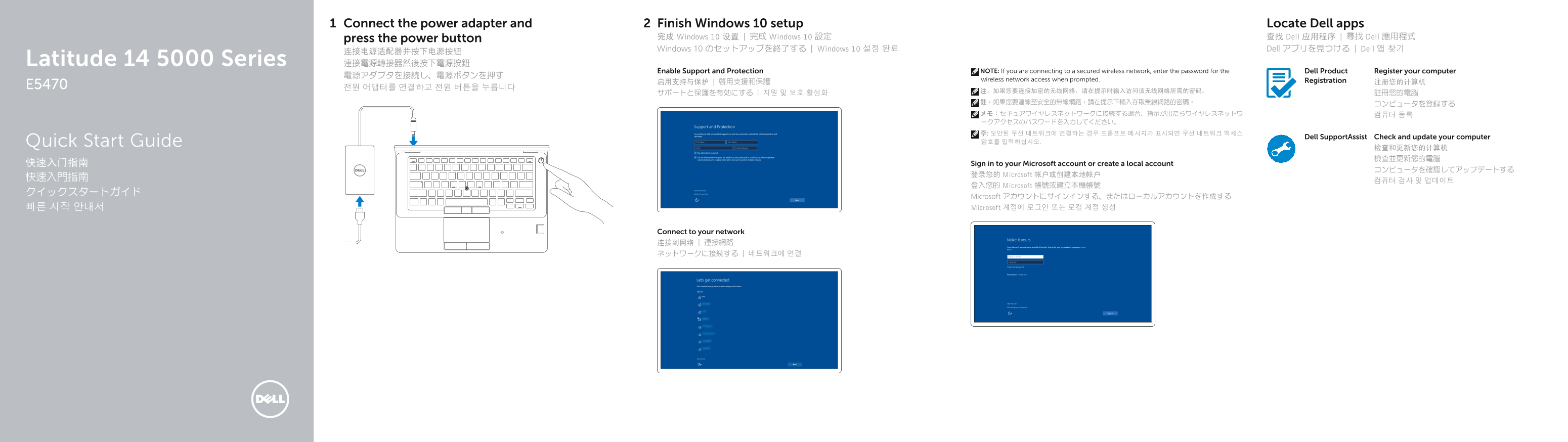
Page 1 Text Content
Connect the power adapter and Finish Windows 10 setup Locate Dell apps
press the power button 完成 Windows 10 设置 | 完成 Windows 10 設定 查找 Dell 应用程序 | 尋找 Dell 應用程式 Windows 10 のセットアップを終了する | Windows 10 설정 완료 Dell アプリを見つける | Dell 앱 찾기
Latitude 14 5000 Series 連接電源轉接器然後按下電源按鈕
Enable Support and Protection NOTE: If you are connecting to a secured wireless network, enter the password for the Dell Product Register your computer
wireless network access when prompted. Registration
Dell Support Assist Check and update your computer
Quick Start Guide 암호를 입력하십시오.
快速入门指南 Sign in to your Microsoft account or create a local account
登录您的 Microsoft 帐户或创建本地帐户
登入您的 Microsoft 帳號或建立本機帳號
Microsoft アカウントにサインインする、またはローカルアカウントを作成する 빠른 시작 안내서 Microsoft 계정에 로그인 또는 로컬 계정 생성
Connect to your network 连接到网络 | 連接網路 ネットワークに接続する | 네트워크에 연결
Page Summary Contents For Dell Latitude E5470 Quick User Guide - Windows 10
Manual Details
| Brand | Dell |
|---|---|
| Pages | 2 |
| File Size | 520.67 KB |
| Published | July 02, 2026 |
Enter the captcha to get the download link:

Frequently Asked Questions
What steps do I take when first powering on the device?
Connect the power adapter and press the power button after finishing Windows 10 setup.
Which video output connections are available?
You have options for HDMI connectors, VGA connectors, and standard USB 3.0 ports.
Can I upgrade or add biometric features to the machine?
Optional features include a Touch fingerprint reader and a non-contact smart-card reader.
How do I keep my computer's software running updated?
You can use Dell SupportAssist to check and update your computer, or sign in with a Microsoft account.