Dell Latitude 3460 Quick User Guide - Windows 7, 8.1 and Ubuntu
Summary
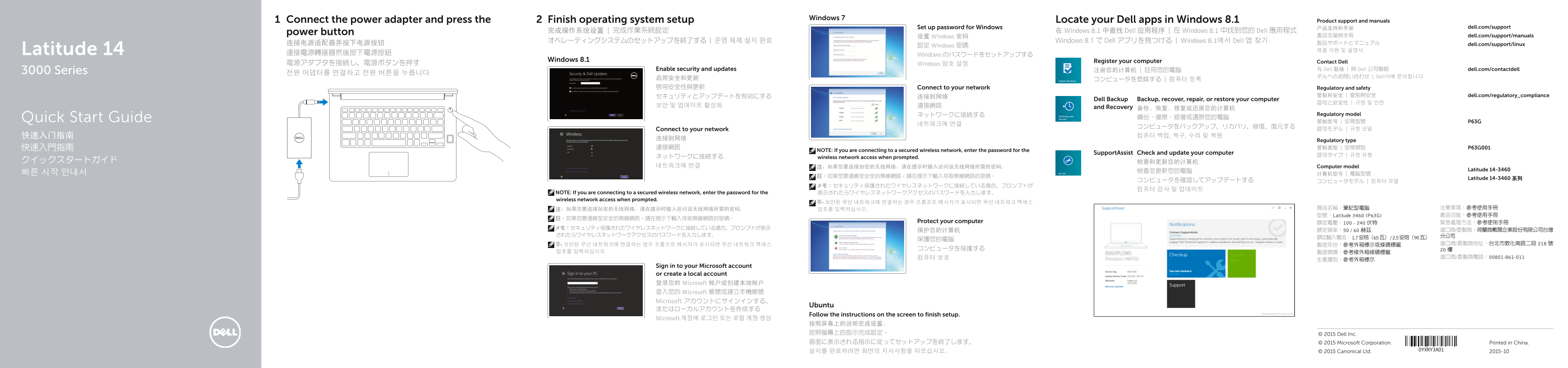
This is a multilingual Quick Start Guide for the Dell Latitude 14 3000 Series (model 3460) laptop. It covers initial setup steps including connecting power, finishing OS setup, setting passwords, connecting to networks, and locating Dell applications. The manual also provides regulatory information, support contacts, and backup/recovery options. Target users are new Dell Latitude laptop owners and IT administrators deploying Dell business notebooks in enterprise environments.
Page 1 Text Content
Windows 7
Connect the power adapter and press the Finish operating system setup Locate your Dell apps in Windows 8.1 Product support and manuals
Set up password for Windows 产品支持和手册 dell.com/support
power button 完成操作系统设置 | 完成作業系統設定 在 Windows 8.1 中查找 Dell 应用程序 | 在 Windows 8.1 中找到您的 Dell 應用程式
设置 Windows 密码 產品支援與手冊 dell.com/support/manuals
オペレーティングシステムのセットアップを終了する | 운영 체제 설치 완료 Windows 8.1 で Dell アプリを見つける | Windows 8.1에서 Dell 앱 찾기
连接电源适配器并按下电源按钮 製品サポートとマニュアル dell.com/support/linux
設定 Windows 密碼
Latitude 14 제품 지원 및 설명서
連接電源轉接器然後按下電源按鈕 Windows のパスワードをセットアップする
Windows 8.1 Register your computer Contact Dell
電源アダプタを接続し、電源ボタンを押す Windows 암호 설정
Enable security and updates 注册您的计算机 | 註冊您的電腦 与 Dell 联络 | 與 Dell 公司聯絡 dell.com/contactdell
3000 Series 전원 어댑터를 연결하고 전원 버튼을 누릅니다
启用安全和更新 デルへのお問い合わせ | Dell사에 문의합니다
啟用安全性與更新 Connect to your network Regulatory and safety
セキュリティとアップデートを有効にする 连接到网络 管制和安全 | 管制與安全 dell.com/regulatory_compliance
Dell Backup Backup, recover, repair, or restore your computer
보안 및 업데이트 활성화 連接網路 and Recovery
ネットワークに接続する Regulatory model
Quick Start Guide 備份、復原、修復或還原您的電腦
Connect to your network 認可モデル | 규정 모델
Regulatory type
NOTE: If you are connecting to a secured wireless network, enter the password for the
Support Assist Check and update your computer
wireless network access when prompted.
네트워크에 연결 注:如果您要连接加密的无线网络,请在提示时输入访问该无线网络所需的密码。 Computer model
檢查並更新您的電腦 Latitude 14-3460
Latitude 14-3460 系列
NOTE: If you are connecting to a secured wireless network, enter the password for the 表示されたらワイヤレスネットワークアクセスのパスワードを入力します。 wireless network access when prompted.
注:如果您要连接加密的无线网络,请在提示时输入访问该无线网络所需的密码。 암호를 입력하십시오. 商品名稱:筆記型電腦 注意事項:參考使用手冊 型號:Latitude 3460 (P63G) 產品功能:參考使用手冊
Protect your computer 額定電壓:100 - 240 伏特 緊急處理方法:參考使用手冊
Sign in to your Microsoft account or create a local account 登录您的 Microsoft 帐户或创建本地帐户 登入您的 Microsoft 帳號或建立本機帳號 Microsoft アカウントにサインインする、
Ubuntu
Follow the instructions on the screen to finish setup.
Microsoft 계정에 로그인 또는 로컬 계정 생성
按照屏幕上的说明完成设置。 按照螢幕上的指示完成設定。 © 2015 Dell Inc. 画面に表示される指示に従ってセットアップを終了します。 © 2015 Microsoft Corporation. Printed in China. 설치를 완료하려면 화면의 지시사항을 따르십시오. © 2015 Canonical Ltd. 2015-10
Page Summary Contents For Dell Latitude 3460 Quick User Guide - Windows 7, 8.1 and Ubuntu
Manual Details
| Brand | Dell |
|---|---|
| Pages | 2 |
| File Size | 1.31 MB |
| Published | June 25, 2026 |
Enter the captcha to get the download link:

Frequently Asked Questions
如何在加密的无线网络环境下进行配置?
如果连接到安全的无线网络,请在提示时输入访问该无线网络的密码。
笔记本电脑有哪些物理端口和接口?
它配备了摄像头、麦克风、HDMI、USB 3.0 (2个) 和 VGA 等多个端口。
用户需要如何处理操作系统设置的最后步骤?
根据屏幕上的指示完成系统设置,或注册您的计算机。