Dell Latitude 7370 Quick User Guide - Windows 7, 8.1 and Ubuntu
Summary
This Quick Start Guide for the Dell Latitude 13 7000 Series notebook provides multilingual setup instructions covering Windows 7 and Windows 8.1 operating system configuration, power adapter connection, network connectivity, and security settings. It includes guidance on Dell Backup and Recovery for data protection, Dell Data Protection and Protected Workspace for advanced malware defense, SupportAssist for system health monitoring, and password configuration for Windows. Hardware features and shortcut keys are documented. Designed for enterprise mobile professionals.
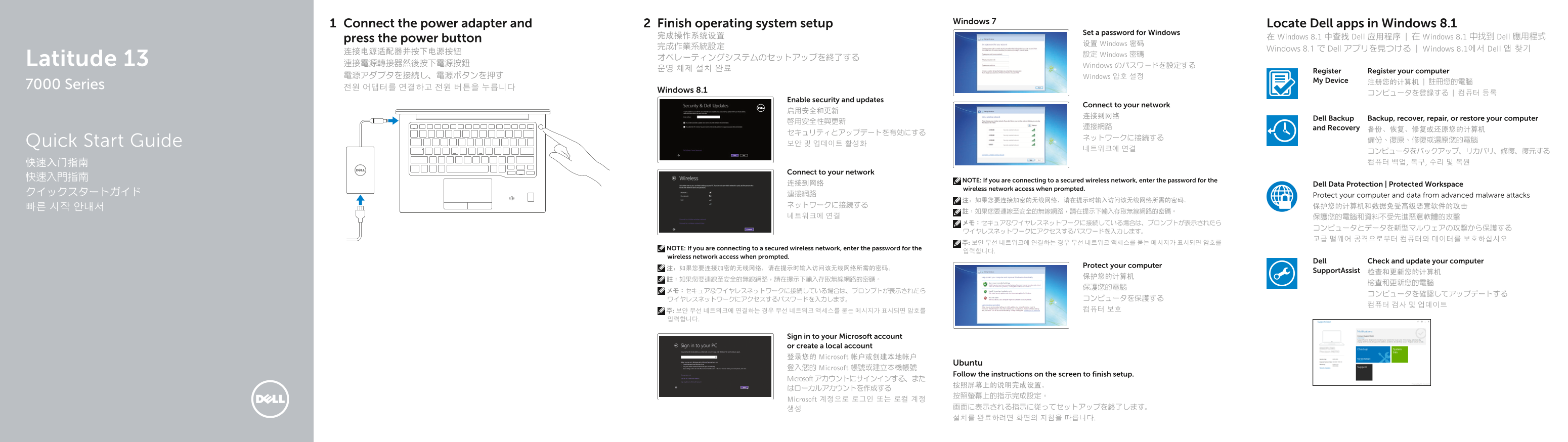
Page 1 Text Content
Windows 7
Connect the power adapter and Finish operating system setup Locate Dell apps in Windows 8.1
Set a password for Windows
完成操作系统设置 在 Windows 8.1 中查找 Dell 应用程序 | 在 Windows 8.1 中找到 Dell 應用程式
press the power button
设置 Windows 密码
Windows 8.1 で Dell アプリを見つける | Windows 8.1에서 Dell 앱 찾기
設定 Windows 密碼
Latitude 13 オペレーティングシステムのセットアップを終了する
連接電源轉接器然後按下電源按鈕 Windows のパスワードを設定する
Register Register your computer
電源アダプタを接続し、電源ボタンを押す Windows 암호 설정
My Device 注册您的计算机 | 註冊您的電腦
7000 Series 전원 어댑터를 연결하고 전원 버튼을 누릅니다
Windows 8.1
Enable security and updates
Connect to your network
Dell Backup Backup, recover, repair, or restore your computer
連接網路 and Recovery
Quick Start Guide 備份、復原、修復或還原您的電腦
Connect to your network
快速入門指南 NOTE: If you are connecting to a secured wireless network, enter the password for the
连接到网络 Dell Data Protection | Protected Workspace
wireless network access when prompted.
クイックスタートガイド 連接網路 Protect your computer and data from advanced malware attacks
NOTE: If you are connecting to a secured wireless network, enter the password for the
wireless network access when prompted.
Dell Check and update your computer
Protect your computer
Support Assist 检查和更新您的计算机
Sign in to your Microsoft account or create a local account 登录您的 Microsoft 帐户或创建本地帐户
Ubuntu
登入您的 Microsoft 帳號或建立本機帳號
Follow the instructions on the screen to finish setup.
Microsoft アカウントにサインインする、また
Microsoft 계정으로 로그인 또는 로컬 계정
Page Summary Contents For Dell Latitude 7370 Quick User Guide - Windows 7, 8.1 and Ubuntu
Manual Details
| Brand | Dell |
|---|---|
| Pages | 2 |
| File Size | 1.20 MB |
| Published | July 02, 2026 |
Enter the captcha to get the download link:

Frequently Asked Questions
如何完成设备设置?
只需按照屏幕上的指示进行操作即可结束安装。
如果我连接到一个安全的无线网络,需要做什么?
在系统提示时输入访问该无线上网所需的密码。
哪些可选择的硬件组件有哪些?
可选功能包括指纹读取器(Fingerprint reader)、非接触式卡读卡器(Contactless card reader)和智能卡阅读器(Smartcard reader)。
我可以在哪里找到产品手册和支持信息?
请访问 Dell.com/support 或查看本机上的 Product support and manuals 部分。