Dell Latitude E7470 Quick User Guide - Windows 7, 8.1 and Ubuntu
Summary
Quick Start Guide for Dell Latitude 14 7000 Series laptop. Covers initial setup: connecting power adapter, pressing power button, finishing Windows 7/8.1 setup, setting password, and locating Dell apps. Includes enabling security and updates, connecting to networks, registering, and using Dell Backup and Recovery. Introduces Dell Data Protection for malware defense, SupportAssist for system checks, and My Device management. Features multi-language diagrams of ports: USB 3.0 with PowerShare, SD reader, headset, smart card reader, fingerprint scanner, dock connector. For business professionals.
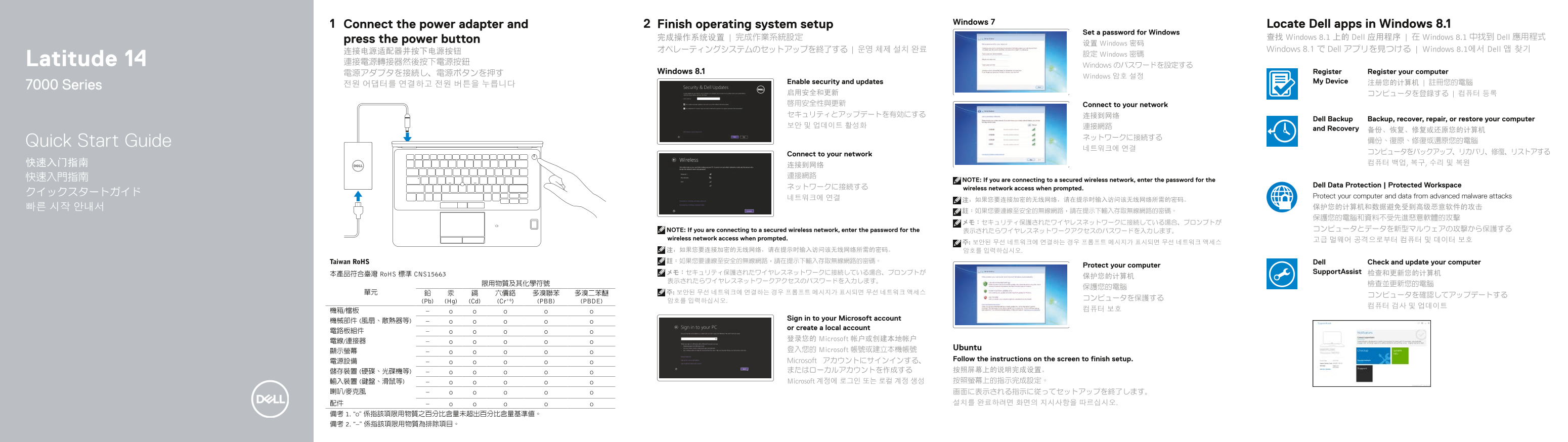
Page 1 Text Content
Windows 7 Locate Dell apps in Windows 8.1
Connect the power adapter and Finish operating system setup
Set a password for Windows
press the power button 完成操作系统设置 | 完成作業系統設定 查找 Windows 8.1 上的 Dell 应用程序 | 在 Windows 8.1 中找到 Dell 應用程式
设置 Windows 密码
连接电源适配器并按下电源按钮 オペレーティングシステムのセットアップを終了する | 운영 체제 설치 완료 Windows 8.1 で Dell アプリを見つける | Windows 8.1에서 Dell 앱 찾기
設定 Windows 密碼
Latitude 14 連接電源轉接器然後按下電源按鈕
Windows のパスワードを設定する
電源アダプタを接続し、電源ボタンを押す Windows 8.1 Register Register your computer
Windows 암호 설정
Enable security and updates My Device 注册您的计算机 | 註冊您的電腦
7000 Series 전원 어댑터를 연결하고 전원 버튼을 누릅니다
启用安全和更新 コンピュータを登録する | 컴퓨터 등록 啟用安全性與更新 Connect to your network セキュリティとアップデートを有効にする 连接到网络
Dell Backup Backup, recover, repair, or restore your computer
and Recovery 备份、恢复、修复或还原您的计算机
Quick Start Guide 備份、復原、修復或還原您的電腦
Connect to your network
NOTE: If you are connecting to a secured wireless network, enter the password for the
ネットワークに接続する Dell Data Protection | Protected Workspace
wireless network access when prompted.
네트워크에 연결 Protect your computer and data from advanced malware attacks
NOTE: If you are connecting to a secured wireless network, enter the password for the 表示されたらワイヤレスネットワークアクセスのパスワードを入力します。 コンピュータとデータを新型マルウェアの攻撃から保護する
wireless network access when prompted. 고급 멀웨어 공격으로부터 컴퓨터 및 데이터 보호
注:如果您要连接加密的无线网络,请在提示时输入访问该无线网络所需的密码。 암호를 입력하십시오. Taiwan Ro HS 註:如果您要連線至安全的無線網路,請在提示下輸入存取無線網路的密碼。 Dell Check and update your computer
Protect your computer
メモ:セキュリティ保護されたワイヤレスネットワークに接続している場合、プロンプトが Support Assist 检查和更新您的计算机
本產品符合臺灣 Ro HS 標準 CNS15663
(Pb) (Hg) (Cd) (Cr+6) (PBB) (PBDE) 암호를 입력하십시오.
Sign in to your Microsoft account
or create a local account
登录您的 Microsoft 帐户或创建本地帐户
登入您的 Microsoft 帳號或建立本機帳號 Ubuntu
Microsoft アカウントにサインインする、 Follow the instructions on the screen to finish setup.
儲存裝置 (硬碟、光碟機等) またはローカルアカウントを作成する 按照屏幕上的说明完成设置。 輸入裝置 (鍵盤、滑鼠等) Microsoft 계정에 로그인 또는 로컬 계정 생성 按照螢幕上的指示完成設定。
Page Summary Contents For Dell Latitude E7470 Quick User Guide - Windows 7, 8.1 and Ubuntu
Manual Details
| Brand | Dell |
|---|---|
| Pages | 2 |
| File Size | 691.60 KB |
| Published | June 25, 2026 |
Enter the captcha to get the download link:

Frequently Asked Questions
How do I finish the operating system setup?
Follow the on-screen instructions to complete the setup process.
What should I do if I am connecting to a secured wireless network?
Enter the password for the wireless network access when prompted.
How do I register my computer?
Click Register your computer to complete the registration.
Can I sign in with a local account instead of Microsoft?
Yes, you can sign in to your Microsoft account or create a local account.
How do I find Dell apps on Windows 8.1?
Use the 'Locate Dell apps in Windows 8.1' feature to find them.