Dell Quick Startup Guide - Windows 7
Summary
This Quick Start Guide for the Dell XPS L321X and L322X ultrabook provides a detailed computer features diagram identifying components including digital microphones, camera, ambient-light sensor, power button, USB ports with PowerShare functionality, backlit keyboard, headphone/microphone combo port, Mini-DisplayPort, and battery-status lights. It includes NOM Mexico regulatory compliance information and support contact details. Designed for premium ultrabook users and IT administrators managing high-end portable systems.
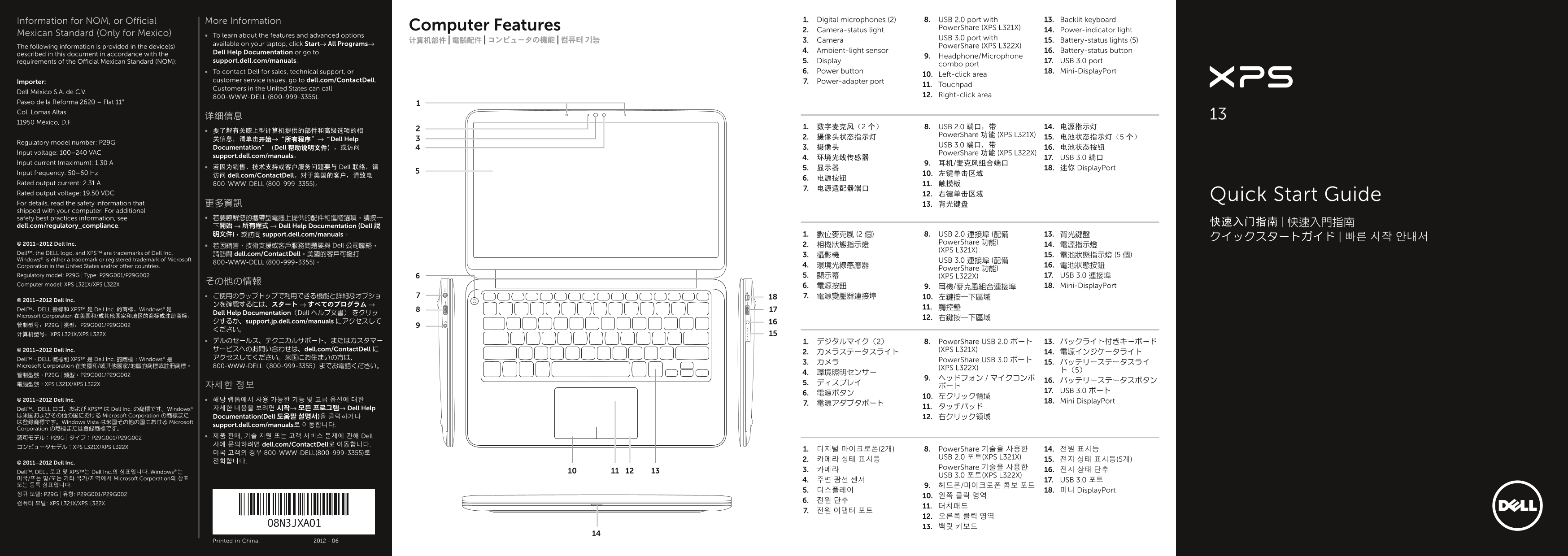
Page 1 Text Content
Information for NOM, or Official More Information 1. Digital microphones (2) 8. USB 2.0 port with 13. Backlit keyboard
Computer Features Power Share (XPS L321X)
2. Camera-status light 14. Power-indicator light
Mexican Standard (Only for Mexico) To learn about the features and advanced options
USB 3.0 port with
计算机部件 | 電腦配件 | コンピュータの機能 | 컴퓨터 기능 3. Camera 15. Battery-status lights (5)
available on your laptop, click Start→ All Programs→
The following information is provided in the device(s) Power Share (XPS L322X)
Dell Help Documentation or go to 4. Ambient-light sensor 16. Battery-status button
described in this document in accordance with the
9. Headphone/Microphone
requirements of the Official Mexican Standard (NOM): support.dell.com/manuals. 5. Display 17. USB 3.0 port
combo port
To contact Dell for sales, technical support, or 6. Power button 18. Mini-Display Port
10. Left-click area
Importer: customer service issues, go to dell.com/Contact Dell. 7. Power-adapter port
11. Touchpad
Customers in the United States can call
Dell México S.A. de C.V.
800-WWW-DELL (800-999-3355). 12. Right-click area
Paseo de la Reforma 2620 – Flat 11° Col. Lomas Altas
11950 México, D.F.
1. 数字麦克风(2 个) 8. USB 2.0 端口,带 14. 电源指示灯
Power Share 功能 (XPS L321X)
关信息,请单击开始→“所有程序”→“Dell Help 2. 摄像头状态指示灯 15. 电池状态指示灯(5 个)
Regulatory model number: P29G
USB 3.0 端口,带
Documentation”(Dell 帮助说明文件),或访问 3. 摄像头 16. 电池状态按钮
Input voltage: 100–240 VAC Power Share 功能 (XPS L322X)
support.dell.com/manuals。
4. 环境光线传感器 17. USB 3.0 端口
Input current (maximum): 1.30 A 9. 耳机/麦克风组合端口
若因为销售、技术支持或客户服务问题要与 Dell 联络,请 5. 显示器 18. 迷你 Display Port
Input frequency: 50–60 Hz 10. 左键单击区域
访问 dell.com/Contact Dell。对于美国的客户,请致电
Rated output current: 2.31 A 800-WWW-DELL (800-999-3355)。 11. 触摸板
Rated output voltage: 19.50 VDC 12. 右键单击区域
Quick Start Guide
For details, read the safety information that 更多資訊 13. 背光键盘 shipped with your computer. For additional
safety best practices information, see 若要瞭解您的攜帶型電腦上提供的配件和進階選項,請按一
dell.com/regulatory_compliance. 下開始 → 所有程式 → Dell Help Documentation (Dell 說
明文件),或訪問 support.dell.com/manuals。 1. 數位麥克風 (2 個) 8. USB 2.0 連接埠 (配備 13. 背光鍵盤
© 2011–2012 Dell Inc. Power Share 功能)
若因銷售、技術支援或客戶服務問題要與 Dell 公司聯絡, 2. 相機狀態指示燈 14. 電源指示燈
(XPS L321X)
Dell™, the DELL logo, and XPS™ are trademarks of Dell Inc. 請訪問 dell.com/Contact Dell。美國的客戶可撥打
Windows® is either a trademark or registered trademark of Microsoft USB 3.0 連接埠 (配備
800-WWW-DELL (800-999-3355)。
Corporation in the United States and/or other countries. 4. 環境光線感應器 16. 電池狀態按鈕
Power Share 功能)
Regulatory model: P29G | Type: P29G001/P29G002 5. 顯示幕 (XPS L322X) 17. USB 3.0 連接埠
Computer model: XPS L321X/XPS L322X その他の情報
6. 電源按鈕 9. 耳機/麥克風組合連接埠 18. Mini-Display Port
© 2011–2012 Dell Inc.
Dell™、DELL 徽标和 XPS™ 是 Dell Inc. 的商标。Windows® 是 11. 觸控墊
Dell Help Documentation(Dell ヘルプ文書) をクリッ
Microsoft Corporation 在美国和/或其他国家和地区的商标或注册商标。
クするか、support.jp.dell.com/manuals にアクセスして
计算机型号:XPS L321X/XPS L322X
デルのセールス、テクニカルサポート、またはカスタマー 1. デジタルマイク(2) 8. Power Share USB 2.0 ポート 13. バックライト付きキーボード © 2011–2012 Dell Inc. サービスへのお問い合わせは、dell.com/Contact Dell に (XPS L321X)
Dell™、DELL 徽標和 XPS™ 是 Dell Inc. 的商標;Windows® 是 アクセスしてください。米国にお住まいの方は、
Power Share USB 3.0 ポート
Microsoft Corporation 在美國和/或其他國家/地區的商標或註冊商標。 800-WWW-DELL(800-999-3355)までお電話ください。
(XPS L322X)
電腦型號:XPS L321X/XPS L322X 5. ディスプレイ
17. USB 3.0 ポート
© 2011–2012 Dell Inc. 해당 랩톱에서 사용 가능한 기능 및 고급 옵션에 대한 18. Mini Display Port
자세한 내용을 보려면 시작→ 모든 프로그램→ Dell Help 11. タッチパッド
Dell™、DELL ロゴ、および XPS™ は Dell Inc. の商標です。Windows® は米国およびその他の国における Microsoft Corporation の商標また Documentation(Dell 도움말 설명서)을 클릭하거나 12. 右クリック領域 は登録商標です。Windows Vista は米国その他の国における Microsoft
support.dell.com/manuals로 이동합니다.
Corporation の商標または登録商標です。
認可モデル:P29G | タイプ:P29G001/P29G002 제품 판매, 기술 지원 또는 고객 서비스 문제에 관해 Dell 사에 문의하려면 dell.com/Contact Dell로 이동합니다.
コンピュータモデル:XPS L321X/XPS L322X
1. 디지털 마이크로폰(2개) 8. Power Share 기술을 사용한 14. 전원 표시등
미국 고객의 경우 800-WWW-DELL(800-999-3355)로
USB 2.0 포트(XPS L321X)
© 2011–2012 Dell Inc.
Power Share 기술을 사용한
Dell™, DELL 로고 및 XPS™는 Dell Inc.의 상표입니다. Windows® 는 3. 카메라 16. 전지 상태 단추
USB 3.0 포트(XPS L322X)
미국/또는 및/또는 기타 국가/지역에서 Microsoft Corporation의 상표
4. 주변 광선 센서 17. USB 3.0 포트
5. 디스플레이 18. 미니 Display Port
컴퓨터 모델: XPS L321X/XPS L322X
Printed in China. 2012 - 06
Page Summary Contents For Dell Quick Startup Guide - Windows 7
Manual Details
| Brand | Dell |
|---|---|
| Pages | 2 |
| File Size | 456.52 KB |
| Published | July 01, 2026 |
Enter the captcha to get the download link:

Frequently Asked Questions
我该如何寻求技术支持或销售帮助?
您可以访问 dell.com/ContactDell,或者致电美国用户专线:800-WWW-DELL (800-999-3355)。
怎样才能连接外部显示器?
步骤是连接电源适配器并完成 Windows 设置后,进行外接式屏幕切换。
请问设备的最大工作频率是多少?
设备的输入频率为 50–60 Hz。
如果想关闭或开启无线功能,需要执行哪些操作?
,需要在相应的按键或软件界面上操作“Wireless ON”或“Wireless OFF”。