Dell Quick Startup Guide
Summary
This Quick Start Guide for the Dell Wyse Cloud Client Wyse 7010 thin client provides multilingual setup instructions covering vertical stand installation, keyboard and mouse connection, network cable connection, display connection via DisplayPort or DVI-I connectors with VGA adapter option, power cable connection to both client device and display, and wireless antenna setup. It includes a comprehensive hardware features diagram and information on product support and manuals. Designed for IT administrators deploying VDI thin client solutions in enterprise environments.
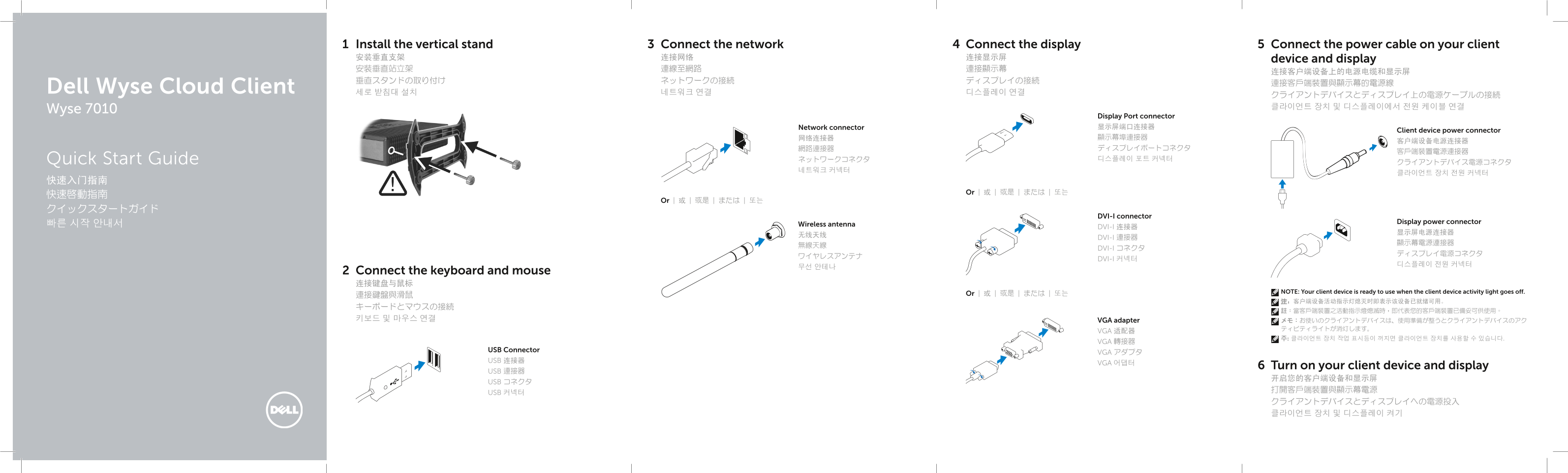
Page 1 Text Content
Install the vertical stand Connect the network Connect the display Connect the power cable on your client 安装垂直支架 连接网络 连接显示屏 device and display 安裝垂直站立架 連線至網路 連接顯示幕
Dell Wyse Cloud Client 세로 받침대 설치 네트워크 연결 디스플레이 연결
Wyse 7010
Display Port connector Network connector 显示屏端口连接器
Client device power connector
Quick Start Guide ネットワークコネクタ 디스플레이 포트 커넥터
Or | 或 | 或是 | または | 또는
Or | 或 | 或是 | または | 또는
DVI-I connector
Display power connector
빠른 시작 안내서 Wireless antenna
DVI-I 连接器
DVI-I 連接器
DVI-I コネクタ
DVI-I 커넥터
Connect the keyboard and mouse 连接键盘与鼠标
NOTE: Your client device is ready to use when the client device activity light goes off.
連接鍵盤與滑鼠 Or | 或 | 或是 | または | 또는
키보드 및 마우스 연결 VGA adapter メモ:お使いのクライアントデバイスは、使用準備が整うとクライアントデバイスのアク
VGA 适配器
VGA 轉接器
USB Connector
VGA アダプタ
USB 连接器
VGA 어댑터
Turn on your client device and display
USB 連接器
USB コネクタ
USB 커넥터
Page Summary Contents For Dell Quick Startup Guide
Manual Details
| Brand | Dell |
|---|---|
| Pages | 2 |
| File Size | 870.45 KB |
| Published | July 02, 2026 |
Enter the captcha to get the download link:

Frequently Asked Questions
To use the client device, what must happen?
The client device activity light must go off.
How many USB ports are available on the unit?
There are two SuperSpeed USB 3.0 ports and two USB 2.0 ports.
What display types can the DVI-I port support?
The DVI-I port supports one DVI-D and one VGA connection.
Is external peripheral support provided?
Yes, it includes optional ports like Serial (2x), PS/2 keyboard-only (optional), and Parallel (optional).