Dell Inspiron 15Z 5523 Quick Startup Guide
Summary
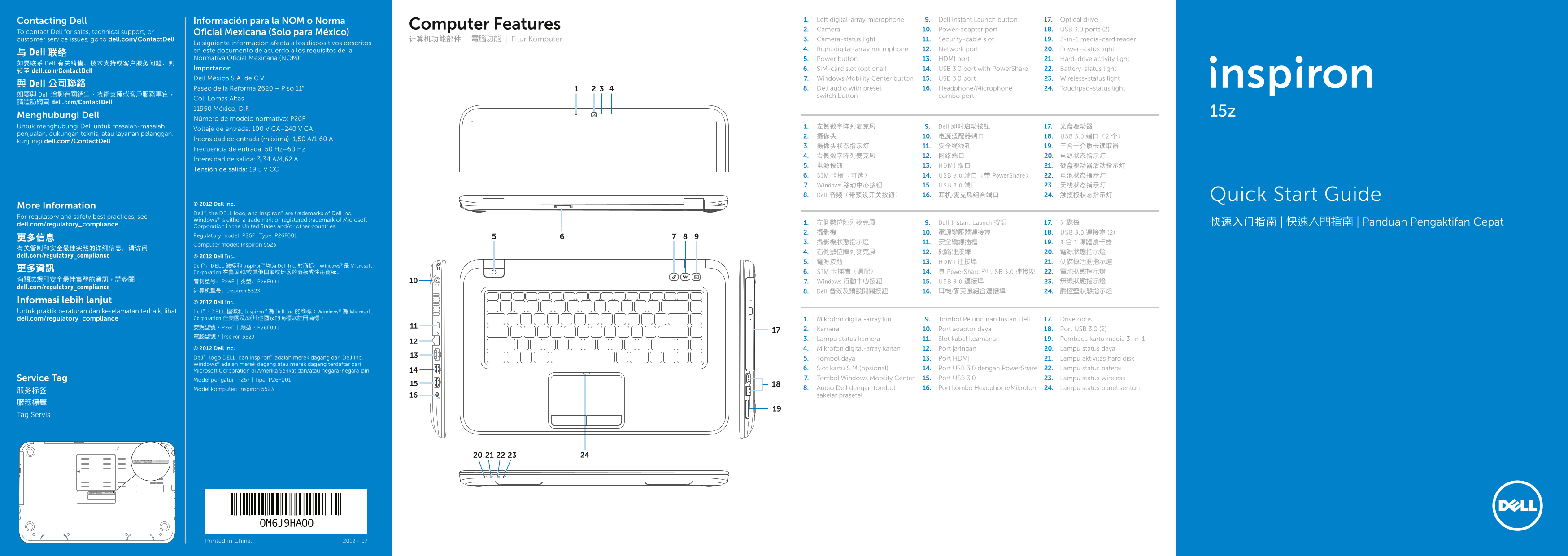
Quick Start Guide for the Dell Inspiron 15z laptop (Regulatory Model P26F) from 2012 with multi-language support including Indonesian. Features dual digital-array microphones, camera with status light, SIM-card slot option, Dell Instant Launch and Windows Mobility Center buttons, Dell audio with preset switch, USB 3.0 with PowerShare, HDMI, 3-in-1 media-card reader, and comprehensive status lights for power, battery, wireless, hard drive, and touchpad.
Page 1 Text Content
Contacting Dell Información para la NOM o Norma Left digital-array microphone1. Dell Instant Launch button9. Optical drive17.
Computer Features
Camera2. Power-adapter port10. USB 3.0 ports (2) 18.
To contact Dell for sales, technical support, or Oficial Mexicana (Solo para México)
customer service issues, go to dell.com/Contact Dell 计算机功能部件 | 電腦功能 | Fitur Komputer Camera-status light3. Security-cable slot11. 3-in-1 media-card reader19.
La siguiente información afecta a los dispositivos descritos
en este documento de acuerdo a los requisitos de la Right digital-array microphone4. Network port12. Power-status light20.
与 Dell 联络
Normativa Oficial Mexicana (NOM): Power button5. HDMI port13. Hard-drive activity light21.
如要联系 Dell 有关销售、技术支持或客户服务问题,则
Importador: SIM-card slot (optional)6. USB 3.0 port with Power Share14. Battery-status light22.
转至 dell.com/Contact Dell
Dell México S.A. de C.V. Windows Mobility Center button7. USB 3.0 port15. Wireless-status light23.
與 Dell 公司聯絡
Paseo de la Reforma 2620 – Piso 11° Dell audio with preset 8. Headphone/Microphone 16. Touchpad-status light24.
如要與 Dell 洽詢有關銷售、技術支援或客戶服務事宜, switch button combo port
Col. Lomas Altas
請造訪網頁 dell.com/Contact Dell
11950 México, D.F.
Menghubungi Dell 15z
Número de modelo normativo: P26F
Untuk menghubungi Dell untuk masalah-masalah 左侧数字阵列麦克风1. Dell 即时启动按钮9. 光盘驱动器17.
Voltaje de entrada: 100 V CA–240 V CA
penjualan, dukungan teknis, atau layanan pelanggan.
摄像头2. 电源适配器端口10. USB 3.0 端口(2 个) 18.
Intensidad de entrada (máxima): 1,50 A/1,60 A
kunjungi dell.com/Contact Dell
Frecuencia de entrada: 50 Hz–60 Hz
Intensidad de salida: 3,34 A/4,62 A
电源按钮5. HDMI 端口13. 硬盘驱动器活动指示灯21.
Tensión de salida: 19,5 V CC
SIM 卡槽(可选)6. USB 3.0 端口(带 Power Share)14. 电池状态指示灯22. Windows 移动中心按钮7. USB 3.0 端口15. 无线状态指示灯23. Dell 音频(带预设开关按钮)8. 耳机/麦克风组合端口16. 触摸板状态指示灯24. Quick Start Guide
© 2012 Dell Inc.
More Information
Dell™, the DELL logo, and Inspiron™ are trademarks of Dell Inc.
For regulatory and safety best practices, see
Windows® is either a trademark or registered trademark of Microsoft
dell.com/regulatory_compliance 左側數位陣列麥克風1. Dell Instant Launch 按鈕9. 光碟機17. 快速入门指南 | 快速入門指南 | Panduan Pengaktifan Cepat
Corporation in the United States and/or other countries.
攝影機2. 電源變壓器連接埠10. USB 3.0 連接埠 (2) 18.
Regulatory model: P26F | Type: P26F001
Computer model: Inspiron 5523
dell.com/regulatory_compliance © 2012 Dell Inc.
電源按鈕5. HDMI 連接埠13. 硬碟機活動指示燈21.
Dell™、DELL 徽标和 Inspiron™ 均为 Dell Inc. 的商标;Windows® 是 Microsoft
Corporation 在美国和/或其他国家或地区的商标或注册商标。 SIM 卡插槽(選配)6. 具 Power Share 的 USB 3.0 連接埠14. 電池狀態指示燈22.
Windows 行動中心按鈕7. USB 3.0 連接埠15. 無線狀態指示燈23.
dell.com/regulatory_compliance
计算机型号:Inspiron 5523 Dell 音效及預設開關按鈕8. 耳機/麥克風組合連接埠16. 觸控墊狀態指示燈24.
Informasi lebih lanjut © 2012 Dell Inc. Untuk praktik peraturan dan keselamatan terbaik, lihat Dell™、DELL 標徽和 Inspiron™ 為 Dell Inc 的商標;Windows® 為 Microsoft
dell.com/regulatory_compliance Corporation 在美國及/或其他國家的商標或註冊商標。 Mikrofon digital-array kiri1. Tombol Peluncuran Instan Dell9. Drive optis17. 安規型號:P26F | 類型:P26F001
Kamera2. Port adaptor daya10. Port USB 3.0 (2) 18.
電腦型號:Inspiron 5523
Lampu status kamera3. Slot kabel keamanan11. Pembaca kartu media 3-in-119.
© 2012 Dell Inc. Mikrofon digital-array kanan4. Port jaringan12. Lampu status daya20. Dell™, logo DELL, dan Inspiron™ adalah merek dagang dari Dell Inc. Tombol daya5. Port HDMI13. Lampu aktivitas hard disk21. Windows® adalah merek dagang atau merek dagang terdaftar dari
Slot kartu SIM (opsional)6. Port USB 3.0 dengan Power Share14. Lampu status baterai22.
Microsoft Corporation di Amerika Serikat dan/atau negara-negara lain.
Service Tag Model pengatur: P26F | Tipe: P26F001 Tombol Windows Mobility Center7. Port USB 3.015. Lampu status wireless23. Model komputer: Inspiron 5523 Audio Dell dengan tombol 8. Port kombo Headphone/Mikrofon16. Lampu status panel sentuh24.
sakelar prasetel
服務標籤 Tag Servis
Printed in China. 2012 - 07
Page Summary Contents For Dell Inspiron 15Z 5523 Quick Startup Guide
Manual Details
| Brand | Dell |
|---|---|
| Pages | 2 |
| File Size | 1.45 MB |
| Published | July 03, 2026 |
Enter the captcha to get the download link:

Frequently Asked Questions
How do I contact Dell for technical support?
Visit dell.com/ContactDell.
Where can I find regulatory compliance information for this model?
See the section detailing 'For regulatory and safety best practices' or visit dell.com/regulatory_compliance.
What are the physical ports available on the device?
It includes HDMI port, two USB 3.0 ports, a network port, headphone/microphone combo port, and a three-in-one media card reader.
Does the unit have optional wireless connectivity features?
Yes, it has a SIM-card slot for optional use (Model: P26F).