Dell Dell Dell Precision Rack 7910 Quick Startup Guide
Summary
This Quick Start Guide for the Dell Precision Rack 7910 rack workstation provides multilingual setup instructions covering rack installation, keyboard, mouse, and monitor connection, system-to-power source connection with cable retention clip management, and system power-on procedures. It documents extensive hardware features via labeled diagrams including power button, NMI button, system identification button, LCD panel with menu buttons, hard drives, vFlash media card slot, USB ports, iDRAC8 E
Page 1 Text Content
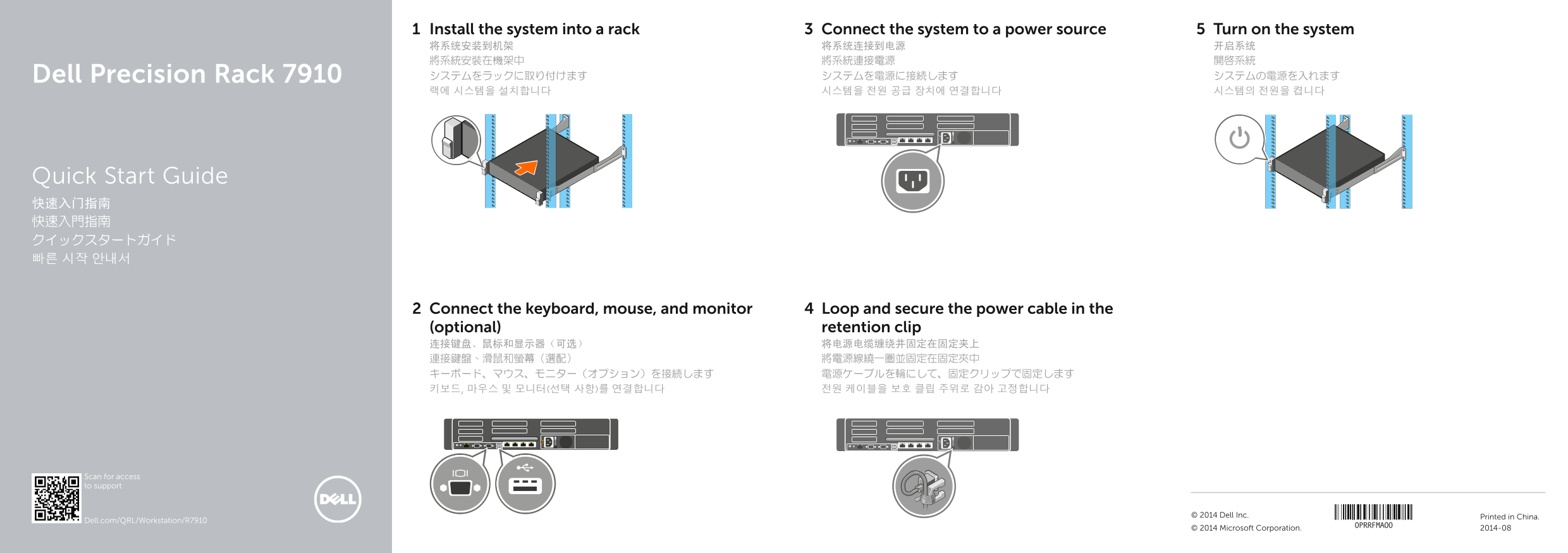
Install the system into a rack Connect the system to a power source Turn on the system 将系统安装到机架 将系统连接到电源 开启系统 將系統安裝在機架中 將系統連接電源 開啟系統 Dell Precision Rack 7910 システムをラックに取り付けます システムを電源に接続します システムの電源を入れます 랙에 시스템을 설치합니다 시스템을 전원 공급 장치에 연결합니다 시스템의 전원을 켭니다
Quick Start Guide 快速入门指南 快速入門指南 クイックスタートガイド 빠른 시작 안내서
Connect the keyboard, mouse, and monitor Loop and secure the power cable in the (optional) retention clip 连接键盘、鼠标和显示器(可选) 将电源电缆缠绕并固定在固定夹上 連接鍵盤、滑鼠和螢幕(選配) 將電源線繞一圈並固定在固定夾中 キーボード、マウス、モニター(オプション)を接続します 電源ケーブルを輪にして、固定クリップで固定します 키보드, 마우스 및 모니터(선택 사항)를 연결합니다 전원 케이블을 보호 클립 주위로 감아 고정합니다
Scan for access to support
© 2014 Dell Inc. Printed in China.
Dell.com/QRL/Workstation/R7910
© 2014 Microsoft Corporation. 2014-08
Page Summary Contents For Dell Dell Dell Precision Rack 7910 Quick Startup Guide
Manual Details
| Brand | Dell |
|---|---|
| Pages | 2 |
| File Size | 290.79 KB |
| Published | July 02, 2026 |
Enter the captcha to get the download link:

Frequently Asked Questions
How do I initially set up the rack system?
Mount it in a rack, connect to power, and turn it on by following the quick start guide.
What types of connectivity ports are available?
It includes USB 2.0/3.0 connectors, VGA connector(s), serial connector, and multiple PCIe expansion slots (half and full height).
Does this system support optional components?
Yes, optional items include optical drives, iDRAC8 Enterprise ports, and LCD menu buttons.
Where can I find safety and compliance information?
Safety details are available on the regulatory page at dell.com/regulatory_compliance.