Dell P1913s Monitor User Manual
Summary
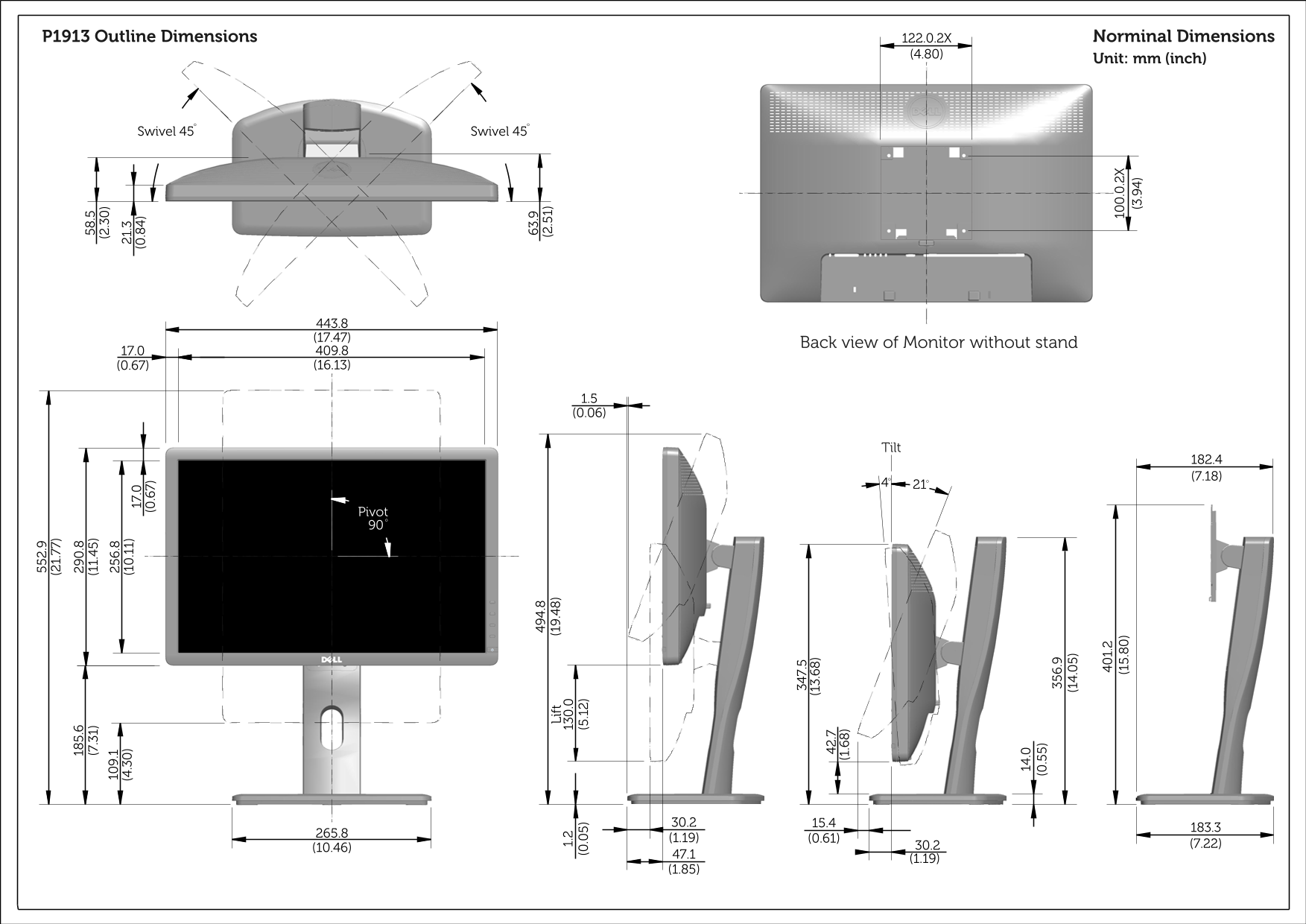
This document provides the outline dimension drawing for a Dell monitor, showing detailed physical measurements in millimeters and inches. It includes specifications for swivel range (plus/minus 45 degrees), pivot adjustment (90 degrees), tilt range (4 to 21 degrees), and overall monitor dimensions with and without the stand. Designed for workspace planners, IT procurement teams, and system integrators who need precise dimensional data for monitor installation and ergonomic setup planning.
Manual Details
| Brand | Dell |
|---|---|
| Pages | 3 |
| File Size | 4.43 MB |
| Published | July 01, 2026 |
Enter the captcha to get the download link:

Frequently Asked Questions
What is the maximum swivel angle available for this monitor?
The monitor supports a maximum swivel range of 45 degrees.
What are the vertical adjustment capabilities, including pivot support?
It can adjust with a pivot capability up to 90 degrees and has an adjustable tilt between 21 and 30 degrees.
Provide the approximate overall dimensions (width x height) from the back view.
The general measurements appear to be around 30.2 units wide by 182.4 units high, but please refer to diagram section (1.19) for precise readings.