Dell P2212H Monitor User Manual
Summary
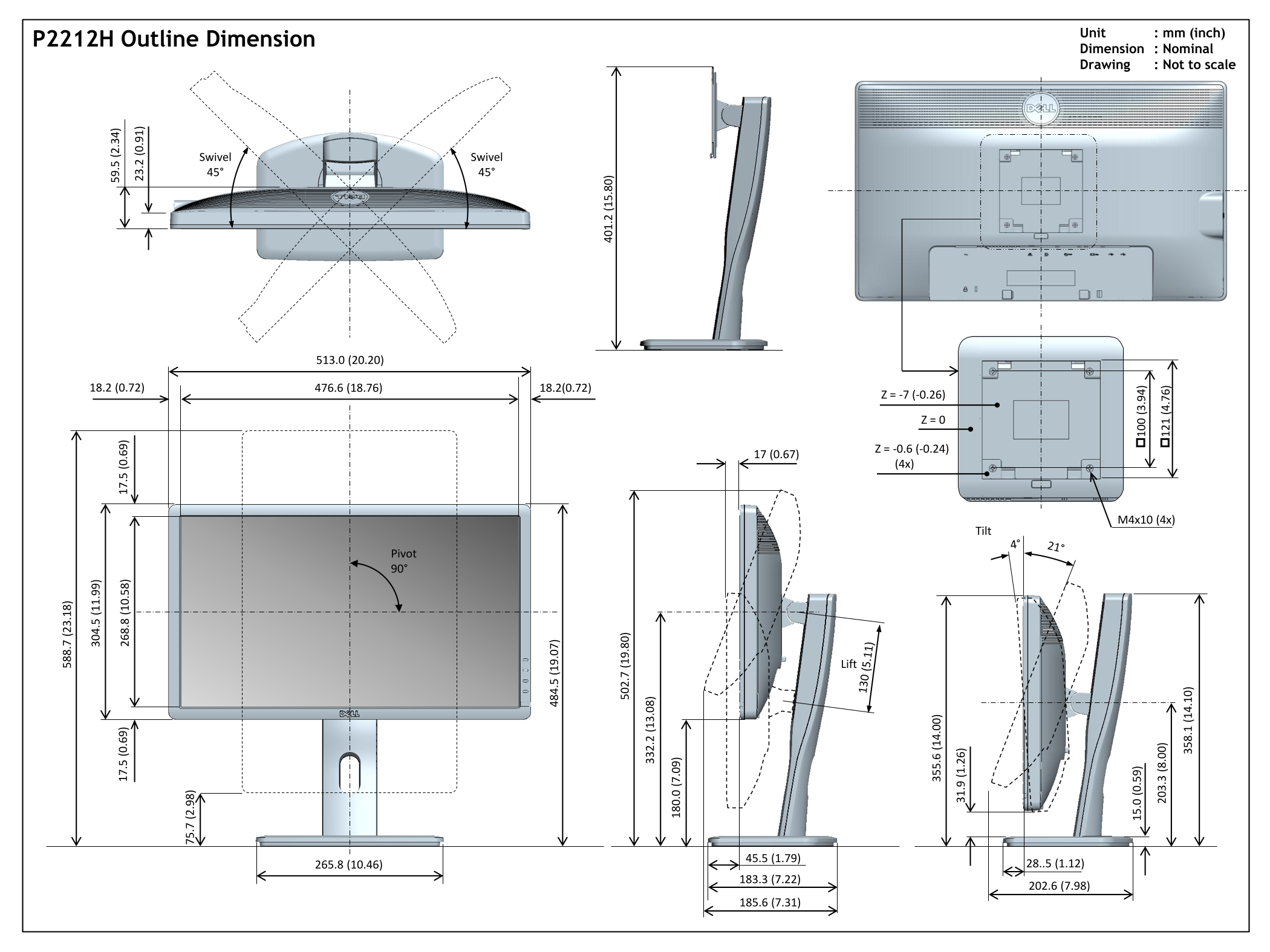
This document provides outline dimension drawings for the Dell P2212H and P2312H monitors, showing detailed physical measurements in millimeters and inches for both the 22-inch and 23-inch models. It includes specifications for swivel range (plus/minus 45 degrees), pivot adjustment (90 degrees), tilt range (4 to 21 degrees), lift height (130mm for P2312H), VESA mounting patterns, and overall dimensions. Designed for workspace planners and IT procurement teams requiring precise dimensional data for dual-monitor office deployments.
Page 1 Text Content
Unit : mm (inch)
P2212H Outline Dimension
Dimension : Nominal .7 .1 Drawing : Not to scale
Swivel Swivel 45° 45°
.5 .0 Pivot 90°
Page Summary Contents For Dell P2212H Monitor User Manual
Manual Details
| Brand | Dell |
|---|---|
| Pages | 2 |
| File Size | 577.51 KB |
| Published | July 02, 2026 |
Enter the captcha to get the download link:

Frequently Asked Questions
What external hardware is required for mounting?
The installation requires four M4x10 fasteners.
What are the maximum operable angles?
The unit features 45° swivel, 90° tilt, and a lift of 45°.
How can I measure the dimensions on these drawings?
All units are specified in millimeters (mm) and inches, but general dimensions (Nominal) are provided.
What is the distinguishing dimension between P2312H and P2212H regarding their profile?
While overall geometries are similar, P2312H features a different central coordinate range than P2212H, suggesting variation in depth or component size.