# A B C D E F G H I J K L M N O P Q R S T U V W X Y Z

Dell OpenManage Server Administrator Version 5.4 README

Summary

Manage your Dell infrastructure with OpenManage Server Administrator v5.4. This comprehensive guide is essential for IT professionals and system administrators managing PowerEdge servers. It provides in-depth documentation, including User's Guides, CLI references, SNMP guides, and compatibility information. Learn minimum system requirements, supported operating systems (like Windows Server or RHEL), installation procedures, and the latest release highlights to ensure optimal management and maintenance of your server environment.
📄 Preview 📖 Table of Contents Contents PAGE OF 28

Page 1 Text Content

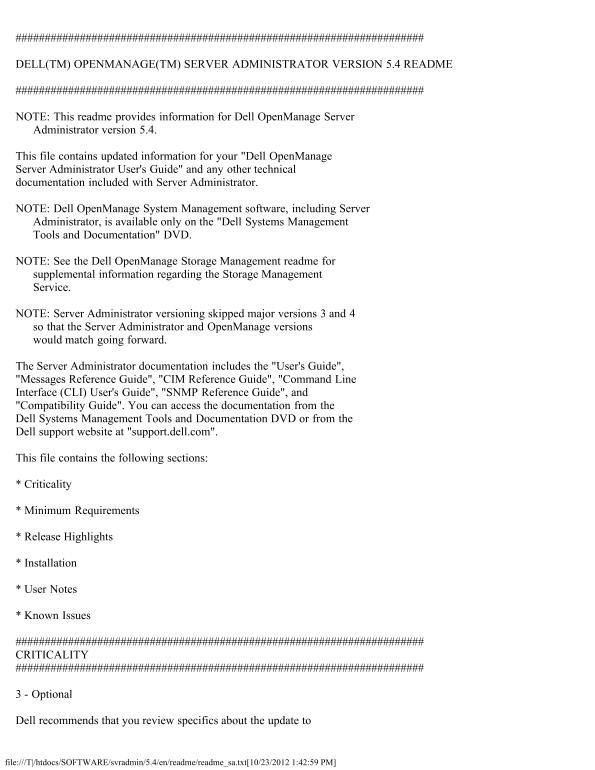
DELL(TM) OPENMANAGE(TM) SERVER ADMINISTRATOR VERSION 5.4 README

NOTE: This readme provides information for Dell Open Manage Server Administrator version 5.4.

This file contains updated information for your "Dell Open Manage Server Administrator User's Guide" and any other technical documentation included with Server Administrator.

NOTE: Dell Open Manage System Management software, including Server Administrator, is available only on the "Dell Systems Management Tools and Documentation" DVD.

NOTE: See the Dell Open Manage Storage Management readme for supplemental information regarding the Storage Management Service.

NOTE: Server Administrator versioning skipped major versions 3 and 4 so that the Server Administrator and Open Manage versions would match going forward.

The Server Administrator documentation includes the "User's Guide", "Messages Reference Guide", "CIM Reference Guide", "Command Line Interface (CLI) User's Guide", "SNMP Reference Guide", and "Compatibility Guide". You can access the documentation from the Dell Systems Management Tools and Documentation DVD or from the Dell support website at "support.dell.com".

This file contains the following sections:

* Criticality

* Minimum Requirements

* Release Highlights

* Installation

* User Notes

* Known Issues

CRITICALITY

3 - Optional

Dell recommends that you review specifics about the update to

file:///T|/htdocs/SOFTWARE/svradmin/5.4/en/readme/readme_sa.txt[10/23/2012 1:42:59 PM]

Page Summary Contents For Dell OpenManage Server Administrator Version 5.4 README

Page 1 DELL(TM) OPENMANAGE(TM) SERVER ADMINISTRATOR VERSION 5.4 README NOTE: This readme provides information for Dell Open Manage Server Administrator version 5.4. This file contains updated information for...
Page 2 determine if it applies to your system. The update contains changes that impact only certain configurations and provides new features that may or may not apply to your environment. MINIMUM REQUIREMENT...
Page 3 * Server Administrator supports SSL 3.0 exclusively. SUPPORTED RAC FIRMWARE * i DRAC firmware version 1.0 or greater is required for systems installed with i DRAC. * DRAC 5 firmware version 1.0 or gre...
Page 4 This section provides information to help enhance your experience with Server Administrator, in particular, implementations and environments. * Server Administrator uses port 1311 as the default port....
Page 5 4. Select "Trusted sites". 5. Click the "Custom Level" button. 6. Under "User Authentication", select the "Automatic Logon with current username and password" r...
Page 6 located at "\support\mib" on the Dell Systems Management Tools and Documentation DVD. NOTE: A MIB-II-compliant, SNMP-supported network management station is required to compile and browse MI...
Page 7 Redundancy Lost: The sensors display this status, whenever any system fan fails or is removed from the chassis. Additionally, on Power Edge 6800, the sensors will report a fan redundancy status of &qu...
Page 8 If the drivers are available with the operating system, Server Administrator will use those versions of the drivers. If the drivers are not available with the operating system, Server Administrator wi...
Page 9 * After installing Internet Explorer 5.0 or later, you may notice that the automatic configuration and proxy setting information for each connection is separate from the same information used for the ...
Page 10 This section provides information on open issues with this release of Server Administrator. ISSUES FOR SERVER ADMINISTRATOR RUNNING ON ALL SUPPORTED OPERATING SYSTEMS * On Power Edge 1950, 2950 and Po...
Page 11 NOTE: The above situation is applicable only when the "reboot" option in the startup and recovery options is disabled. If the "reboot" option is enabled, the system will automatica...
Page 12 * If you import an invalid root certificate into Server Administrator using "Preferences-> General Settings-> Web Server-> X.509 Certificate" and try to log in to Server Administrat...
Page 13 This will take you to the "Fan Probes" page, leaving the tab menu bar unchanged. The "Fan Probes" page under "Alert Actions" on the tab menu bar instead of "Fan Prob...
Page 14 management shows only one session (the last log-in session) for that user. If a user (or root user) tries to log in to multiple Mozilla/Firefox browser instances, then only the last session is active ...
Page 15 unknown event. (175331) * On certain systems that do not support power monitoring, Server Administrator reports the two platform event filters related to power monitoring as System Power Probe Warning...
Page 16 ISSUES FOR SERVER ADMINISTRATOR RUNNING ON ALL LINUX OPERATING SYSTEMS * In case the user belongs to many groups/domains, the login to Server Administrator might fail for that user if the installed gl...
Page 17 as part of Windows Server 2003 installation. For more information on this component and reasons for errors, see the following articles on the Microsoft website: "http://www.microsoft.com/technet/...
Page 18 When Server Administrator is installed on Microsoft Windows Server 2008, the DSM SA Data Manager service is installed as a non-interactive service which means that it is configured to not be allowed t...
Page 19 device will be listed under a Tertiary Channel instead of the Primary Channel. This issue has been resolved in Red Hat Enterprise Linux 4 Update 2. * In the initial release of Red Hat Enterprise Linux...
Page 20 The following are open issues regarding the Storage Management Service. STORAGE MANAGEMENT SERVICE ISSUES FOR ALL SUPPORTED OPERATING SYSTEMS * When issuing certain "omconfig storage" CLI co...
Page 21 Management Service Advanced Create VDisk Wizard, the current page is opened in a new window, rather than launching the selected option. STORAGE MANAGEMENT SERVICE ISSUES FOR RED HAT ENTERPRISE LINUX O...
Page 22 ISSUES FOR DRAC 4 Download the DRAC 4 readme from support.dell.com for the latest information on all known issues. * Perform the following steps if you do not see the "Remote Access Controller&qu...
Page 23 8. Log in to DRAC 4, and navigate to the Virtual Media link. The plug-in is installed and ready to use. 9. At this point, delete the "~/rac4vm.xpi" file. * The cfg DNSServer1 and cfg DNSServ...
Page 24 "omconfig rac uploadcert" "omconfig rac generatecert" The following racadm commands use FTP protocol to communicate with the RAC: "racadm sslcertupload" "racadm sslc...
Page 25 - Change the password through Server Administrator using the "User" tab. Ensure that the check box to change the password is checked. Enter a new password, and then enter it again to validat...
Page 26 DRAC III ISSUES FOR WINDOWS OPERATING SYSTEMS * A dial-up network connection to the remote access controller is established by the RAC managed system software installer. The RAC software will not work...
Page 27 press <Enter>: 4. Start the Install Shield uninstallation program to remove software: a. In the command shell window, type the following line (replacing x: with the actual drive letter of your D...
Page 28 "start.sh" script opens its own window). If you choose "Run In Terminal", you must restart the racvnc service after installing Dell Open Manage systems management applications by t...

Manual Details

Brand Server
Pages 28
File Size 73.50 KB
Published May 31, 2026
91 views

Enter the captcha to get the download link:

captcha

Frequently Asked Questions

What is the minimum SSL version supported by Server Administrator?

Server Administrator supports SSL 3.0 exclusively.

Which Operating Systems and browsers are compatible with Server Administrator v5.4?

Supported OS and browser details must be checked in the latest Dell Software Support Matrix or documentation provided on the DVD/website.

What is required for systems using iDRAC, DRAC 5, or RAC firmware?

iDRAC requires version 1.0 or greater; DRAC 5 requires v1.0+; and RAC III requires v3.20 or greater.

If I lose focus while using Console Redirection on RHEL, what should I do?

Click the mouse in the text window's spacebar or top menu bar to ensure that target text window has focus.