Dell Latitude 7390 Quick Install Guide
Summary
This Quick Start Guide for the Dell Latitude 7390 notebook (Regulatory Model P28S, Type P28S002, Model Latitude-7390) highlights new features including Intel 7th and 8th Gen processor support, optional infrared camera with narrow border touch screen, and precision touchpad. It provides multilingual setup instructions, Taiwan RoHS compliance documentation, RF safety guidelines recommending 1.5 cm body distance, and electrical specifications. Designed for enterprise IT teams deploying business-class ultrabooks for mobile professionals.
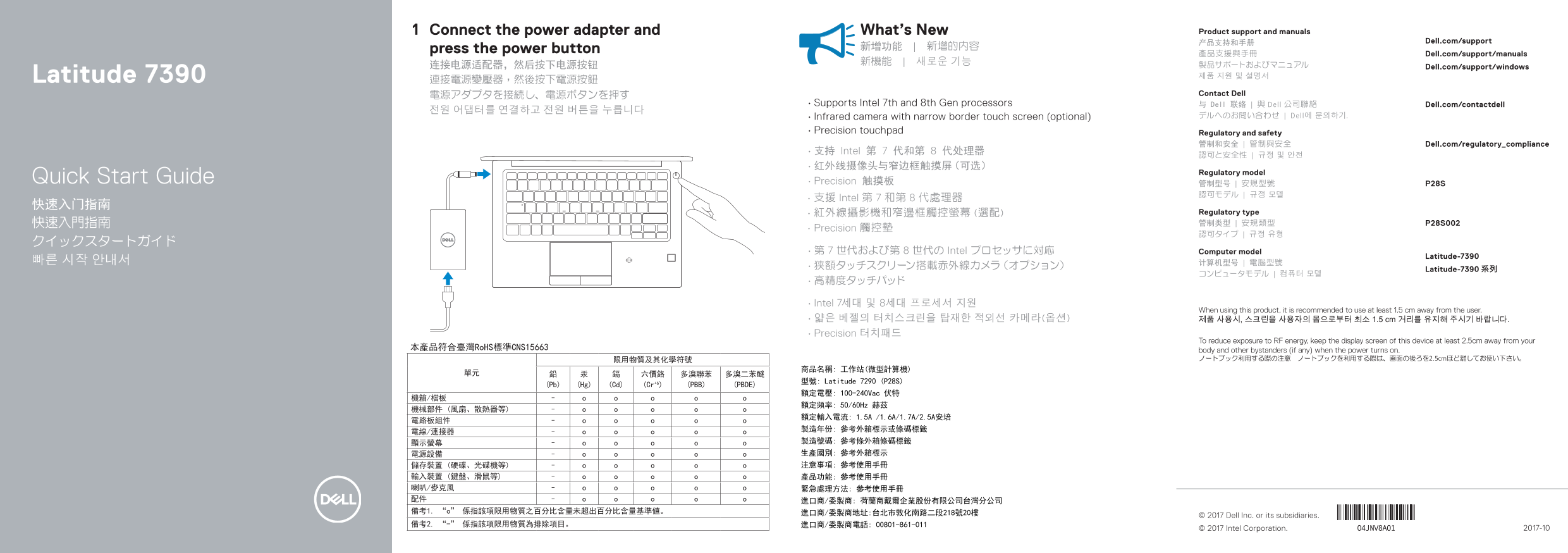
Page 1 Text Content
Connect the power adapter and What’s New Product support and manuals
产品支持和手册 Dell.com/support
press the power button 新增功能 | 新增的內容
產品支援與手冊 Dell.com/support/manuals
连接电源适配器,然后按下电源按钮 Dell.com/support/windows
Latitude 7390 제품 지원 및 설명서
電源アダプタを接続し、電源ボタンを押す Contact Dell
• Supports Intel 7th and 8th Gen processors 与 Dell 联络 | 與 Dell 公司聯絡 Dell.com/contactdell
• Infrared camera with narrow border touch screen (optional) デルへのお問い合わせ | Dell에 문의하기.
• Precision touchpad Regulatory and safety
管制和安全 | 管制與安全 Dell.com/regulatory_compliance
• 支持 Intel 第 7 代和第 8 代处理器
Regulatory model
Quick Start Guide • Precision 触摸板 管制型号 | 安規型號 P28S
• 支援 Intel 第 7 和第 8 代處理器
• 紅外線攝影機和窄邊框觸控螢幕 (選配) Regulatory type 快速入門指南 管制类型 | 安規類型 P28S002
• Precision 觸控墊
• 第 7 世代および第 8 世代の Intel プロセッサに対応 Computer model
Latitude-7390
Latitude-7390 系列
• Intel 7세대 및 8세대 프로세서 지원
When using this product, it is recommended to use at least 1.5 cm away from the user.
• 얇은 베젤의 터치스크린을 탑재한 적외선 카메라(옵션) 제품 사용시, 스크린을 사용자의 몸으로부터 최소 1.5 cm 거리를 유지해 주시기 바랍니다. • Precision 터치패드
To reduce exposure to RF energy, keep the display screen of this device at least 2.5cm away from your
本產品符合臺灣Ro HS標準CNS15663 body and other bystanders (if any) when the power turns on.
限用物質及其化學符號 ノートブック利用する際の注意 ノートブックを利用する際は、画面の後ろを2.5cmほど離してお使い下さい。
型號: Latitude 7290 (P28S)
(Pb) (Hg) (Cd) (Cr+6) (PBB) (PBDE)
額定電壓: 100-240Vac 伏特
額定頻率: 50/60Hz 赫茲
© 2017 Dell Inc. or its subsidiaries.
© 2017 Intel Corporation. 2017-10
Page Summary Contents For Dell Latitude 7390 Quick Install Guide
Manual Details
| Brand | Dell |
|---|---|
| Pages | 2 |
| File Size | 784.99 KB |
| Published | July 02, 2026 |
Enter the captcha to get the download link:

Frequently Asked Questions
How do I power on the laptop?
Connect the power adapter and then press the power button.
What processors does this model support?
It supports Intel 7th and 8th Gen processors.
Are there any privacy or safety guidelines for using the display?
When operating a notebook, keep the screen at least 2.5 cm away from your body to reduce exposure to RF energy.
What key physical features are available on this device?
It offers HDMI port, USB 3.1 Gen 1 with PowerShare, DisplayPort over USB Type-C, a microSD card slot, and optional features like Fingerprint reader and IR Camera.