Dell Latitude 3380_Win 10 Quick User Guide
Summary
Quick Start Guide for the Dell Latitude 3380 education laptop supporting Windows 10 and Ubuntu. Multi-language document covering power adapter connection, operating system setup, Dell app location, SupportAssist system checks, and network connectivity. Features dual microphones, camera with status light, microSD card reader, USB 3.0 with PowerShare, HDMI, VGA, speakers, touchpad, and optional SIM card slot for this compact business laptop.
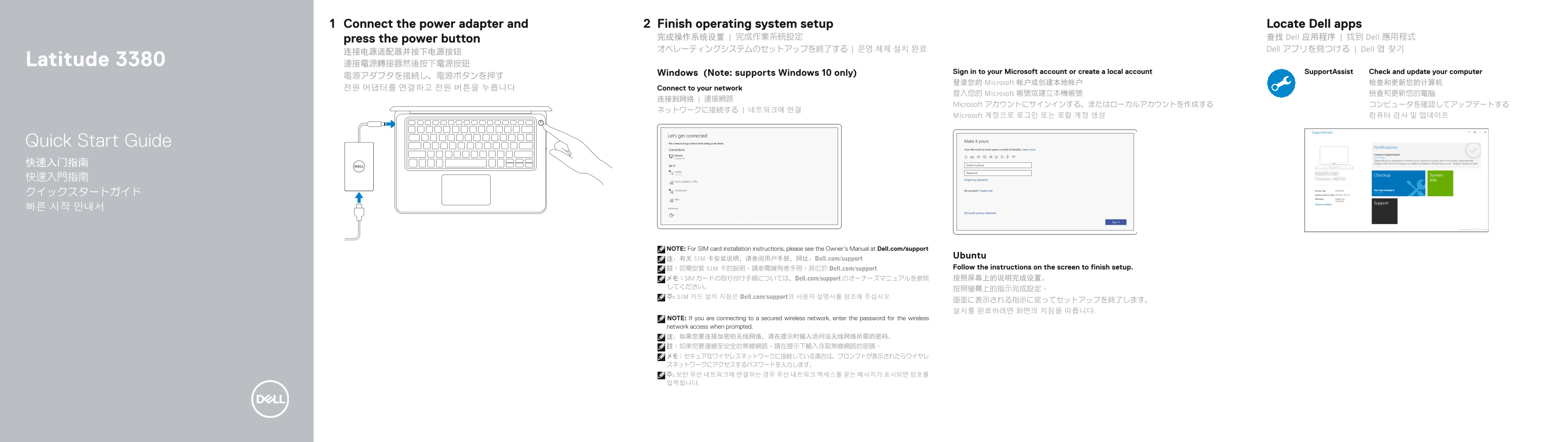
Page 1 Text Content
Connect the power adapter and Finish operating system setup Locate Dell apps
press the power button 完成操作系统设置 | 完成作業系統設定 查找 Dell 应用程序 | 找到 Dell 應用程式 オペレーティングシステムのセットアップを終了する | 운영 체제 설치 완료 Dell アプリを見つける | Dell 앱 찾기
Latitude 3380 連接電源轉接器然後按下電源按鈕
Windows (Note: supports Windows 10 only) Sign in to your Microsoft account or create a local account Support Assist Check and update your computer
登录您的 Microsoft 帐户或创建本地帐户 检查和更新您的计算机
전원 어댑터를 연결하고 전원 버튼을 누릅니다 Connect to your network
登入您的 Microsoft 帳號或建立本機帳號 檢查和更新您的電腦
Microsoft アカウントにサインインする、またはローカルアカウントを作成する コンピュータを確認してアップデートする
Microsoft 계정으로 로그인 또는 로컬 계정 생성 컴퓨터 검사 및 업데이트
Quick Start Guide 快速入门指南 快速入門指南 クイックスタートガイド 빠른 시작 안내서
NOTE: For SIM card installation instructions, please see the Owner’s Manual at Dell.com/support
Ubuntu
注:有关 SIM 卡安装说明,请参阅用户手册,网址:Dell.com/support
註:如需安裝 SIM 卡的說明,請參閱擁有者手冊,其位於 Dell.com/support Follow the instructions on the screen to finish setup. メモ:SIM カードの取り付け手順については、Dell.com/support のオーナーズマニュアルを参照 按照屏幕上的说明完成设置。
주: SIM 카드 설치 지침은 Dell.com/support의 사용자 설명서를 참조해 주십시오
NOTE: If you are connecting to a secured wireless network, enter the password for the wireless network access when prompted. 注:如果您要连接加密的无线网络,请在提示时输入访问该无线网络所需的密码。 註:如果您要連線至安全的無線網路,請在提示下輸入存取無線網路的密碼。 メモ:セキュアなワイヤレスネットワークに接続している場合は、プロンプトが表示されたらワイヤレ スネットワークにアクセスするパスワードを入力します。 주: 보안 무선 네트워크에 연결하는 경우 무선 네트워크 액세스를 묻는 메시지가 표시되면 암호를 입력합니다.
Page Summary Contents For Dell Latitude 3380_Win 10 Quick User Guide
Manual Details
| Brand | Dell |
|---|---|
| Pages | 2 |
| File Size | 688.70 KB |
| Published | July 03, 2026 |
Enter the captcha to get the download link:

Frequently Asked Questions
How do I start the initial device setup?
Connect the power adapter, sign into a Microsoft account or create a local one, and follow the on-screen prompts to complete configuration.
Does this laptop support Windows 10?
Yes, the unit supports Windows 10 only.
Are all USB ports the same?
No, some USB 3.0 ports are designated as having PowerShare functionality, providing extra power.
Where should I look for SIM card setup instructions?
For SIM card installation details, please consult the Owner’s Manual available at Dell.com/support.
Which website offers full product support and manuals?
You can access product support and manuals at Dell.com/support.