Dell Inspiron 530 Installation Guide User Manual
Summary
Quick-start setup guide for Dell Inspiron 530/531 desktop computer. Covers monitor connection via DVI/VGA, keyboard/mouse hookup, network and modem connection, power cable setup, and optional wireless configuration. For home and small office users.
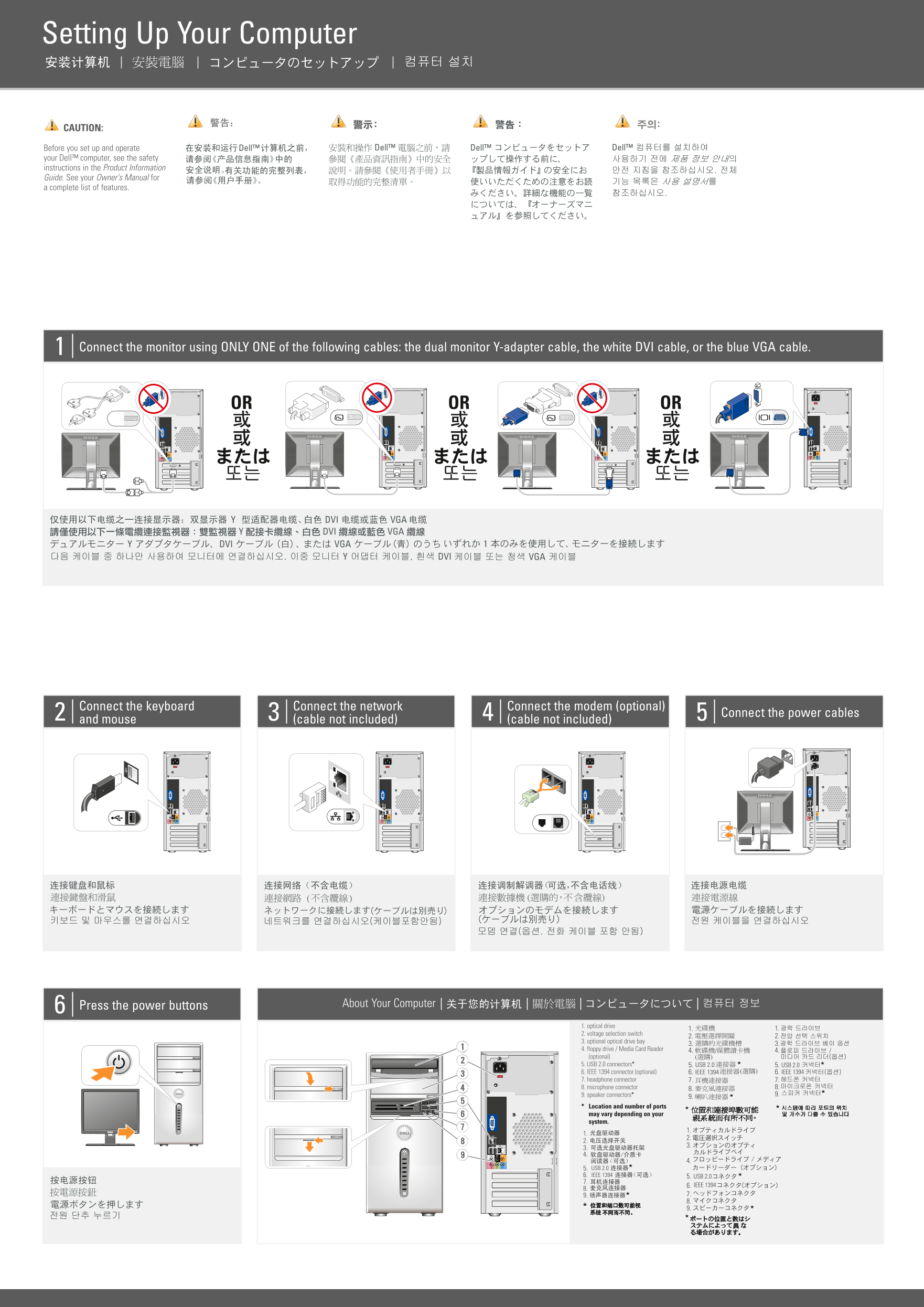
Page 1 Text Content
NT203A04ap0.qxp 02/09/2008 17:04 Page 1
Setting Up Your Computer
CAUTION: Before you set up and operate your Dell™ computer, see the safety instructions in the Product Information Guide. See your Owner's Manual for complete list of features.
Connect the monitor using ONLY ONE of the following cables: the dual monitor Y-adapter cable, the white DVI cable, or the blue VGA cable.
OR OR OR
Connect the keyboard Connect the network Connect the modem (optional)
Connect the power cables
and mouse (cable not included) (cable not included)
Press the power buttons About Your Computer
1. optical drive
2. voltage selection switch
3. optional optical drive bay
4. floppy drive / Media Card Reader 4. 4. (optional) 5. USB 2.0 connectors* 5. USB 2.0 5. USB 2.0 6. IEEE 1394 connector (optional) 6. IEEE 1394 6. IEEE 1394 7. headphone connector 7. 7.
8. microphone connector 8. 8. 9. speaker connectors* 9.
Location and number of ports may vary depending on your system.
5. USB 2.0 6. IEEE 1394 5. USB 2.0 7.
6. IEEE 1394
Page Summary Contents For Dell Inspiron 530 Installation Guide User Manual
Manual Details
| Brand | Dell |
|---|---|
| Pages | 2 |
| File Size | 2.92 MB |
| Published | June 27, 2026 |
Enter the captcha to get the download link:

Frequently Asked Questions
What connections are needed when setting up the computer initially?
Connect the monitor, keyboard, network (if using wired internet), modem (optional), power cables, and mouse.
How should a user connect multiple monitors?
You must use ONLY ONE of the following cables: the dual monitor Y-adapter cable, the white DVI cable, or the blue VGA cable.
Where can I find comprehensive instructions for this computer's features?
See your Owner's Manual for a complete list of features. If you don't have a physical copy, visit support.dell.com.
What is required for wireless network connectivity options?
You will need either a cable or DSL modem connected to a wireless router, or use a USB wireless adapter.