Dell Dell Edge Gateway 5100 Quick User Guide
Summary
The Dell Edge Gateway 5000 Series is a professional-grade connectivity gateway designed for integrating various network systems in demanding environments. It provides extensive connectivity options, including multiple USB ports, HDMI output, and specialized industrial serial connections (RS232/485, CANbus). This manual serves as a comprehensive guide for installation, setup procedures—including mounting on a wall bracket—and configuring all peripheral components such as wireless antennas and cellular modules. It is essential reading for IT professionals and system integrators who require reliable, flexible edge networking capabilities.
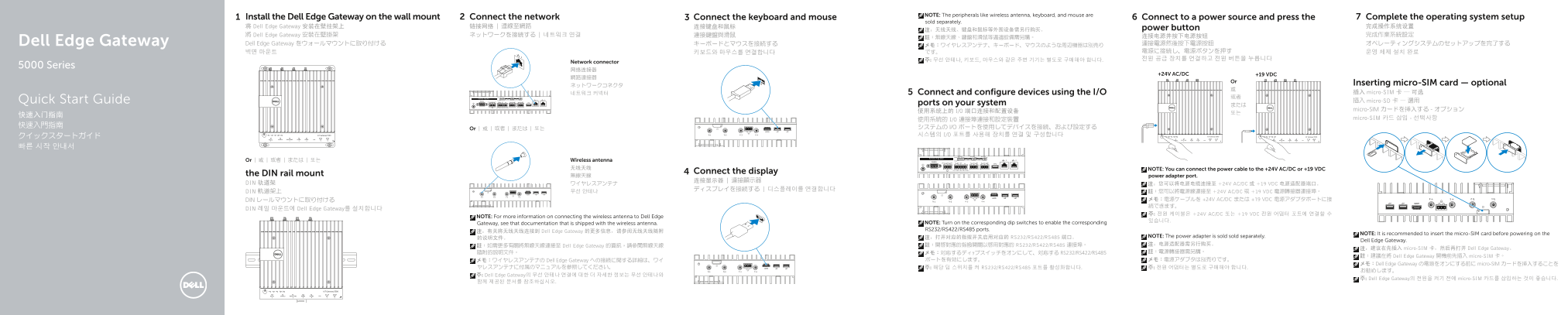
Page 1 Text Content
NOTE: The peripherals like wireless antenna, keyboard, and mouse are
Install the Dell Edge Gateway on the wall mount Connect the network Connect the keyboard and mouse Connect to a power source and press the Complete the operating system setup
sold separately.
将 Dell Edge Gateway 安装在壁挂架上 链接网络 | 連線至網路 连接键盘和鼠标 power button 完成操作系统设置
將 Dell Edge Gateway 安裝在壁掛架 ネットワークを接続する | 네트워크 연결 連接鍵盤與滑鼠 连接电源并按下电源按钮 完成作業系統設定
Dell Edge Gateway Dell Edge Gateway をウォールマウントに取り付ける キーボードとマウスを接続する 連接電源然後按下電源按鈕 オペレーティングシステムのセットアップを完了する
Network connector
5000 Series
+24V AC/DC +19 VDC
Inserting micro-SIM card — optional
네트워크 커넥터 Connect and configure devices using the I/O 插入 micro-SIM 卡 — 可选
Quick Start Guide 插入 micro-SD 卡 — 選用
ports on your system または
micro-SIM カードを挿入する - オプション
micro-SIM 카드 삽입 - 선택사항
Or | 或 | 或者 | または | 또는
Or | 或 | 或者 | または | 또는 Wireless antenna 无线天线 NOTE: You can connect the power cable to the +24V AC/DC or +19 VDC
Connect the display
the DIN rail mount 無線天線 power adapter port.
DIN 轨道架 ワイヤレスアンテナ 注:您可以将电源电缆连接至 +24V AC/DC 或 +19 VDC 电源适配器端口。
DIN 軌道架上 무선 안테나 註:您可以將電源線連接至 +24V AC/DC 或 +19 VDC 電源轉接器連接埠。
DIN レールマウントに取り付ける メモ:電源ケーブルを +24V AC/DC または +19 VDC 電源アダプタポートに接 続できます。
DIN 레일 마운트에 Dell Edge Gateway를 설치합니다
주: 전원 케이블은 +24V AC/DC 또는 +19 VDC 전원 어댑터 포트에 연결할 수
NOTE: For more information on connecting the wireless antenna to Dell Edge
Gateway, see that documentation that is shipped with the wireless antenna. NOTE: Turn on the corresponding dip switches to enable the corresponding RS232/RS422/RS485 ports.
注:有关将无线天线连接到 Dell Edge Gateway 的更多信息,请参阅无线天线随附
NOTE: It is recommended to insert the micro-SIM card before powering on the
注:打开对应的指拨开关启用对应的 RS232/RS422/RS485 端口。 NOTE: The power adapter is sold sold separately.
Dell Edge Gateway.
註:開啟對應的指撥開關以啟用對應的 RS232/RS422/RS485 連接埠。 注:电源适配器需另行购买。
註:如需更多有關將無線天線連接至 Dell Edge Gateway 的資訊,請參閱無線天線
注:建议在先插入 micro-SIM 卡,然后再打开 Dell Edge Gateway。
隨附的說明文件。 メモ:対応するディップスイッチをオンにして、対応する RS232/RS422/RS485 註:電源轉接器需另購。
註:建議在將 Dell Edge Gateway 開機前先插入 micro-SIM 卡。
メモ:ワイヤレスアンテナの Dell Edge Gateway への接続に関する詳細は、ワイ ポートを有効にします。 メモ:電源アダプタは別売りです。
メモ:Dell Edge Gateway の電源をオンにする前に micro-SIM カードを挿入することを
ヤレスアンテナに付属のマニュアルを参照してください。 주: 해당 딥 스위치를 켜 RS232/RS422/RS485 포트를 활성화합니다. 주: 전원 어댑터는 별도로 구매해야 합니다.
주: Dell Edge Gateway의 무선 안테나 연결에 대한 더 자세한 정보는 무선 안테나와
주: Dell Edge Gateway의 전원을 켜기 전에 micro-SIM 카드를 삽입하는 것이 좋습니다.
Page Summary Contents For Dell Dell Edge Gateway 5100 Quick User Guide
Manual Details
| Brand | Gateway |
|---|---|
| Pages | 2 |
| File Size | 590.91 KB |
| Published | May 21, 2026 |
Enter the captcha to get the download link:

Frequently Asked Questions
What power adapters can I use for this device?
You can connect the power cable to either the +24V AC/DC or +19 VDC adapter port.
Are accessories like antennas and key/mouse included?
No, peripheral devices such as wireless antennas, keyboards, and mice are sold separately.
What must I configure before connecting a wireless antenna?
Refer to the specific manual that came with the wireless antenna; you also need to turn on the corresponding dip switches for RS232/RS422/RS485 ports.
Do I need to insert a micro-SIM card first?
It is recommended to insert the micro-SIM card before powering on the Dell Edge Gateway.