Dell C2 Ceiling Rail Adapter Installation Guide
Summary
AP-220-MNT-C2 Installation Guide describes the ceiling rail adapter kit for mounting Aruba AP-220 series wireless access points. The kit includes adapters for open and flanged ceiling tile rails. The guide provides step-by-step installation instructions with diagrams. Target users include network installation technicians and IT professionals deploying wireless access points in commercial buildings.
Page 1 Text Content
AP-220-MNT-C2 Installation Guide
This mount kit supports multiple AP models. All installation images show the 225 AP.
The AP-220-MNT-C2 ceiling rail adapter kit includes the following items: Adapter for Open (Silhouette) ceiling tile rails. The wider of the two adapters. Adapter for Flanged (Interlude) ceiling tile rails. The narrower of the two adapters. For complete information about selecting the location and setting up the AP, see the Access Point Installation Guide.
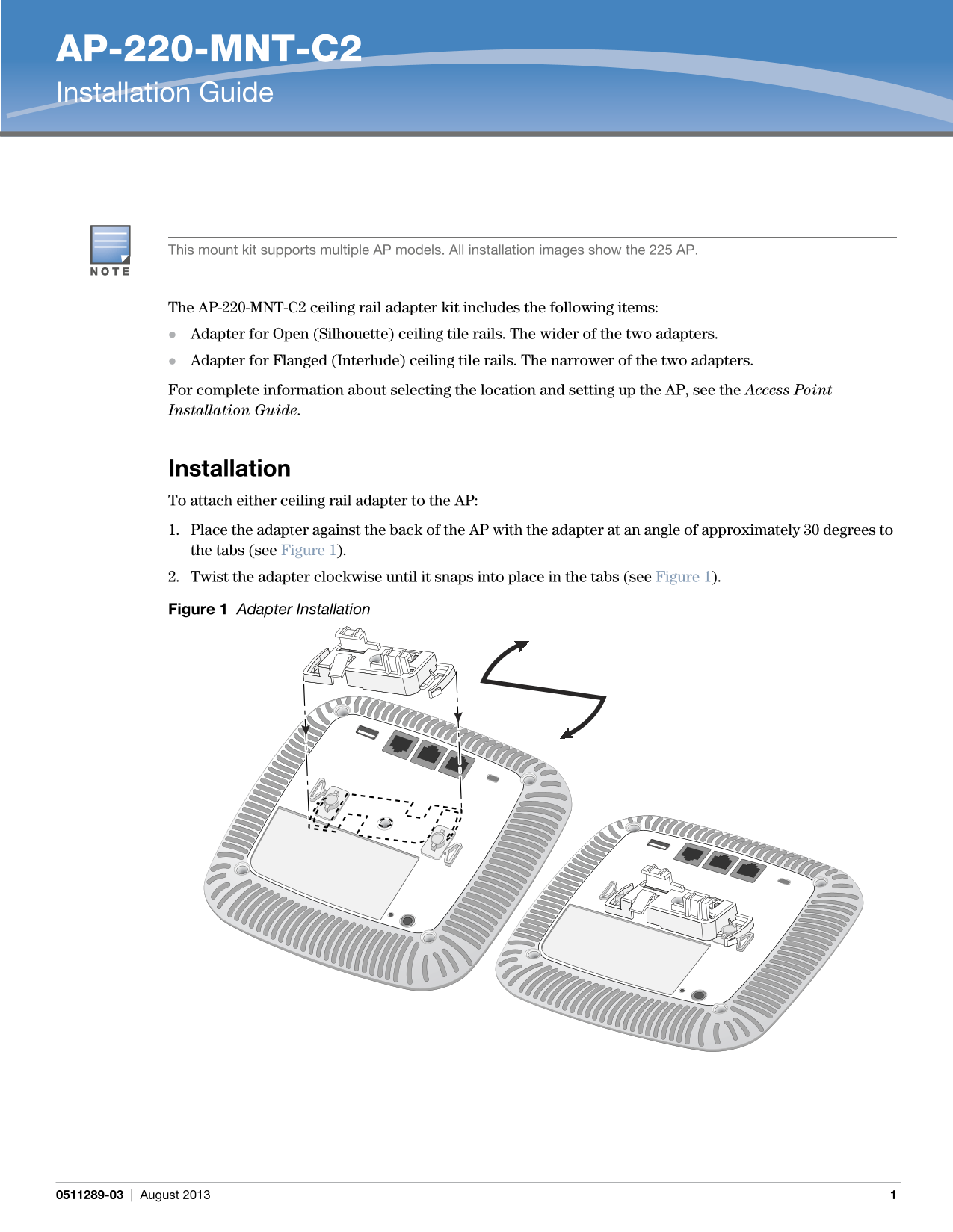
Installation To attach either ceiling rail adapter to the AP: 1. Place the adapter against the back of the AP with the adapter at an angle of approximately 30 degrees to the tabs (see Figure 1). 2. Twist the adapter clockwise until it snaps into place in the tabs (see Figure 1). Figure 1 Adapter Installation
0511289-03 | August 2013
Page Summary Contents For Dell C2 Ceiling Rail Adapter Installation Guide
Manual Details
| Brand | Dell |
|---|---|
| Pages | 2 |
| File Size | 426.86 KB |
| Published | June 29, 2026 |
Enter the captcha to get the download link:

Frequently Asked Questions
How do I attach the ceiling rail adapter to the Access Point (AP)?
Place the adapter against the back of the AP at a 30° angle, then twist it clockwise until it snaps into place in the tabs.
What is required after attaching the adapter?
You must mount the AP onto the ceiling tile rail using the adapter.
How do I install the AP on a ceiling rail?
Align the AP so the mounting tabs are at a 30° angle to the rail. Then, push toward the ceiling and rotate the unit clockwise until it clicks into place.