Sharp LC-26A37M LC-32A37M LC-37A37M User Manual
Summary
Explore the capabilities of your SHARP high-definition LCD Colour Television with this comprehensive owner’s manual. This guide provides step-by-step instructions for setting up, operating, and connecting all external devices to ensure a seamless viewing experience. Beyond operational guides, the manual emphasizes critical safety precautions concerning ventilation, placement, and handling for long-term use. Essential reading material for new owners seeking safe and effective TV usage.
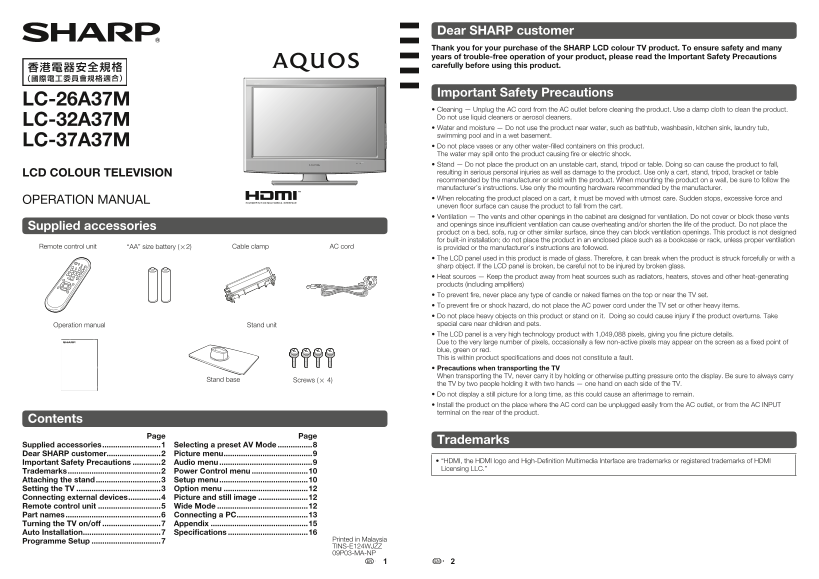
Page 1 Text Content
Dear SHARP customer Thank you for your purchase of the SHARP LCD colour TV product. To ensure safety and many years of trouble-free operation of your product, please read the Important Safety Precautions carefully before using this product.
Important Safety Precautions
LC-26A37M
• Cleaning — Unplug the AC cord from the AC outlet before cleaning the product. Use a damp cloth to clean the product. Do not use liquid cleaners or aerosol cleaners.
LC-32A37M
• Water and moisture — Do not use the product near water, such as bathtub, washbasin, kitchen sink, laundry tub, swimming pool and in a wet basement.
LC-37A37M
• Do not place vases or any other water-fi lled containers on this product. The water may spill onto the product causing fi re or electric shock. • Stand — Do not place the product on an unstable cart, stand, tripod or table. Doing so can cause the product to fall, LCD COLOUR TELEVISION resulting in serious personal injuries as well as damage to the product. Use only a cart, stand, tripod, bracket or table recommended by the manufacturer or sold with the product. When mounting the product on a wall, be sure to follow the manufacturer’s instructions. Use only the mounting hardware recommended by the manufacturer. • When relocating the product placed on a cart, it must be moved with utmost care. Sudden stops, excessive force and
OPERATION MANUAL
uneven fl oor surface can cause the product to fall from the cart. • Ventilation — The vents and other openings in the cabinet are designed for ventilation. Do not cover or block these vents and openings since insuffi cient ventilation can cause overheating and/or shorten the life of the product. Do not place the
Supplied accessories
product on a bed, sofa, rug or other similar surface, since they can block ventilation openings. This product is not designed for built-in installation; do not place the product in an enclosed place such as a bookcase or rack, unless proper ventilation
Remote control unit “AA” size battery (g2) Cable clamp AC cord is provided or the manufacturer’s instructions are followed.
• The LCD panel used in this product is made of glass. Therefore, it can break when the product is struck forcefully or with a sharp object. If the LCD panel is broken, be careful not to be injured by broken glass. • Heat sources — Keep the product away from heat sources such as radiators, heaters, stoves and other heat-generating products (including amplifi ers) • To prevent fi re, never place any type of candle or naked fl ames on the top or near the TV set. • To prevent fi re or shock hazard, do not place the AC power cord under the TV set or other heavy items. • Do not place heavy objects on this product or stand on it. Doing so could cause injury if the product overturns. Take Operation manual Stand unit special care near children and pets. • The LCD panel is a very high technology product with 1,049,088 pixels, giving you fi ne picture details. Due to the very large number of pixels, occasionally a few non-active pixels may appear on the screen as a fi xed point of blue, green or red. This is within product specifi cations and does not constitute a fault. • Precautions when transporting the TV When transporting the TV, never carry it by holding or otherwise putting pressure onto the display. Be sure to always carry
Stand base Screws (g 4)
the TV by two people holding it with two hands — one hand on each side of the TV. • Do not display a still picture for a long time, as this could cause an afterimage to remain. • Install the product on the place where the AC cord can be unplugged easily from the AC outlet, or from the AC INPUT terminal on the rear of the product.
Contents
Page Page
Trademarks
Supplied accessories ...........................1 Selecting a preset AV Mode ................8 Dear SHARP customer .........................2 Picture menu .........................................9
Important Safety Precautions .............2 Audio menu ...........................................9 • “HDMI, the HDMI logo and High-Defi nition Multimedia Interface are trademarks or registered trademarks of HDMI Licensing LLC.”
Trademarks ...........................................2 Power Control menu ..........................10 Attaching the stand ..............................3 Setup menu .........................................10 Setting the TV .......................................3 Option menu .......................................12 Connecting external devices ...............4 Picture and still image .......................12 Remote control unit .............................5 Wide Mode ..........................................12 Part names ............................................6 Connecting a PC .................................13 Turning the TV on/off ...........................7 Appendix .............................................15 Auto Installation ....................................7 Specifi cations .....................................16
Printed in Malaysia
Programme Setup ................................7
TINS-E124WJZZ 09P03-MA-NP
LC26A37M_HK_EN.indd 1 3/3/2009 11:03:45 AM
Page Summary Contents For Sharp LC-26A37M LC-32A37M LC-37A37M User Manual
Manual Details
| Brand | Sharp |
|---|---|
| Pages | 8 |
| File Size | 894.20 KB |
| Published | May 29, 2026 |
Enter the captcha to get the download link:

Frequently Asked Questions
How should I clean the TV safely?
Unplug the AC cord first, then use only a damp cloth. Never use liquid or aerosol cleaners.
Can I install this TV on my wall myself?
No; mounting requires qualified service personnel and specific brackets (AN-37AG3) to ensure safety and stability.
Are fixed spots (non-active pixels) on the screen a fault?
No, occasional non-active pixel points are within product specifications due to the large number of pixels and do not indicate a fault.
What precautions must be taken when moving or transporting the TV?
Always carry the unit horizontally with two hands (one on each side) and never put pressure directly onto the display.