# A B C D E F G H I J K L M N O P Q R S T U V W X Y Z

SHARP LC-42SB45U LC-42SB45UT Operation Manual

Summary

This essential guide provides comprehensive operating instructions and critical safety warnings for the Sharp LCD Color Television. It details safe setup procedures, proper cleaning techniques, and necessary electrical precautions to ensure optimal performance. New owners will find vital information regarding FCC compliance, product warranty coverage, and how to connect with authorized service professionals for reliable maintenance and support.
📄 Preview PAGE OF 27

Page 1 Text Content

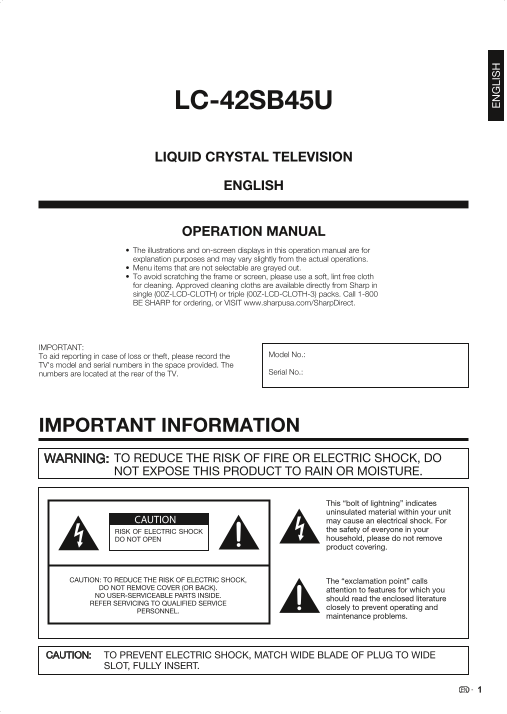
LC-42SB45U LIQUID CRYSTAL TELEVISION ENGLISH

OPERATION MANUAL The illustrations and on-screen displays in this operation manual are for

explanation purposes and may vary slightly from the actual operations. Menu items that are not selectable are grayed out. To avoid scratching the frame or screen, please use a soft, lint free cloth for cleaning. Approved cleaning cloths are available directly from Sharp in single (00Z-LCD-CLOTH) or triple (00Z-LCD-CLOTH-3) packs. Call 1-800 BE SHARP for ordering, or VISIT www.sharpusa.com/Sharp Direct.

IMPORTANT:

To aid reporting in case of loss or theft, please record the Model No.:

TV's model and serial numbers in the space provided. The

numbers are located at the rear of the TV. Serial No.:

IMPORTANT INFORMATION WARNING: TO REDUCE THE RISK OF FIRE OR ELECTRIC SHOCK, DO

NOT EXPOSE THIS PRODUCT TO RAIN OR MOISTURE.

This “bolt of lightning” indicates uninsulated material within your unit

CAUTION may cause an electrical shock. For

RISK OF ELECTRIC SHOCK the safety of everyone in your DO NOT OPEN household, please do not remove product covering.

CAUTION: TO REDUCE THE RISK OF ELECTRIC SHOCK, The “exclamation point” calls

DO NOT REMOVE COVER (OR BACK).

attention to features for which you

NO USER-SERVICEABLE PARTS INSIDE.

should read the enclosed literature

REFER SERVICING TO QUALIFIED SERVICE

closely to prevent operating and

PERSONNEL.

maintenance problems.

CAUTION: TO PREVENT ELECTRIC SHOCK, MATCH WIDE BLADE OF PLUG TO WIDE

SLOT, FULLY INSERT.

Page Summary Contents For SHARP LC-42SB45U LC-42SB45UT Operation Manual

Page 1 LC-42SB45U LIQUID CRYSTAL TELEVISION ENGLISH OPERATION MANUAL The illustrations and on-screen displays in this operation manual are for explanation purposes and may vary slightly from the actual opera...
Page 2 IMPORTANT INFORMATION CAUTION: DO NOT PLACE THIS PRODUCT ON AN UNSTABLE CART, STAND, TRIPOD, BRACKET, OR TABLE. THE PRODUCT MAY FALL CAUSING SERIOUS PERSONAL INJURY AND SERIOUS DAMAGE TO THE PRODUCT. ...
Page 3 DEAR SHARP CUSTOMER Thank you for your purchase of the Sharp Liquid Crystal Television. To ensure safety and many years of trouble-free operation of your product, please read the Important Safety Inst...
Page 4 IMPORTANT SAFETY INSTRUCTIONS • Outdoor Antenna Grounding — If an outside antenna is connected to the television equipment, be sure the antenna system is grounded so as to provide some protection agai...
Page 5 IMPORTANT SAFETY INSTRUCTIONS
Page 6 QUICK REFERENCE Supplied Accessories Make sure the following accessories are provided with the product. Remote control unit “AA” size battery AC cord Stand Screws Operation manual Always use the AC co...
Page 7 QUICK REFERENCE Quick Installation Tips Attach your antenna to the back of the television. Bundle the cords properly with the cable tie. (See page 8.) Connect the AC plug for the television into the A...
Page 8 Preparation Antennas To enjoy a clearer picture, use an outdoor antenna. The following is a brief explanation of the types of connections that are used for a coaxial cable. If your outdoor antenna use...
Page 9 Contents IMPORTANT INFORMATION ............................................................................................................................ TRADEMARKS ....................................
Page 10 Part Names TV (Front) Remote control sensor POWER indicator (See page 13.) TV (Side/Rear) Volume buttons SERVICE terminal (VOL +/-) Channel buttons (CH ) MENU button INPUT button INPUT 3 terminals (SI...
Page 11 Part Names POWER: Switch the power on or enters standby mode. Remote Control Unit (See page 13.) 0–9: Set the channel. • (DOT): (See page 14.) SURROUND: Display the surround setting menu. (See page 14...
Page 12 Connecting to External Equipment You can connect many types of external equipment to your TV like a Blu-ray disc player, HD-DVD player, DVD player, VCR, Digital TV tuner, HDMI equipment, game console ...
Page 13 Watching TV Turning On/Off the Power Press POWER on the TV, or POWER on the remote control unit to turn the power on. POWER indicator (Green): The TV is on. (After a few seconds, a window appears with...
Page 14 Direct Button Operation FLASHBACK Press FLASHBACK to switch to the previously tuned channel. Press • FLASHBACK again to switch back to the currently tuned channel. FLASHBACK• will not work if no chann...
Page 15 Direct Button Operation AUDIO Closed Captions and Digital Closed Captions ■ MTS/SAP stereo mode Your TV is equipped with an internal Closed Caption The TV has a feature that allows reception of sound ...
Page 16 Direct Button Operation VIEW MODE You can select the screen size. Press VIEW MODE. The View Mode menu displays.• The menu lists the View Mode options selectable for the type of video signal currently ...
Page 17 On-Screen Display Menu Menu Items For TV Mode For PC Mode Picture Picture Menu Contrast ............................................................................... Contrast ..........................
Page 18 On-Screen Display Menu On-Screen Display Menu Operation Example Example Picture Contrast Settings Audio Contrast 50 Picture Audio setting Brightness 50 Audio Audio mode Color 50 Features Alternate aud...
Page 19 On-Screen Display Menu Picture Menu Audio Menu Adjusts the picture to your preference with the Adjusts the sound quality to your preference with the following picture settings. following settings. Exa...
Page 20 On-Screen Display Menu Features Menu Digital Caption Service Setting This allows you to configure the way you choose to view digital captioning. Select one of the digital Example service channels made...
Page 21 On-Screen Display Menu Parental Control Menu US TV Ratings Lock Setting Your TV is equipped with a V-chip that allows you to Controls special functions for the TV channels. control access to individua...
Page 22 On-Screen Display Menu US Movie Ratings Lock Setting Over 14 years: Could contain themes where violence is one of the dominant This section describes how to control viewing of elements of the storylin...
Page 23 On-Screen Display Menu Setup Menu Clock Setting This function allows you to use the TV as a clock. Example Use a/b to set the time (Hour/Minute/AM or PM) and press ENTER to confirm the change. Setting...
Page 24 Appendix Troubleshooting Problem Possible Solution No power Check if you pressed POWER on the remote control unit. (See page 13.) If the indicator on the TV does not light up, press POWER on the TV. I...
Page 25 Appendix Specifications Item Model: LC-42SB45U LCD panel a-si TFT LCD 42o Class (42 1/64 o Diagonal) Resolution 2,073,600 pixels (1,920 g 1,080) TV-standard (CCIR) American TV Standard ATSC/NTSC Syste...
Page 26 PC Compatibility Chart It is necessary to set the PC correctly to display XGA and WXGA signal. Refer to page 14 to set PC input signals. PC Horizontal Frequency Vertical Frequency VESA Standard Resolu...
Page 27 Calling for Service li g for Service For location of the nearest Sharp Authorized Service, or to obtain product literature, accessories, supplies, or r l ti f t , r t tain product literature, acces or...

Manual Details

Brand Sharp
Pages 27
File Size 5.39 MB
Published June 02, 2026
78 views

Enter the captcha to get the download link:

captcha

Frequently Asked Questions

What should I use to clean the screen?

Use a soft, lint free cloth. Approved cloths are available from Sharp.

Are there any fire or shock risks I need to know about?

Do not expose it to rain or moisture, and do not open the product covering near high voltage areas (indicated by 'bolt of lightning').

What rules must I follow for mounting or placement?

Only use recommended mounts. Do not place the unit on unstable carts, stands, tripods, or tables.

If the TV needs service, what information should I have ready?

Gather your Proof of Purchase and be prepared to allow access for servicing, as warranties exclude complex installations.