Page 1
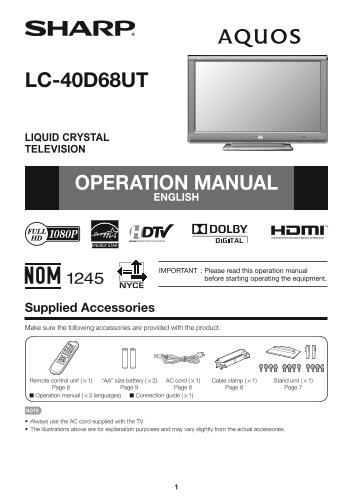
LC-40D68UT LIQUID CRYSTAL TELEVISION OPERATION MANUAL ENGLISH IMPORTANT : Please read this operation manual before starting operating the equipment. Supplied Accessories Make sure the following access...
Page 2
IMPORTANT: Model No.: To aid reporting in case of loss or theft, please record the TV's model and serial numbers in the space Serial No.: provided. The numbers are located at the rear of the TV. IMPOR...
Page 3
IMPORTANT INFORMATION INFORMATION: This equipment has been tested and found to comply with the limits for a Class B digital device, pursuant to Part 15 of the FCC Rules. These limits are designed to p...
Page 4
DEAR SHARP CUSTOMER Thank you for your purchase of the Sharp Liquid Crystal Television. To ensure safety and many years of trouble-free operation of your product, please read the Important Safety Inst...
Page 5
IMPORTANT SAFETY INSTRUCTIONS • Outdoor Antenna Grounding — If an outside antenna is EXAMPLE OF ANTENNA GROUNDING AS PER connected to the television equipment, be sure the antenna NATIONAL ELECTRICAL ...
Page 6
IMPORTANT SAFETY INSTRUCTIONS Caring for the Liquid Crystal panel • Turn off the main power and unplug the AC cord from the wall outlet before handling. • Gently wipe the surface of the display panel ...
Page 7
QUICK REFERENCE Attaching/Detaching the Stand Setting the TV on the Wall • Before attaching (or detaching) the stand, unplug the AC CAUTION cord. • This TV should be mounted on the wall with both • Be...
Page 8
QUICK REFERENCE QUICK INSTALLATION TIPS Experiencing HD images An HDTV without an HD source is just an ordinary TV. 1 Attach your antenna to the back of the television. To enjoy HD images on the TV, y...
Page 9
Preparation Antennas To enjoy a clearer picture, use an outdoor antenna. The following is a brief explanation of the types of connections that are used for a coaxial cable. If your outdoor antenna use...
Page 10
Part Names TV (Front) Remote control sensor OPC sensor* (See page 18.) OPC indicator (See page 18.) POWER indicator (See page 12.) * OPC: Optical Picture Control TV (Rear/Side) Antenna/Cable in OUTPUT...
Page 11
Connecting to External Equipment You can connect many types of external equipment to your TV. To view external source images, select the input source from INPUT on the remote control unit or on the TV...
Page 12
Watching TV Turning On/Off the Power Press POWER on the TV or on the remote control unit to turn the power on. The POWER indicator (Green): The TV is on. POWER The Initial Installation starts when the...
Page 13
Direct Button Operation Changing Volume You can change the volume by pressing VOLk/l on the TV or on the remote control unit. To increase the volume, press VOLk. To decrease the volume, press VOLl. Au...
Page 14
Direct Button Operation AV MODE AUDIO AV MODE gives you several viewing options to choose ■ MTS/SAP stereo mode from to best match the surrounding environment of the The TV has a feature that allows r...
Page 15
Direct Button Operation INPUT 1 Press CC. This will present the Closed Caption information display. To view external source images, select the input source by 2 Press CC while the Closed Caption infor...
Page 16
Direct Button Operation VIEW MODE You can select the screen size. 1 Press VIEW MODE. The View Mode menu displays. The menu lists the View Mode options selectable for the type of video signal currently...
Page 17
On-Screen Display Menu On-Screen Display Menu Operation Example Example Picture Option Audio Only OPC [On(Display)] Input Select Backlight Output Select Contrast [ 30] b40 Color System Brightness [ 0]...
Page 18
On-Screen Display Menu Color Temp. (Color Temperature) Picture Menu For a better white balance, use color temperature Adjusts the picture to your preference with the correction. following picture sett...
Page 19
On-Screen Display Menu Audio Menu No Signal Off When set to "Enable", the power will automatically shut You can adjust the sound quality to your preference down if there is no signal for 15 ...
Page 20
On-Screen Display Menu CH Setup Position If Initial Installation does not memorize all the channels For adjusting a picture's horizontal and vertical in your region, follow the instructions below to m...
Page 21
On-Screen Display Menu Fine Sync. Audio Setup Ordinarily you can easily adjust the picture as You can output digital audio to an AV amplifi er or necessary to change image position using "Auto si...
Page 22
On-Screen Display Menu Parental CTRL V-Chip (Parental Control Setting) V-CHIP is an electronic fi ltering device built into your TV. This tool gives parents a great degree of control Secret No. over b...
Page 23
On-Screen Display Menu TV Parental Guidelines Canadian Rating Systems (Canadian English ratings and Canadian French ratings) Example The TV rating systems in Canada are based on the MPAA Canadian Radi...
Page 24
On-Screen Display Menu Canadian French Ratings Option Menu Example MPAA Audio Only TV Guidelines When listening to music from a music program, you Can. English Ratings can turn the screen off and enjo...
Page 25
On-Screen Display Menu Digital Caption Setup Operation Lock Out This function allows you to adjust the closed caption This function locks the operation buttons on the TV screen appearance to suit your...
Page 26
On-Screen Display Menu 3 Press a/b to select “Software Update”, and then 7 Press ENTER to start updating. press ENTER. The screen becomes dark for a while until the update If you have already set the ...
Page 27
Appendix Troubleshooting Problem Possible Solution • No power • Check if you pressed POWER on the remote control unit. Page 12 If the indicator on the TV does not light up, press POWER on the TV. • Is...
Page 28
Appendix Problem Possible Solution • No picture • Is connection to other components correct? Page 11 • Is correct input signal source selected after connection? Page 24 • Is the correct input selected...
Page 29
Appendix Specifi cations Item Model: LC-40D68UT LCD Size 40o Class (40o Diagonal) panel Resolution 2,073,600 pixels (1,920 g 1,080) TV-standard (CCIR) American TV Standard ATSC/NTSC System VHF/UHF VHF...
Page 30
Appendix PC Compatibility Chart It is necessary to set the PC correctly to display XGA and WXGA signal. PC Horizontal Frequency Vertical Frequency VESA Standard Resolution 720 x 400 31.5 k Hz 70 Hz 31...
Page 31
Calling for Service For location of the nearest Sharp Authorized Service, or to obtain product literature, accessories, supplies, or customer assistance, please call 1-800-BE-SHARP. LIMITED WARRANTY C...