Samsung SP-46L3HX Quick User Guide
Summary
Master your television experience with this comprehensive user manual. Whether you are connecting external devices like DVD players, gaming consoles, PCs, or set-top boxes, the guide provides detailed instructions for all input types (HDMI, Component, RCA). Learn advanced remote functionalities, troubleshoot common issues, and optimally configure your display settings to ensure flawless viewing quality every time. Ideal for new owners setting up a multi-source home theater system.
Page 1 Text Content
BP68-00391A-00Eng 7/29/04 2:52 PM Page 9
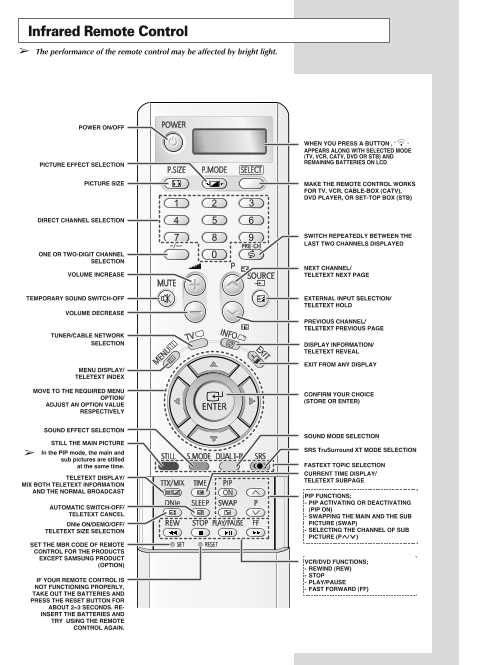
Infrared Remote Control The performance of the remote control may be affected by bright light.
POWER ON/OFF
WHEN YOU PRESS A BUTTON , ‘ ’ APPEARS ALONG WITH SELECTED MODE (TV, VCR, CATV, DVD OR STB) AND REMAINING BATTERIES ON LCD
PICTURE EFFECT SELECTION
PICTURE SIZE MAKE THE REMOTE CONTROL WORKS
FOR TV, VCR, CABLE-BOX (CATV), DVD PLAYER, OR SET-TOP BOX (STB)
DIRECT CHANNEL SELECTION
SWITCH REPEATEDLY BETWEEN THE LAST TWO CHANNELS DISPLAYED
ONE OR TWO-DIGIT CHANNEL
SELECTION
NEXT CHANNEL/
VOLUME INCREASE TELETEXT NEXT PAGE
TEMPORARY SOUND SWITCH-OFF EXTERNAL INPUT SELECTION/
TELETEXT HOLD
VOLUME DECREASE
PREVIOUS CHANNEL/ TELETEXT PREVIOUS PAGE
TUNER/CABLE NETWORK
SELECTION DISPLAY INFORMATION/
TELETEXT REVEAL
EXIT FROM ANY DISPLAY
MENU DISPLAY/ TELETEXT INDEX
MOVE TO THE REQUIRED MENU
CONFIRM YOUR CHOICE
OPTION/
(STORE OR ENTER)
ADJUST AN OPTION VALUE
RESPECTIVELY
SOUND EFFECT SELECTION
SOUND MODE SELECTION
STILL THE MAIN PICTURE
SRS Tru Surround XT MODE SELECTION
In the PIP mode, the main and sub pictures are stilled
at the same time. FASTEXT TOPIC SELECTION CURRENT TIME DISPLAY/ TELETEXT SUBPAGETELETEXT DISPLAY/
MIX BOTH TELETEXT INFORMATION AND THE NORMAL BROADCAST
PIP FUNCTIONS; PIP ACTIVATING OR DEACTIVATING
AUTOMATIC SWITCH-OFF/
(PIP ON)
TELETEXT CANCEL
SWAPPING THE MAIN AND THE SUB DNIe ON/DEMO/OFF/ PICTURE (SWAP) TELETEXT SIZE SELECTION SELECTING THE CHANNEL OF SUB PICTURE (P^/∨)
SET THE MBR CODE OF REMOTE CONTROL FOR THE PRODUCTS EXCEPT SAMSUNG PRODUCT
VCR/DVD FUNCTIONS;
(OPTION)
REWIND (REW) STOP
IF YOUR REMOTE CONTROL IS
PLAY/PAUSE
NOT FUNCTIONING PROPERLY,
FAST FORWARD (FF)
TAKE OUT THE BATTERIES AND PRESS THE RESET BUTTON FOR ABOUT 2~3 SECONDS. RE- INSERT THE BATTERIES AND TRY USING THE REMOTE
CONTROL AGAIN.
English - 9
Page Summary Contents For Samsung SP-46L3HX Quick User Guide
Manual Details
| Brand | Samsung |
|---|---|
| Pages | 9 |
| File Size | 933.33 KB |
| Published | June 05, 2026 |
Enter the captcha to get the download link:

Frequently Asked Questions
How can I troubleshoot a malfunctioning remote control?
Replace the batteries, clean the transmission window, and check the battery terminals.
What is the procedure for resetting the infrared remote control?
Remove the batteries, press the RESET button for 2-3 seconds, re-insert the batteries, and try again.
Which ports are used for high-definition digital video connections?
The HDMI/DVI IN and corresponding AUDIO-L/R connectors are used for equipment with a digital output.
Are there specific guidelines when connecting audio or video systems?
Ensure that all elements are switched off before connecting an audio or video system to the television.
How do I connect different types of source devices (VCR, DVD Player, PC)?
Use EXT1/EXT3 for RGB outputs; S-VIDEO and AUDIO-L/R for camcorders/VCRs; HDMI/DVI IN for digital sources; or COMPONENT IN for DTV/DVD receivers.