Samsung SP-43T9HE Quick User Guide
Summary
Master your home media setup with this comprehensive guide to external connections. This manual provides detailed instructions for linking various digital and traditional sources, including VCRs, video game consoles, DVD players, and audio systems, to your display unit. Learn how to utilize multiple essential ports—such as RCA, S-Video, Component Inputs, and dedicated audio outputs—to achieve optimal performance and surround sound effects. Ideal for electronics enthusiasts and users building a full multimedia entertainment system.
Page 1 Text Content
BP68-00288A (J59A_ENG_Asia) 4/7/04 8:23 AM Page 57
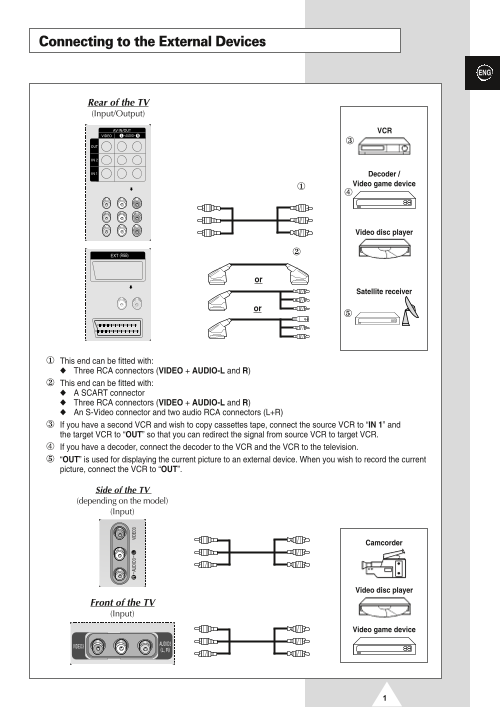
Connecting to the External Devices
Rear of the TV (Input/Output)
Decoder / Video game device
Video disc player
Satellite receiver
This end can be fitted with: Three RCA connectors (VIDEO + AUDIO-L and R) This end can be fitted with: A SCART connector Three RCA connectors (VIDEO + AUDIO-L and R) An S-Video connector and two audio RCA connectors (L+R) If you have a second VCR and wish to copy cassettes tape, connect the source VCR to “IN 1” and the target VCR to “OUT” so that you can redirect the signal from source VCR to target VCR. If you have a decoder, connect the decoder to the VCR and the VCR to the television. “OUT” is used for displaying the current picture to an external device. When you wish to record the current picture, connect the VCR to “OUT”.
Side of the TV (depending on the model) (Input)
Camcorder
Video disc player
Front of the TV (Input)
Video game device
Page Summary Contents For Samsung SP-43T9HE Quick User Guide
Manual Details
| Brand | Samsung |
|---|---|
| Pages | 3 |
| File Size | 474.12 KB |
| Published | May 29, 2026 |
Enter the captcha to get the download link:

Frequently Asked Questions
How can I connect another VCR to copy tapes?
Connect the source VCR to “IN 1” and the target VCR to “OUT” to redirect the signal for copying.
What is the purpose of the 'OUT' connection?
The 'OUT' port displays the current picture on an external device, or it can be used with a VCR connected to record the current picture.
Which connectors are required for a camcorder or VCR?
Use the S-VIDEO INPUT and RCA (AUDIO3-L and R) connectors. Both must be used to play pictures and sound.
What inputs should I use if I have a DVD/DTV receiver?
The COMPONENT IN connectors are designed for equipment with a DVD or DTV receiver output.