Rollei Desview T3 Teleprompter Operation Manual (EN)
Summary
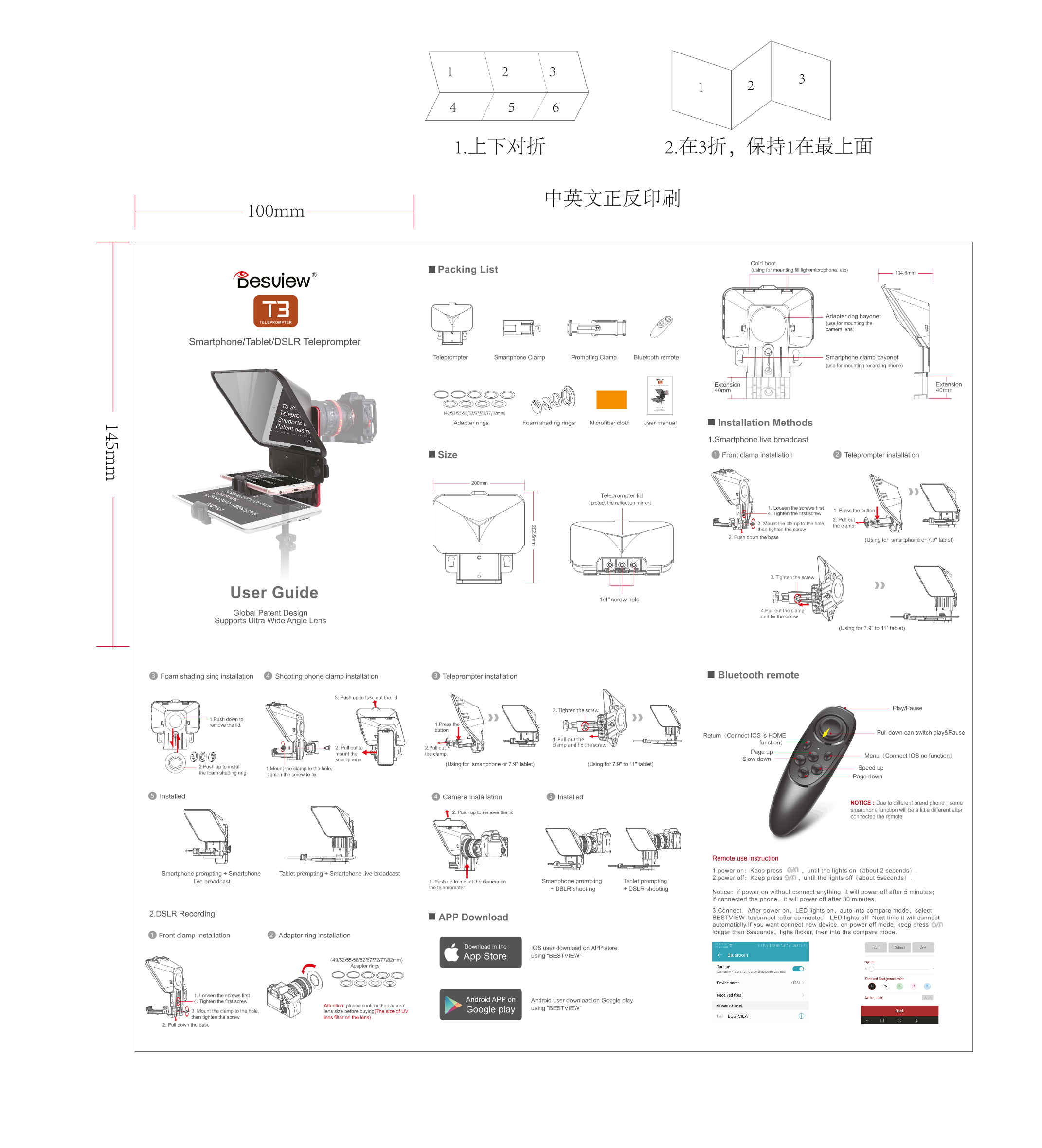
This comprehensive teleprompter kit is an essential tool for modern content creators, live streamers, videographers, and e-commerce sellers. Designed for ultimate flexibility, it integrates seamlessly with smartphones, tablets, and DSLRs, supporting everything from intimate setups to professional live broadcasts. The user manual provides detailed instructions on multi-platform installation methods, encompassing clamp mounting, camera lens attachment, and Bluetooth connectivity setup. Effortlessly transition between various filming modes—including slow/fast readouts, pre-recorded clips, and real-time streaming—to ensure your message is always clear and cinematic.
Page 1 Text Content
100mm
Cold boot
四 Packing List using for mountng 介 W9htmicrophone, eto)
上 一 尝 em -|
省 esuiew”
Adapter ring bayonet
TELEPROMPTER
tuse for mounting the
camera lens)人
Smartphone/Tablet DSLR Teleprompter
Teleprompter Smartphone Clamp Bluetooth remote clamp bayonet Prompting Clamp
use for mounting recording phone)
Extension Extension
40mm 40mm
Adapter rings Microfiber cloth User manual 国 Installation Methods
1.Smartphone live broadcast
大 Size 各 Front camp installation 四 Teleprompter installation
UUUISTT
Teleprompter lid
4protect he reflection mirror;
1 Loosen the screws first
4. Tighten the frst screw
2. Pull oul
3. Mountthe clamp to the hole, he alamp then Hghten the screw
2. Push down the base
User Guide
114" Screw hole
4.Pullout the clamp
Global Patent Design
and 入 the screw
Supports Ultra Wide Angle Lens
(Usingfor 7.9"to 11"tablet)
各 Foam shading sing installation ”各 Shooting phone clamp installation 生 Teleprompter installation 国 Bluetooth remote
3. Push up to take eutihe ld
Playf Pause
1TPush down to
remove the lid 1presstme S 一button 站
Pull down can switch play&Pause
Retum (Connect IOSis HOME
4.Pulloutthe 二
PE 上 function)
clamp and flkthe scre
- 厅 2.Pulout
Page up
mountthe the clamp
Menu {Connect IOS no function)
Slow down
smariphone909
(Using for smartphone or7.9" tablet) (Using for7.9"to 11"tablet)
2.Push upto instel
1Mountthe clamp to the hole, Speed up
the foam shading ring
匣 hten the screw to fix
Page down
四 camera Installation 利 nstalea
NODTICE : Due to diferent brand phone ,some
smarphone function will be a little different after
全 2 Pusnmptoremovethea
connected the remote
Remote use instruction
1.power on: Keep press until the lights on (about 2 seconds)
Smartphone prompting + Smartphone Tablet prompting + Smartphone live broadcast
2.power off: Keep press 1 ,until the lights off (about 5seconds)
live broadcast 1 Push up to mount the camera on Smartphone prompting Tablet prompting
the teleprompter
+ DSLR shooting
+ DSLR shooting Notice: if power on without connect anything, it will power off after 5 minutes;
if connected the phone,it will power off after 30 minutes
3.Connect: After power on,LED lights on,auto into compare mode,select
2.DSLR Recording
轩 APP Download BESTVIEW toconnect after connected LED lights off Next time it will connect
automaticlly.If you want connect new device. on power off mode, keep press :gif
Ionger than 8seconds,lighs flicker then into the compare mode
各 Front clamp Installation 外 Adapterring installation
Download in the 和 peput 4
饼 App Store
149152155/58/62167172777i B2mm)
Curanty wsiblete ne
[em 蕊 Ke Dewicename na ,
1 Loosen the screws first
Received fles iormnae 页 克
4. Tighten the fst screw 忆 ,Android APP on Android user download on Google play
Attention: please confirm the camera Ca
using "BESTVIEW pan Eonewees
Iens size before buyingf The size of UV r ”Google play
国 BESTVIEW 全
Iens filter on the lens)then tighten the screw
2. Pull down the base
Page Summary Contents For Rollei Desview T3 Teleprompter Operation Manual (EN)
Manual Details
| Brand | Rollei |
|---|---|
| Pages | 1 |
| File Size | 1.02 MB |
| Published | June 05, 2026 |
Enter the captcha to get the download link:

Frequently Asked Questions
How do I install the teleprompter lid?
To mount the lid, loosen the screws first. Then pull out and push up to take it into place before tightening the screws.
How is the smartphone/tablet clamping done?
Mount the clamp to the designated hole, then secure it with a screw (for foam shading ring) or use the provided specialized clamps for tablets.
What are the power cycle steps for connecting devices?
To power on, keep pressing the button until lights come on. For connection setup, follow the pairing mode instructions by holding the button if necessary.