# A B C D E F G H I J K L M N O P Q R S T U V W X Y Z

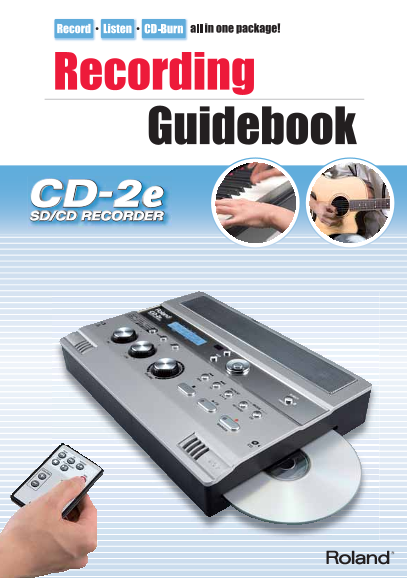
Roland Music Instrument CD-2e SD CD Recorder Users Guide

Summary

The CD-2e is a portable, all-in-one recording unit designed for musicians of all skill levels. This comprehensive guide covers everything from initial setup to advanced recording techniques, allowing you to effortlessly capture high-quality audio performances. Whether you are recording instruments (like piano, strings, or wind ensembles) or practicing at home, the manual provides step-by-step instructions on using built-in mics and CD/SD card functions. Perfect for students, hobbyists, and professional musicians who need a simple, portable tool for music study, practice, and creating lasting recordings without needing complex studio equipment.
📄 Preview PAGE OF 16

Page Summary Contents For Roland Music Instrument CD-2e SD CD Recorder Users Guide

Page 2 Chapter 1: What is the CD-2e? Features of the CD-2e................................................................... Meet the CD-2e! Chapter 2: Create a CD! Easy recording in three steps Easily crea...
Page 3 t is th -2 re te co rd in ip o even m ore w ith the CD -2e Features of the CD-2e All-In-One Unit! Nothing Else Required to Make a CD High-quality stereo mic, stereo speaker, and CD-R/RW drive in a sli...
Page 4 Meet the CD-2e! Remote control Battery operation You can control record- Six AA alkaline batteries will provide ing and playback from approximately six hours of continu- a distance. No need to ous rec...
Page 5 t is th -2 re te co rd in ip o even m ore w ith the CD -2e Stereo speakers The CD-2e’s sound comes from here. Simply press the [PLAY] button and you can listen immediately to what you’ve recorded. CD ...
Page 6 Easy recording in three steps Insert the CD-R disc into the CD-2e Into the CD slot located on the right side of the CD-2e, insert a CD-R disc with the writing surface facing downward. You’ll be able t...
Page 7 t is th -2 re te co rd in ip o even m ore w ith the CD -2e Easily create a CD in three steps Check the recording through the onboard speakers Press the [PLAY] button to listen to the recorded performa...
Page 8 Recording a piano Try diff erent locations to Use the CD-2e for daily practice capture the sound you want or to create lesson materials The sound of a piano comes from the vibration of The CD-2e is a ...
Page 9 t is th -2 re te co rd in ip o even m ore w ith the CD -2e Recording a brass instrument Minimize noise by Keep the mics at a distance avoiding wind pressure to minimize breath noise When recording a b...
Page 10 Recording a string instrument Get a rich sound by allowing Emphasize the body or strings distance from the instrument to capture your unique tone The distinctive resonance of string instruments such a...
Page 11 t is th -2 re te co rd in ip o even m ore w ith the CD -2e Recording a wind ensemble In a concert hall, record Avoid recording the direct from the center! sound in a practice room If you’re recording ...
Page 12 Recording your band practice The key is to restrain the Use a mic to sing along with volume of your PA and amps your electronic instrument When recording your band in a rehearsal studio, the The CD-2e...
Page 13 t is th -2 re te co rd in ip o even m ore w ith the CD -2e Recording a acoustic guitar Minimize the room resonances and Record a good balance of the capture the sound of the guitar itself strings and ...
Page 14 Do even more with the CD-2e Use the lesson functions for practicing Daily practice is essential to progress, and the CD-2e provides various features that can help. Use the built- (1) Tuner in Tuner (1...
Page 15 t is th -2 re te co rd in ip o even m ore w ith the CD -2e Turn records or cassette tapes into CDs Are there any dusty boxes of records or cassette tapes in your closet? They’re taking up space, and t...
Page 16 Accessories CB-CD2E DR-30/DR-50 ST-100MB RH-300/RH-200 Carrying Case Dynamic Microphone Microphone Stand Headphones Specifi cations Input/Output Tracks 2 (Stereo) Frequency Response 20 Hz–20 k Hz (+0d...

Manual Details

Brand Roland
Pages 16
File Size 1.40 MB
Published June 05, 2026
43 views

Enter the captcha to get the download link:

captcha

Frequently Asked Questions

What kind of media can I use to record on the CD-2e?

You can use SD memory cards, CD-R discs for permanent recordings, or CD-RW discs for repeated recording.

Is a computer required to use this unit?

No. The CD-2e is an all-in-one unit that allows recording and burning without needing a separate computer.

How long does the battery typically last on the CD-2e?

With alkaline dry cell batteries, the expected continuous use is approximately 6 hours.

What should I do if I want to record high sound quality?

Adjust the input level appropriately, and watch for the peak indicator light when hearing the loudest sounds.