Roland Music Instrument CD-2e SD CD Recorder Quick Start User Guide
Summary
The CD-2e is an essential recording device designed for musicians and vocalists who want to capture live performances and format them onto professional audio CDs. This manual provides comprehensive, step-by-step guidance covering two key processes: how to use the built-in microphone to record your entire performance onto an SD memory card, and how to successfully write those digital files from the card onto a blank CD-R disc. Perfect for anyone who wants to preserve high-quality musical memories or create professional keepsakes.
Page 1 Text Content
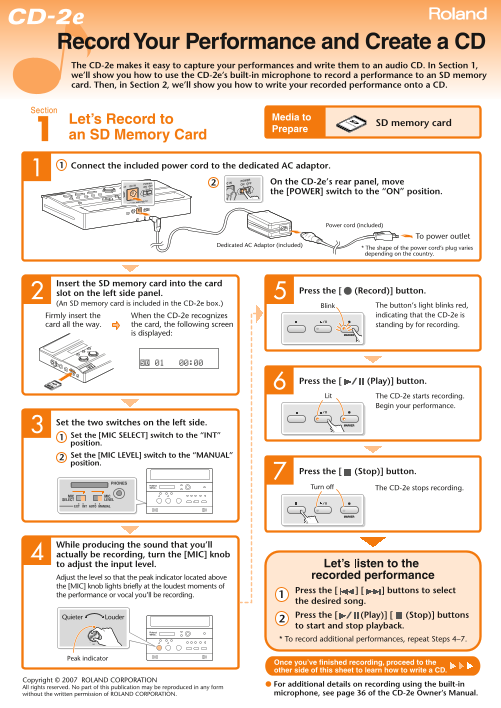
The CD-2e makes it easy to capture your performances and write them to an audio CD. In Section 1, we’ll show you how to use the CD-2e’s built-in microphone to record a performance to an SD memory card. Then, in Section 2, we’ll show you how to write your recorded performance onto a CD.
Let’s Record to Media to
SD memory card
Prepare
an SD Memory Card Connect the included power cord to the dedicated AC adaptor.
On the CD-2e’s rear panel, move the [POWER] switch to the “ON” position.
Power cord (included)
To power outlet
Dedicated AC Adaptor (included)
* The shape of the power cord’s plug varies depending on the country.
Insert the SD memory card into the card
Press the [ (Record)] button.
slot on the left side panel. (An SD memory card is included in the CD-2e box.) The button’s light blinks red,
Blink
Firmly insert the When the CD-2e recognizes indicating that the CD-2e is
card all the way. the card, the following screen standing by for recording.
is displayed:
Press the [ (Play)] button. Lit The CD-2e starts recording.
Begin your performance.
Set the two switches on the left side. Set the [MIC SELECT] switch to the “INT” position. Set the [MIC LEVEL] switch to the “MANUAL” position.
Press the [ (Stop)] button. Turn off The CD-2e stops recording.
While producing the sound that you’ll actually be recording, turn the [MIC] knob to adjust the input level. Adjust the level so that the peak indicator located above the [MIC] knob lights briefly at the loudest moments of
Press the [ ] [ ] buttons to select
the performance or vocal you’ll be recording.
the desired song. Louder Quieter Press the [ (Play)] [ (Stop)] buttons to start and stop playback. * To record additional performances, repeat Steps 4–7.
Peak indicator
Once you’ve finished recording, proceed to the other side of this sheet to learn how to write a CD.
Copyright © 2007 ROLAND CORPORATION
● For additional details on recording using the built-in
All rights reserved. No part of this publication may be reproduced in any form
without the written permission of ROLAND CORPORATION. microphone, see page 36 of the CD-2e Owner’s Manual.
Page Summary Contents For Roland Music Instrument CD-2e SD CD Recorder Quick Start User Guide
Manual Details
| Brand | Roland |
|---|---|
| Pages | 2 |
| File Size | 234.03 KB |
| Published | May 31, 2026 |
Enter the captcha to get the download link:

Frequently Asked Questions
How do I prepare for recording a performance?
Connect the power cord, use the included SD memory card, turn on the [POWER], and press the [RECORD] button until the screen displays 'Standing by'.
Where should the CD-R disc be placed when writing a CD?
Insert it into the dedicated CD slot located on the right side panel of the unit.
How do I adjust the input level while recording?
Turn the [MIC] knob to adjust the input level, monitoring the peak indicator so that it lights briefly at the loudest moments.