Roland KR-105 Digital Intelligent Piano Quick Start User Guide
Summary
Explore the Roland KR105 Digital Intelligent Piano, a powerful instrument featuring over 170 songs, DigiScore notation, and sophisticated Music Assistant functions. This essential Quick Start guide is designed for new owners, offering a streamlined introduction to every major feature. Learn basic operation, customize sounds, and master advanced performance techniques—from creating original compositions to automatic accompaniment—helping you immediately unlock the full potential of your Yamaha keyboard.
Page 1 Text Content
Quick Start_KR105 En Page 1 Wednesday, June 8, 2005 7:16 PM
Quick Start
Congratulations on choosing of the Roland Digital Intelligent Piano KR105!
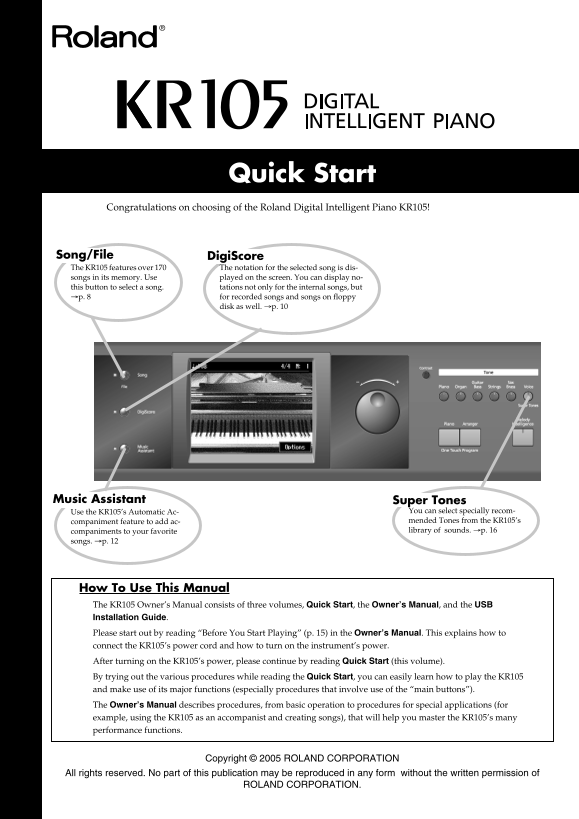
Song/File Digi Score The KR105 features over 170 The notation for the selected song is dis- songs in its memory. Use played on the screen. You can display no- this button to select a song. tations not only for the internal songs, but p. 8 for recorded songs and songs on floppy
disk as well. p. 10
Music Assistant Super Tones
Use the KR105’s Automatic Ac- You can select specially recom- companiment feature to add ac- mended Tones from the KR105’s companiments to your favorite library of sounds. p. 16
songs. p. 12
How To Use This Manual The KR105 Owner’s Manual consists of three volumes, Quick Start , the Owner’s Manual , and the USB Installation Guide Please start out by reading “Before You Start Playing” (p. 15) in the Owner’s Manual . This explains how to connect the KR105’s power cord and how to turn on the instrument’s power. After turning on the KR105’s power, please continue by reading Quick Start (this volume). By trying out the various procedures while reading the Quick Start , you can easily learn how to play the KR105 and make use of its major functions (especially procedures that involve use of the “main buttons”). The Owner’s Manual describes procedures, from basic operation to procedures for special applications (for example, using the KR105 as an accompanist and creating songs), that will help you master the KR105’s many performance functions.
Copyright © 2005 ROLAND CORPORATION
All rights reserved. No part of this publication may be reproduced in any form without the written permission of
ROLAND CORPORATION.
Page Summary Contents For Roland KR-105 Digital Intelligent Piano Quick Start User Guide
Manual Details
| Brand | Roland |
|---|---|
| Pages | 21 |
| File Size | 1.24 MB |
| Published | June 05, 2026 |
Enter the captcha to get the download link:

Frequently Asked Questions
How do I start using the KR105?
Read ""Before You Start Playing"" (p. 15) and then proceed with the Quick Start guide to learn major functions.
What can I use the [DigiScore] button for?
It displays notation not only for internal songs, but also for recorded songs and those on floppy disks.
How do I switch back to basic piano performance mode?
Press the One Touch Program [Piano] button at any time to bring up the Piano screen.
Where can I learn about advanced features like accompaniment or creating songs?
The Owner's Manual is dedicated to special applications, such as using the KR105 as an accompanist and for song creation.