Roland KF-90 Digital Piano MIDI Implementation User's Guide
Summary
Deep dive reference guide for advanced musical performers and sound engineers. This manual details the complete MIDI implementation specifications of your controller, covering every aspect necessary for professional integration into digital audio workstations (DAWs) and sequencing hardware. It provides authoritative technical data on core controls like Volume, Modulation Depth, Pan, Expression, Portamento Time, and comprehensive bank selection protocols. Essential reading for those requiring granular control over pitch variation, balance adjustments, and expressive performance capabilities across multiple MIDI channels.
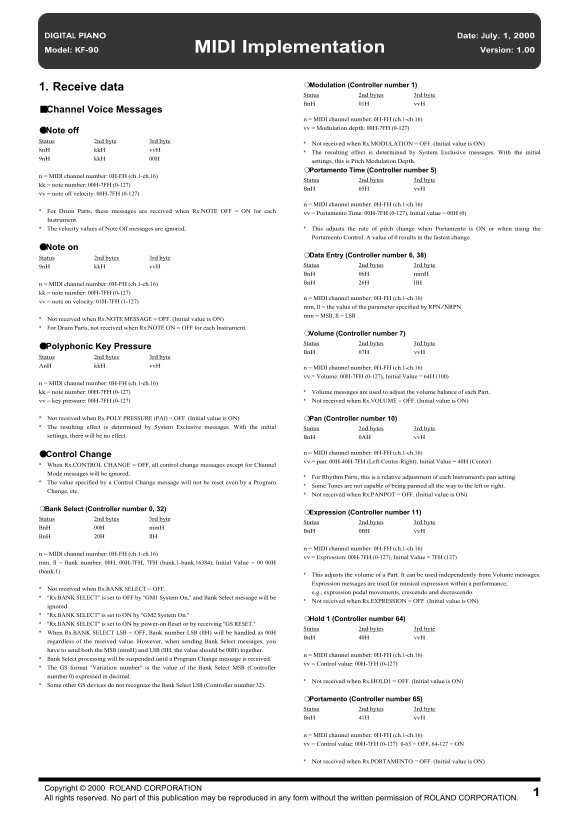
Page 1 Text Content
DIGITAL PIANO Date: July. 1, 2000
Model: KF-90 MIDI Implementation Version: 1.00
❍Modulation (Controller number 1)
1. Receive data
Status 2nd bytes 3rd byte Bn H 01H vv H
■Channel Voice Messages
n = MIDI channel number: 0H-FH (ch.1-ch.16) vv = Modulation depth: 00H-7FH (0-127)
●Note off Status 2nd byte 3rd byte
Not received when Rx.MODULATION = OFF. (Initial value is ON)
8n H kk H vv H
The resulting effect is determined by System Exclusive messages. With the initial
9n H kk H 00H
settings, this is Pitch Modulation Depth. ❍Portamento Time (Controller number 5)
n = MIDI channel number: 0H-FH (ch.1-ch.16)
Status 2nd bytes 3rd byte
kk = note number: 00H-7FH (0-127)
Bn H 05H vv H
vv = note off velocity: 00H-7FH (0-127)
n = MIDI channel number: 0H-FH (ch.1-ch.16)
For Drum Parts, these messages are received when Rx.NOTE OFF = ON for each
vv = Portamento Time: 00H-7FH (0-127), Initial value = 00H (0)
Instrument. The velocity values of Note Off messages are ignored. This adjusts the rate of pitch change when Portamento is ON or when using the
Portamento Control. A value of 0 results in the fastest change.
●Note on
❍Data Entry (Controller number 6, 38)
Status 2nd bytes 3rd byte
9n H kk H vv H Status 2nd bytes 3rd byte Bn H 06H mm H n = MIDI channel number: 0H-FH (ch.1-ch.16) Bn H 26H ll H
kk = note number: 00H-7FH (0-127)
n = MIDI channel number: 0H-FH (ch.1-ch.16)
vv = note on velocity: 01H-7FH (1-127)
mm, ll = the value of the parameter specified by RPN/NRPN mm = MSB, ll = LSB
Not received when Rx.NOTE MESSAGE = OFF. (Initial value is ON) For Drum Parts, not received when Rx.NOTE ON = OFF for each Instrument.
❍Volume (Controller number 7) Status 2nd bytes 3rd byte
●Polyphonic Key Pressure
Bn H 07H vv H
Status 2nd bytes 3rd byte An H kk H vv H
n = MIDI channel number: 0H-FH (ch.1-ch.16) vv = Volume: 00H-7FH (0-127), Initial Value = 64H (100)
n = MIDI channel number: 0H-FH (ch.1-ch.16) kk = note number: 00H-7FH (0-127) Volume messages are used to adjust the volume balance of each Part. vv = key pressure: 00H-7FH (0-127) Not received when Rx.VOLUME = OFF. (Initial value is ON)
Not received when Rx.POLY PRESSURE (PAf) = OFF. (Initial value is ON) ❍Pan (Controller number 10) The resulting effect is determined by System Exclusive messages. With the initial Status 2nd bytes 3rd byte settings, there will be no effect. Bn H 0AH vv H
n = MIDI channel number: 0H-FH (ch.1-ch.16)
●Control Change
vv = pan: 00H-40H-7FH (Left-Center-Right), Initial Value = 40H (Center)
When Rx.CONTROL CHANGE = OFF, all control change messages except for Channel Mode messages will be ignored.
For Rhythm Parts, this is a relative adjustment of each Instrument's pan setting.
The value specified by a Control Change message will not be reset even by a Program
Some Tones are not capable of being panned all the way to the left or right.
Change, etc.
Not received when Rx.PANPOT = OFF. (Initial value is ON)
❍Bank Select (Controller number 0, 32)
❍Expression (Controller number 11)
Status 2nd bytes 3rd byte
Status 2nd bytes 3rd byte
Bn H 00H mm H
Bn H 0BH vv H
Bn H 20H ll H
n = MIDI channel number: 0H-FH (ch.1-ch.16)
n = MIDI channel number: 0H-FH (ch.1-ch.16)
vv = Expression: 00H-7FH (0-127), Initial Value = 7FH (127)
mm, ll = Bank number: 00H, 00H-7FH, 7FH (bank.1-bank.16384), Initial Value = 00 00H (bank.1)
This adjusts the volume of a Part. It can be used independently from Volume messages. Expression messages are used for musical expression within a performance;
Not received when Rx.BANK SELECT = OFF.
e.g., expression pedal movements, crescendo and decrescendo.
"Rx.BANK SELECT" is set to OFF by "GM1 System On," and Bank Select message will be
Not received when Rx.EXPRESSION = OFF. (Initial value is ON)
ignored. "Rx.BANK SELECT" is set to ON by "GM2 System On."
❍Hold 1 (Controller number 64)
"Rx.BANK SELECT" is set to ON by power-on Reset or by receiving "GS RESET."
Status 2nd bytes 3rd byte
When Rx.BANK SELECT LSB = OFF, Bank number LSB (ll H) will be handled as 00H
Bn H 40H vv H
regardless of the received value. However, when sending Bank Select messages, you have to send both the MSB (mm H) and LSB (ll H, the value should be 00H) together.
n = MIDI channel number: 0H-FH (ch.1-ch.16)
Bank Select processing will be suspended until a Program Change message is received.
vv = Control value: 00H-7FH (0-127)
The GS format "Variation number" is the value of the Bank Select MSB (Controller number 0) expressed in decimal.
Not received when Rx.HOLD1 = OFF. (Initial value is ON)
Some other GS devices do not recognize the Bank Select LSB (Controller number 32).
❍Portamento (Controller number 65) Status 2nd bytes 3rd byte Bn H 41H vv H
n = MIDI channel number: 0H-FH (ch.1-ch.16) vv = Control value: 00H-7FH (0-127) 0-63 = OFF, 64-127 = ON
Not received when Rx.PORTAMENTO = OFF. (Initial value is ON)
1Copyright © 2000 ROLAND CORPORATION
All rights reserved. No part of this publication may be reproduced in any form without the written permission of ROLAND CORPORATION.
Page Summary Contents For Roland KF-90 Digital Piano MIDI Implementation User's Guide
Manual Details
| Brand | Roland |
|---|---|
| Pages | 27 |
| File Size | 388.51 KB |
| Published | June 05, 2026 |
Enter the captcha to get the download link:

Frequently Asked Questions
How is Portamento activated or controlled?
Use Controller number 65 (Portamento). A value of 0-63 means OFF, and 64-127 means ON.
Can volume adjustments be made to individual parts?
Yes, Volume messages adjust the volume balance of each Part, independent of Expression messages.
What is the initial setting for the Pan control?
The initial value for the Pan control (Controller number 10) is 40H, which represents Center.
When does the Transpose/Piano key pressure message work?
Volume messages are used to adjust the volume balance using Polyphonic Key Pressure (PAf), but this function requires Rx.VOLUME and Rx.POLY PRESSURE (PAf) to be ON.