Roland FP-3 Digital Piano MIDI Implementation User's Manual
Summary
This comprehensive guide provides expert details on the MIDI communication protocols for the FP-3 digital piano. It covers advanced technical specifications, enabling thorough control over musical performance data. Users—including composers, sound designers, and serious musicians—will learn how to manage everything from complex volume regulation (RPN) and detailed effects levels (Reverb, Chorus) to fine-tuning tonal parameters via standard MIDI messaging. Perfect for integrating the FP-3 into external recording setups, sequencers, or professional music production environments.
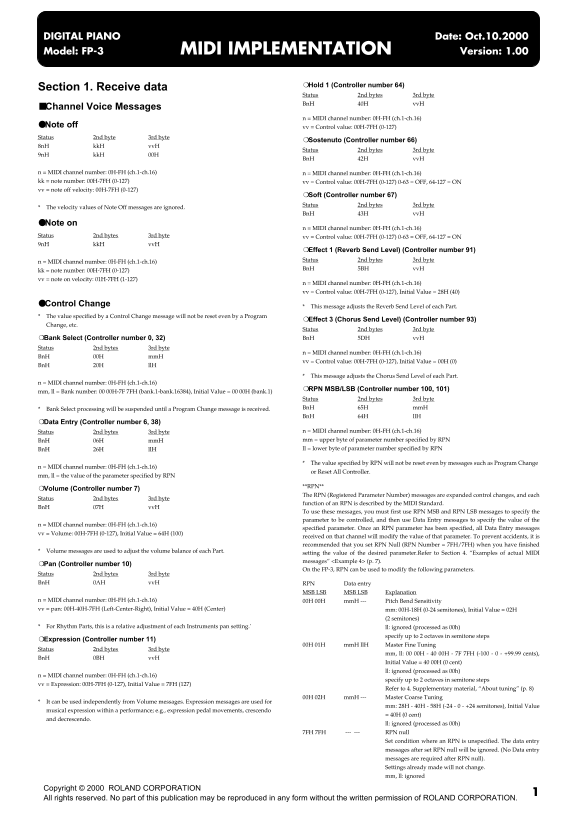
Page 1 Text Content
DIGITAL PIANO Date: Oct.10.2000 Model: FP-3 MIDI IMPLEMENTATION Version: 1.00
Hold 1 (Controller number 64)
Section 1. Receive data
Status 2nd bytes 3rd byte Bn H 40H vv H
Channel Voice Messages
n = MIDI channel number: 0H-FH (ch.1-ch.16)
Note off vv = Control value: 00H-7FH (0-127) Status 2nd byte 3rd byte
Sostenuto (Controller number 66)
8n H kk H vv H
Status 2nd bytes 3rd byte
9n H kk H 00H
Bn H 42H vv H
n = MIDI channel number: 0H-FH (ch.1-ch.16) n = MIDI channel number: 0H-FH (ch.1-ch.16) kk = note number: 00H-7FH (0-127) vv = Control value: 00H-7FH (0-127) 0-63 = OFF, 64-127 = ON vv = note off velocity: 00H-7FH (0-127)
Soft (Controller number 67) Status 2nd bytes 3rd byte
The velocity values of Note Off messages are ignored.
Bn H 43H vv H
Note on
n = MIDI channel number: 0H-FH (ch.1-ch.16)
Status 2nd bytes 3rd byte vv = Control value: 00H-7FH (0-127) 0-63 = OFF, 64-127 = ON 9n H kk H vv H
Effect 1 (Reverb Send Level) (Controller number 91) Status 2nd bytes 3rd byte
n = MIDI channel number: 0H-FH (ch.1-ch.16)
Bn H 5BH vv H
kk = note number: 00H-7FH (0-127) vv = note on velocity: 01H-7FH (1-127)
n = MIDI channel number: 0H-FH (ch.1-ch.16) vv = Control value: 00H-7FH (0-127), Initial Value = 28H (40)
Control Change
This message adjusts the Reverb Send Level of each Part.
The value specified by a Control Change message will not be reset even by a Program
Effect 3 (Chorus Send Level) (Controller number 93)
Change, etc.
Status 2nd bytes 3rd byte
Bank Select (Controller number 0, 32) Bn H 5DH vv H
Status 2nd bytes 3rd byte
n = MIDI channel number: 0H-FH (ch.1-ch.16)
Bn H 00H mm H
vv = Control value: 00H-7FH (0-127), Initial Value = 00H (0)
Bn H 20H ll H
This message adjusts the Chorus Send Level of each Part.
n = MIDI channel number: 0H-FH (ch.1-ch.16)
RPN MSB/LSB (Controller number 100, 101)
mm, ll = Bank number: 00 00H-7F 7FH (bank.1-bank.16384), Initial Value = 00 00H (bank.1)
Status 2nd bytes 3rd byte Bank Select processing will be suspended until a Program Change message is received. Bn H 65H mm H Bn H 64H ll H
Data Entry (Controller number 6, 38)
Status 2nd bytes 3rd byte n = MIDI channel number: 0H-FH (ch.1-ch.16) Bn H 06H mm H mm = upper byte of parameter number specified by RPN Bn H 26H ll H ll = lower byte of parameter number specified by RPN
The value specified by RPN will not be reset even by messages such as Program Change
n = MIDI channel number: 0H-FH (ch.1-ch.16)
or Reset All Controller.
mm, ll = the value of the parameter specified by RPN
**RPN**
Volume (Controller number 7)
The RPN (Registered Parameter Number) messages are expanded control changes, and each
Status 2nd bytes 3rd byte
function of an RPN is described by the MIDI Standard.
Bn H 07H vv H
To use these messages, you must first use RPN MSB and RPN LSB messages to specify the parameter to be controlled, and then use Data Entry messages to specify the value of the
n = MIDI channel number: 0H-FH (ch.1-ch.16)
specified parameter. Once an RPN parameter has been specified, all Data Entry messages
vv = Volume: 00H-7FH (0-127), Initial Value = 64H (100)
received on that channel will modify the value of that parameter. To prevent accidents, it is recommended that you set RPN Null (RPN Number = 7FH/7FH) when you have finished
Volume messages are used to adjust the volume balance of each Part.
setting the value of the desired parameter.Refer to Section 4. “Examples of actual MIDI messages” <Example 4> (p. 7).
Pan (Controller number 10)
On the FP-3, RPN can be used to modify the following parameters.
Status 2nd bytes 3rd byte Bn H 0AH vv H RPN Data entry
MSB LSB MSB LSB Explanation
n = MIDI channel number: 0H-FH (ch.1-ch.16) 00H 00H mm H --- Pitch Bend Sensitivity vv = pan: 00H-40H-7FH (Left-Center-Right), Initial Value = 40H (Center) mm: 00H-18H (0-24 semitones), Initial Value = 02H
(2 semitones)
For Rhythm Parts, this is a relative adjustment of each Instruments pan setting.' ll: ignored (processed as 00h)
specify up to 2 octaves in semitone steps
Expression (Controller number 11)
00H 01H mm H ll H Master Fine Tuning
Status 2nd bytes 3rd byte
mm, ll: 00 00H - 40 00H - 7F 7FH (-100 - 0 - +99.99 cents),
Bn H 0BH vv H
Initial Value = 40 00H (0 cent) ll: ignored (processed as 00h)
n = MIDI channel number: 0H-FH (ch.1-ch.16)
specify up to 2 octaves in semitone steps
vv = Expression: 00H-7FH (0-127), Initial Value = 7FH (127)
Refer to 4. Supplementary material, “About tuning” (p. 8)
00H 02H mm H --- Master Coarse Tuning
It can be used independently from Volume messages. Expression messages are used for
mm: 28H - 40H - 58H (-24 - 0 - +24 semitones), Initial Value
musical expression within a performance; e.g., expression pedal movements, crescendo
= 40H (0 cent)
and decrescendo.
ll: ignored (processed as 00h)
7FH 7FH --- --- RPN null
Set condition where an RPN is unspecified. The data entry messages after set RPN null will be ignored. (No Data entry messages are required after RPN null). Settings already made will not change. mm, ll: ignored
Copyright © 2000 ROLAND CORPORATION All rights reserved. No part of this publication may be reproduced in any form without the written permission of ROLAND CORPORATION.
Page Summary Contents For Roland FP-3 Digital Piano MIDI Implementation User's Manual
Manual Details
| Brand | Roland |
|---|---|
| Pages | 9 |
| File Size | 86.66 KB |
| Published | June 01, 2026 |
Enter the captcha to get the download link:

Frequently Asked Questions
How do I adjust the Reverb Send Level?
Use status 2nd bytes 3rd byte BnH 43H vvH to adjust the Reverb Send Level of each Part.
How can I reset specific controls or parameters?
To prevent accidental changes after adjusting settings, set RPN Null (RPN Number = 7FH/7FH).
What message controls the overall volume balance of each Part?
Volume is adjusted using RPN messages by sending status 2nd bytes and 3rd byte BnH 07H vvH.