# A B C D E F G H I J K L M N O P Q R S T U V W X Y Z

Roland FP-4 Digital Piano MIDI Implementation User's Manual

Summary

Achieve comprehensive electronic sound control through detailed documentation of advanced MIDI implementation. This manual serves as a technical guide for professional musicians and sound engineers, outlining how vital musical parameters—such as Portamento Time, Volume/Key Pressure, Expression, Pan, and Pitch Modulation Depth—function using industry-standard MIDI protocols. It ensures seamless integration with external studio hardware, giving users granular command over complex effects like Chorus and Flanger within demanding performance setups.
📄 Preview 📖 Table of Contents Contents PAGE OF 33

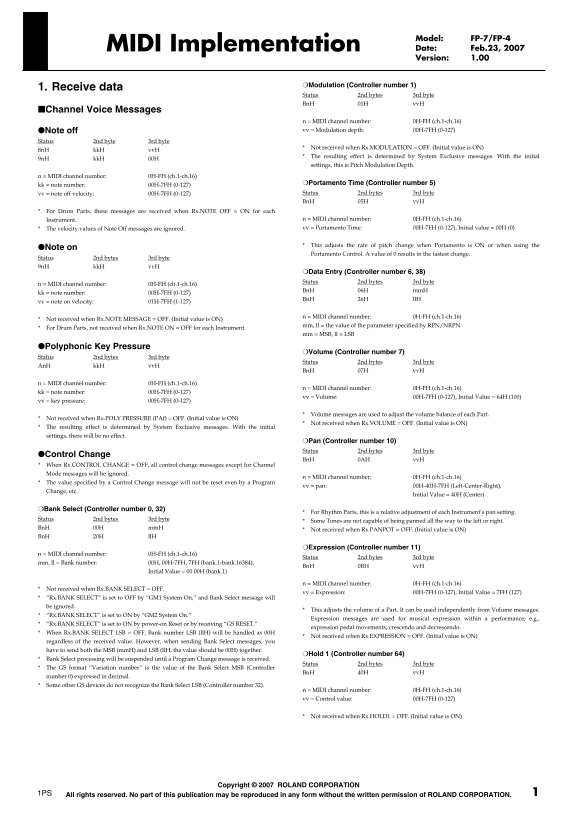
Page 1 Text Content

Model: FP-7/FP-4 MIDI Implementation Date: Feb.23, 2007 Version: 1.00

❍Modulation (Controller number 1)

1. Receive data

Status 2nd bytes 3rd byte Bn H 01H vv H

■Channel Voice Messages

n = MIDI channel number: 0H-FH (ch.1-ch.16) ●Note off vv = Modulation depth: 00H-7FH (0-127)

Status 2nd byte 3rd byte

Not received when Rx.MODULATION = OFF. (Initial value is ON)

8n H kk H vv H

The resulting effect is determined by System Exclusive messages. With the initial

9n H kk H 00H

settings, this is Pitch Modulation Depth.

n = MIDI channel number: 0H-FH (ch.1-ch.16)

kk = note number: 00H-7FH (0-127) ❍Portamento Time (Controller number 5) vv = note off velocity: 00H-7FH (0-127) Status 2nd bytes 3rd byte Bn H 05H vv H

For Drum Parts, these messages are received when Rx.NOTE OFF = ON for each

Instrument. n = MIDI channel number: 0H-FH (ch.1-ch.16) The velocity values of Note Off messages are ignored. vv = Portamento Time: 00H-7FH (0-127), Initial value = 00H (0)

This adjusts the rate of pitch change when Portamento is ON or when using the

●Note on

Portamento Control. A value of 0 results in the fastest change.

Status 2nd bytes 3rd byte 9n H kk H vv H

❍Data Entry (Controller number 6, 38) Status 2nd bytes 3rd byte

n = MIDI channel number: 0H-FH (ch.1-ch.16)

Bn H 06H mm H

kk = note number: 00H-7FH (0-127)

Bn H 26H ll H

vv = note on velocity: 01H-7FH (1-127)

n = MIDI channel number: 0H-FH (ch.1-ch.16)

Not received when Rx.NOTE MESSAGE = OFF. (Initial value is ON)

mm, ll = the value of the parameter specified by RPN/NRPN

For Drum Parts, not received when Rx.NOTE ON = OFF for each Instrument.

mm = MSB, ll = LSB

●Polyphonic Key Pressure

❍Volume (Controller number 7)

Status 2nd bytes 3rd byte

Status 2nd bytes 3rd byte

An H kk H vv H

Bn H 07H vv H

n = MIDI channel number: 0H-FH (ch.1-ch.16)

n = MIDI channel number: 0H-FH (ch.1-ch.16)

kk = note number: 00H-7FH (0-127)

vv = Volume: 00H-7FH (0-127), Initial Value = 64H (100)

vv = key pressure: 00H-7FH (0-127)

Volume messages are used to adjust the volume balance of each Part.

Not received when Rx.POLY PRESSURE (PAf) = OFF. (Initial value is ON)

Not received when Rx.VOLUME = OFF. (Initial value is ON)

The resulting effect is determined by System Exclusive messages. With the initial settings, there will be no effect.

❍Pan (Controller number 10) Status 2nd bytes 3rd byte

●Control Change

Bn H 0AH vv H

When Rx.CONTROL CHANGE = OFF, all control change messages except for Channel Mode messages will be ignored.

n = MIDI channel number: 0H-FH (ch.1-ch.16)

The value specified by a Control Change message will not be reset even by a Program

vv = pan: 00H-40H-7FH (Left-Center-Right),

Change, etc.

Initial Value = 40H (Center)

❍Bank Select (Controller number 0, 32)

For Rhythm Parts, this is a relative adjustment of each Instrument’s pan setting.

Status 2nd bytes 3rd byte

Some Tones are not capable of being panned all the way to the left or right.

Bn H 00H mm H

Not received when Rx.PANPOT = OFF. (Initial value is ON)

Bn H 20H ll H

❍Expression (Controller number 11)

n = MIDI channel number: 0H-FH (ch.1-ch.16)

Status 2nd bytes 3rd byte

mm, ll = Bank number: 00H, 00H-7FH, 7FH (bank.1-bank.16384),

Bn H 0BH vv H

Initial Value = 00 00H (bank.1)

n = MIDI channel number: 0H-FH (ch.1-ch.16)

Not received when Rx.BANK SELECT = OFF.

vv = Expression: 00H-7FH (0-127), Initial Value = 7FH (127)

“Rx.BANK SELECT” is set to OFF by “GM1 System On,” and Bank Select message will be ignored.

This adjusts the volume of a Part. It can be used independently from Volume messages.

“Rx.BANK SELECT” is set to ON by “GM2 System On.”

Expression messages are used for musical expression within a performance; e.g.,

“Rx.BANK SELECT” is set to ON by power-on Reset or by receiving “GS RESET.”

expression pedal movements, crescendo and decrescendo.

When Rx.BANK SELECT LSB = OFF, Bank number LSB (ll H) will be handled as 00H

Not received when Rx.EXPRESSION = OFF. (Initial value is ON)

regardless of the received value. However, when sending Bank Select messages, you have to send both the MSB (mm H) and LSB (ll H, the value should be 00H) together.

❍Hold 1 (Controller number 64)

Bank Select processing will be suspended until a Program Change message is received.

Status 2nd bytes 3rd byte

The GS format “Variation number” is the value of the Bank Select MSB (Controller

Bn H 40H vv H

number 0) expressed in decimal. Some other GS devices do not recognize the Bank Select LSB (Controller number 32).

n = MIDI channel number: 0H-FH (ch.1-ch.16) vv = Control value: 00H-7FH (0-127)

Not received when Rx.HOLD1 = OFF. (Initial value is ON)

Copyright © 2007 ROLAND CORPORATION

1PS All rights reserved. No part of this publication may be reproduced in any form without the written permission of ROLAND CORPORATION.

Page Summary Contents For Roland FP-4 Digital Piano MIDI Implementation User's Manual

Page 1 Model: FP-7/FP-4 MIDI Implementation Date: Feb.23, 2007 Version: 1.00 ❍Modulation (Controller number 1) 1. Receive data Status 2nd bytes 3rd byte Bn H 01H vv H ■Channel Voice Messages n = MIDI channel...
Page 2 MIDI Implementation ❍Portamento (Controller number 65) Status 2nd bytes 3rd byte ❍Vibrato Rate (Controller number 76) Bn H 41H vv H Status 2nd byte 3rd byte Bn H 4CH vv H n = MIDI channel number: 0H-F...
Page 3 MIDI Implementation ❍NRPN MSB/LSB (Controller number 98, 99) ❍RPN MSB/LSB (Controller number 100, 101) Status 2nd bytes 3rd byte Status 2nd bytes 3rd byte Bn H 63H mm H Bn H 65H mm H Bn H 62H ll H Bn ...
Page 4 MIDI Implementation ●Pitch Bend Change ●MONO (Controller number 126) Status 2nd byte 3rd bytes Status 2nd byte 3rd bytes En H ll H mm H Bn H 7EH mm H n = MIDI channel number: 0H-FH (ch.1-ch.16) n = MI...
Page 5 MIDI Implementation ❍GM2 System On The lower byte (ll H) of Master Volume will be handled as 00H. This is a command message that resets the internal settings of the unit to the General MIDI initial st...
Page 6 MIDI Implementation ❍Chorus Parameters ❍Controller Status Data byte Status Status Data byte Status F0H 7FH, 7FH, 04H, 05H, 01H, 01H, 01H, 01H, 02H, pp H, vv H F7H F0H 7FH, 7FH, 09H, 03H, 0n H, cc H, p...
Page 7 MIDI Implementation 2. Transmit data ●Universal Non-realtime System Exclusive Messages Arranger data can not be transmitted. ❍Identity Request Message Status Data byte Status ■Channel Voice Messages F...
Page 8 MIDI Implementation ❍Effect 3 (Chorus Send Level) (Controller number 93) 3. Parameter Address Map (Model ID = Status 2nd bytes 3rd byte Bn H 5DH vv H 42H) This map indicates address, size, Data (range...
Page 9 MIDI Implementation ■Individual Parameters Individual Parameter Transmission transmits data (or requests data) for one parameter as one exclusive message (one packet of “F0 ..... F7”). In Individual P...
Page 10 MIDI Implementation 40 03 00 00 00 02 00 - 7F EFX TYPE (MSB, LSB) 00 00 - 7F 7F 00 01 Thru Refer to EFX Type Table This EFX Type is current EFX type of this system. When part EFX type is same to this ...
Page 11 MIDI Implementation ●Part Parameters This instrument has 16 parts. Parameters that can be set individually for each Part are called Part parameters. If you use exclusive messages to set Part parameter...
Page 12 MIDI Implementation 40 1x 24 00 00 01 00-01 Rx.BANK SELECT LSB OFF/ON OFF This instrument can be recognise Bank Select LSB (40H-43H) even if this message is OFF. 40 1x 25 00 00 01 00-01 TONE REMAIN OF...
Page 13 MIDI Implementation 40 2x 34 00 00 01 00-7F PAf LFO1 PITCH DEPTH 0-600 [cent] 0 [cent] 40 2x 35 00 00 01 00-7F PAf LFO1 TVF DEPTH 0-2400 [cent] 0 [cent] 40 2x 36 00 00 01 00-7F PAf LFO1 TVA DEPTH 0-10...
Page 14 MIDI Implementation ●Bulk Dump Parameters [FP-4] 4. Supplementary material Setup These messages are transmitted when Bulk Dump SETUP function is executed. ●Decimal and Hexadecimal table In MIDI docume...
Page 15 MIDI Implementation ●Examples of actual MIDI messages ●Example of an Exclusive message and calculating a <Example1> 92 3E 5F Checksum 9n is the Note-on status, and n is the MIDI channel number. ...
Page 16 MIDI Implementation ●The Scale Tune Feature (address: 40 1x 40) 5. EFX Type Table The scale Tune feature allows you to finely adjust the individual pitch of the notes from C through B. Though the sett...
Page 17 MIDI Implementation ■EFX Parameter Map ●0104: Isolator The parameters with ”#1” or “#2” at the end of parameter name can be controlled with each This is an equalizer which cuts the volume greatly, all...
Page 18 MIDI Implementation ●0106: High Pass Filter ●0112: Overdrive2 This is a filter with an extremely sharp slope. The cutoff frequency can be varied cyclically. This is an overdrive that provides heavy di...
Page 19 MIDI Implementation ●0114: Guitar Amp Simulator ●0120: Phaser This is an effect that simulates the sound of a guitar amplifier. This is a stereo phaser. A phase-shifted sound is added to the original ...
Page 20 MIDI Implementation ●012a: Infinite Phaser No Parameter Value Description A phaser that continues raising/lowering the frequency at which the sound is modulated. Feedback 0 - 98 -98- +98 % Adjusts the...
Page 21 MIDI Implementation ●0121: Auto Wah ●012b: Ring Modulator Cyclically controls a filter to create cyclic change in timbre. This is an effect that applies amplitude modulation (AM) to the input signal, ...
Page 22 MIDI Implementation ●012c: Slicer ●0142: Stereo Chorus By applying successive cuts to the sound, this effect turns a conventional sound into a This is a stereo chorus. A filter is provided so that you...
Page 23 MIDI Implementation ●0141: Tremolo Chorus ●0144: 3D Chorus This is a chorus effect with added Tremolo (cyclic modulation of volume). This applies a 3D effect to the chorus sound. The chorus sound will...
Page 24 MIDI Implementation ●0122: Rotary ●0300: Rotary Multi The Rotary effect simulates the sound of the rotary speakers often used with the electric This is an effect combining the VK series internal effec...
Page 25 MIDI Implementation ●015c: Stereo Delay2 ●015e: Stereo Delay4 This is a stereo delay. This is a stereo delay. No Parameter Value Description No Parameter Value Description Delay Left 0 - 1 ms, note Wh...
Page 26 MIDI Implementation ●0150: Monaural Delay ●0152: Triple Tap Delay A delay that provides a long delay time. Produces three delay sounds; center, left and right. No Parameter Value Description No Parame...
Page 27 MIDI Implementation ●0159: Tape Echo ●0172: Lo-Fi A virtual tape echo that produces a realistic tape delay sound. This simulates the tape echo This is an effect that intentionally degrades the sound q...
Page 28 MIDI Implementation ●0200: Overdrive→Chorus ●0203: Distortion→Chorus This effect connects an overdrive and a chorus in series. The parameters are essentially the same as in “Overdrive→Chorus,” with th...
Page 29 MIDI Implementation ●0208: Enhancer→Delay ●020a: Flanger→Delay This effect connects an enhancer and a delay in series. This effect connects a flanger and a delay in series. No Parameter Value Descript...
Page 30 MIDI Implementation ●0040: Damper Resonance On an acoustic piano, holding down the damper pedal allows other strings to resonate in sympathy with the notes you play, creating rich and spacious resonan...
Page 31 MIDI Implementation 6. Tone List (FP-7, FP-4) Num Name MSB LSB PC Guitar/Bass Num Name MSB LSB PC Nylon-str.Gt Piano Steel-str.Gt Grand Piano1 Clean Guitar Piano + Str. Jazz Guitar 0 Grand Piano2 Over...
Page 32 MIDI Implementation Num Name MSB LSB PC Num Name MSB LSB PC Glockenspiel Hammer 121 Music Box 121 Synth Bass 2 Vibraphone 121 Synth Bass 4 Vibraphone w Rubber Syn.Bs Marimba 121 Attack Pulse Marimba w...
Page 33 MIDI Implementation Num Name MSB LSB PC Num Name MSB LSB PC Bottle Blow 121 Reverse Cym. Shakuhachi 121 Gt Fret Noise Whistle 121 Gt Cut Noise Ocarina 121 Bs String Slap Square Lead1 Breath Noise Squa...

Manual Details

Brand Roland
Pages 33
File Size 841.31 KB
Published June 04, 2026
68 views

Enter the captcha to get the download link:

captcha

Frequently Asked Questions

Does the Expression control affect overall volume settings?

Yes, it independently adjusts a Part's volume and can be utilized separate from standard Volume messages.

What are the limitations of the Pan control functionality?

While the value range for pan is 00H-40H-7FH (Left to Right), some tones may not be fully capable of panning all the way left or right.

Under what conditions might MIDI signals fail to register correctly?

Certain messages, like Note Off Velocity or Modulation depth, are explicitly stated as 'Not received' if their corresponding reception modes are set to OFF.