Roland FP-10 Digital Piano DP603 FP-10 GP607 HP MIDI Implementation User Manual
Summary
Master this advanced MIDI implementation guide designed for professional electronic musicians and sound engineers. This detailed manual covers the comprehensive protocol specifications for various Roland controllers (including LX-17, HP605, etc.). It provides technical documentation on standard MIDI messages—such as Bank Select, Modulation Depth, Volume, Expression, Resonance, and Cutoff Time—allowing users to understand how every physical control maps to its required CC message. Ideal for advanced setup, patch sequencing, or system integration requiring granular control over sound parameters.
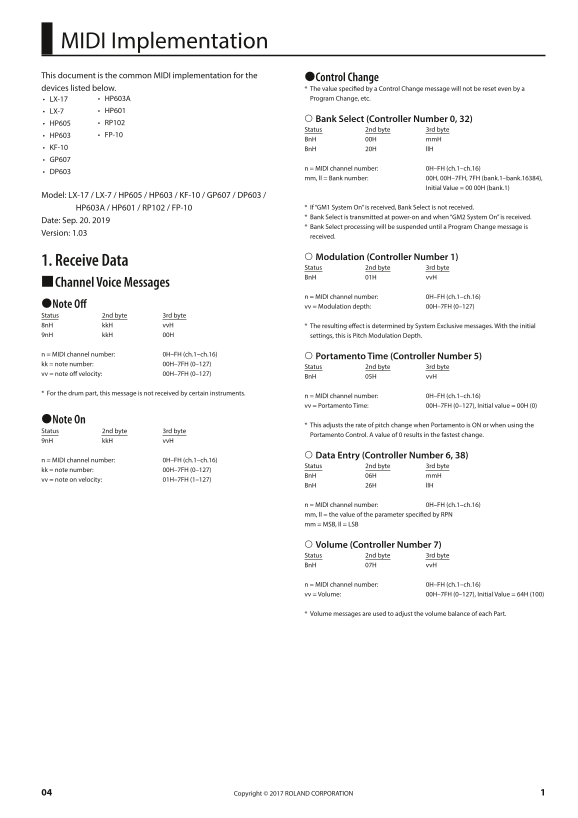
Page 1 Text Content
MIDI Implementation This document is the common MIDI implementation for the 7Control Change devices listed below. * The value specified by a Control Change message will not be reset even by a
• LX-17 • HP603A Program Change, etc.
• LX-7 • HP601
Bank Select (Controller Number 0, 32)
• HP605 • RP102
Status 2nd byte 3rd byte
• HP603 • FP-10
Bn H 00H mm H
• KF-10 Bn H 20H ll H • GP607
n = MIDI channel number: 0H–FH (ch.1–ch.16)
• DP603
mm, ll = Bank number: 00H, 00H–7FH, 7FH (bank.1–bank.16384), Initial Value = 00 00H (bank.1)
Model: LX-17 / LX-7 / HP605 / HP603 / KF-10 / GP607 / DP603 /
HP603A / HP601 / RP102 / FP-10 * If “GM1 System On” is received, Bank Select is not received. * Bank Select is transmitted at power-on and when “GM2 System On” is received.
Date: Sep. 20. 2019
* Bank Select processing will be suspended until a Program Change message is
Version: 1.03
received.
Modulation (Controller Number 1)
1. Receive Data
Status 2nd byte 3rd byte Bn H 01H vv H
9Channel Voice Messages
n = MIDI channel number: 0H–FH (ch.1–ch.16)
7Note Off vv = Modulation depth: 00H–7FH (0–127) Status 2nd byte 3rd byte 8n H kk H vv H * The resulting effect is determined by System Exclusive messages. With the initial 9n H kk H 00H settings, this is Pitch Modulation Depth.
n = MIDI channel number: 0H–FH (ch.1–ch.16)
Portamento Time (Controller Number 5)
kk = note number: 00H–7FH (0–127)
Status 2nd byte 3rd byte
vv = note off velocity: 00H–7FH (0–127)
Bn H 05H vv H
* For the drum part, this message is not received by certain instruments.
n = MIDI channel number: 0H–FH (ch.1–ch.16) vv = Portamento Time: 00H–7FH (0–127), Initial value = 00H (0)
7Note On
* This adjusts the rate of pitch change when Portamento is ON or when using the
Status 2nd byte 3rd byte
Portamento Control. A value of 0 results in the fastest change.
9n H kk H vv H
Data Entry (Controller Number 6, 38)
n = MIDI channel number: 0H–FH (ch.1–ch.16)
Status 2nd byte 3rd byte
kk = note number: 00H–7FH (0–127)
Bn H 06H mm H
vv = note on velocity: 01H–7FH (1–127)
Bn H 26H ll H
n = MIDI channel number: 0H–FH (ch.1–ch.16) mm, ll = the value of the parameter specified by RPN mm = MSB, ll = LSB
Volume (Controller Number 7) Status 2nd byte 3rd byte Bn H 07H vv H
n = MIDI channel number: 0H–FH (ch.1–ch.16) vv = Volume: 00H–7FH (0–127), Initial Value = 64H (100)
* Volume messages are used to adjust the volume balance of each Part.
Copyright © 2017 ROLAND CORPORATION04
Page Summary Contents For Roland FP-10 Digital Piano DP603 FP-10 GP607 HP MIDI Implementation User Manual
Manual Details
| Brand | Roland |
|---|---|
| Pages | 20 |
| File Size | 120.99 KB |
| Published | June 04, 2026 |
Enter the captcha to get the download link:

Frequently Asked Questions
What are the available MIDI controllers?
The manuals detail controls for Bank Select (Controller 0, 32), Modulation Depth (1), Portamento Time (5), Data Entry (6, 38), Volume (7), Pan (10), Expression (11), Hold (64), Portamento (65), Cutoff (74), Decay Time (75), Resonance (71), Release Time (72), Attack Time (73), and Sostenuto (66).
How can I adjust the volume balance of individual parts?
Use Volume messages (Controller 7 status BnH 07H vvH) to adjust the volume balance of each Part, with an initial value of 64H (100).
Is there a specific setting for achieving continuous pitch changes?
To manage pitch change when Portamento is active or using Portamento Control, you can use Note On messages (9nH kkH vvH) to set the Pitch Modulation Depth. A value of 0 yields the fastest change.