Rockwell Automation Quick Ref Integrated 1329I AC Drive Motor SerA User's Manual
Summary
Control and operate your industrial machinery with confidence using this comprehensive manual for advanced motor drives. Learn how to set optimal operating speeds, manage local operator controls, and understand complex electrical integration details. This guide provides detailed walkthroughs on fault code diagnosis, system troubleshooting, wiring standards, and safe startup procedures. Essential reading for maintenance technicians and engineers responsible for the installation and reliable upkeep of variable speed drive systems.
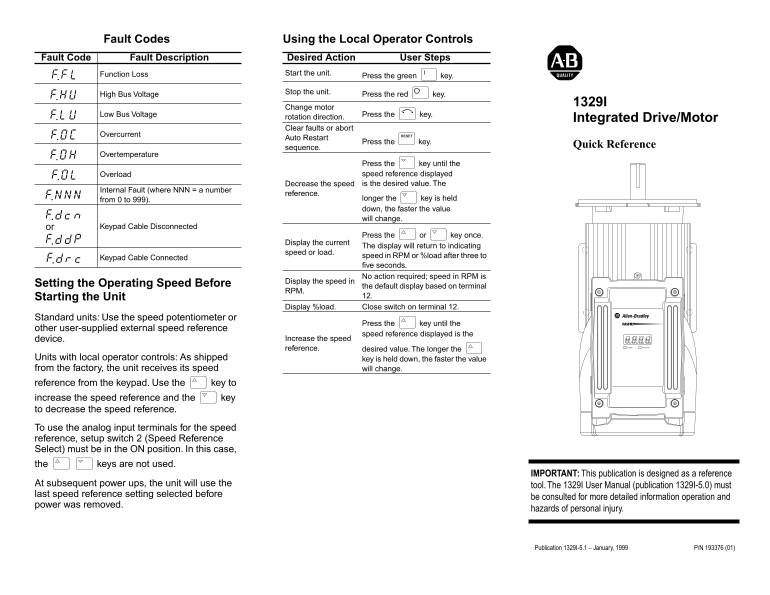
Page 1 Text Content
Fault Codes Using the Local Operator Controls
Fault Code Fault Description Desired Action User Steps
Function Loss Start the unit.
Press the green key.
Stop the unit.
High Bus Voltage Press the red key.
Change motor
Low Bus Voltage Press the key.
rotation direction. Integrated Drive/Motor Clear faults or abort
Overcurrent RESET
Auto Restart
Press the key.
Quick Reference
sequence.
Overtemperature
Press the key until the Overload speed reference displayed Decrease the speed is the desired value. The
Internal Fault (where NNN = a number
reference.
from 0 to 999). longer the key is held down, the faster the value will change.
or Keypad Cable Disconnected
Press the or key once.
Display the current
The display will return to indicating
speed or load.
speed in RPM or %load after three to
Keypad Cable Connected
five seconds. No action required; speed in RPM is
Display the speed in
Setting the Operating Speed Before the default display based on terminal
Starting the Unit 12.
Display %load. Close switch on terminal 12.
Standard units: Use the speed potentiometer or
Press the key until the
other user-supplied external speed reference
speed reference displayed is the
device. Increase the speed reference. desired value. The longer the
Units with local operator controls: As shipped key is held down, the faster the value from the factory, the unit receives its speed will change. reference from the keypad. Use the key to increase the speed reference and the key to decrease the speed reference. To use the analog input terminals for the speed reference, setup switch 2 (Speed Reference Select) must be in the ON position. In this case, the keys are not used.
IMPORTANT: This publication is designed as a reference
At subsequent power ups, the unit will use the
tool. The 1329I User Manual (publication 1329I-5.0) must
last speed reference setting selected before
be consulted for more detailed information operation and
power was removed.
hazards of personal injury.
Publication 1329I-5.1 – January, 1999 P/N 193376 (01)
Page Summary Contents For Rockwell Automation Quick Ref Integrated 1329I AC Drive Motor SerA User's Manual
Manual Details
| Brand | Rockwell Automation |
|---|---|
| Pages | 2 |
| File Size | 79.57 KB |
| Published | June 04, 2026 |
Enter the captcha to get the download link:

Frequently Asked Questions
How do I reset the unit after a fault?
To clear faults or abort, press the red key and follow the required steps.
What is the maximum safe speed setting?
The manual lists speeds up to 3600 RPM (120 Hz) depending on the frequency selection.
How can I change the unit's operating speed reference?
Use a potentiometer or press the green/keypad keys for local adjustment; external sources use 0–10V DC or 4–20 mA signals.
What safety precautions are needed when servicing the components?
Always remove power, wait five minutes to discharge capacitors, and verify cover screws are tight before working on the unit.