PHILIPS Radio User Guide
Summary
Experience full audio versatility with this multi-format stereo system. This comprehensive manual provides detailed instructions for utilizing all integrated features, including CD playback, cassette recording, advanced radio tuning, and volume adjustments. It guides users through proper setup, whether using mains power or optional batteries, and offers expert troubleshooting tips to ensure optimal performance across every mode. Ideal for audiophiles and general consumers seeking clear and consistent operation of their stereo equipment, helping you maximize sound quality with ease.
Page 1 Text Content
AZ1055/00 eng 18/12/00 8:28 Page 4
AZ 1055 /00 page
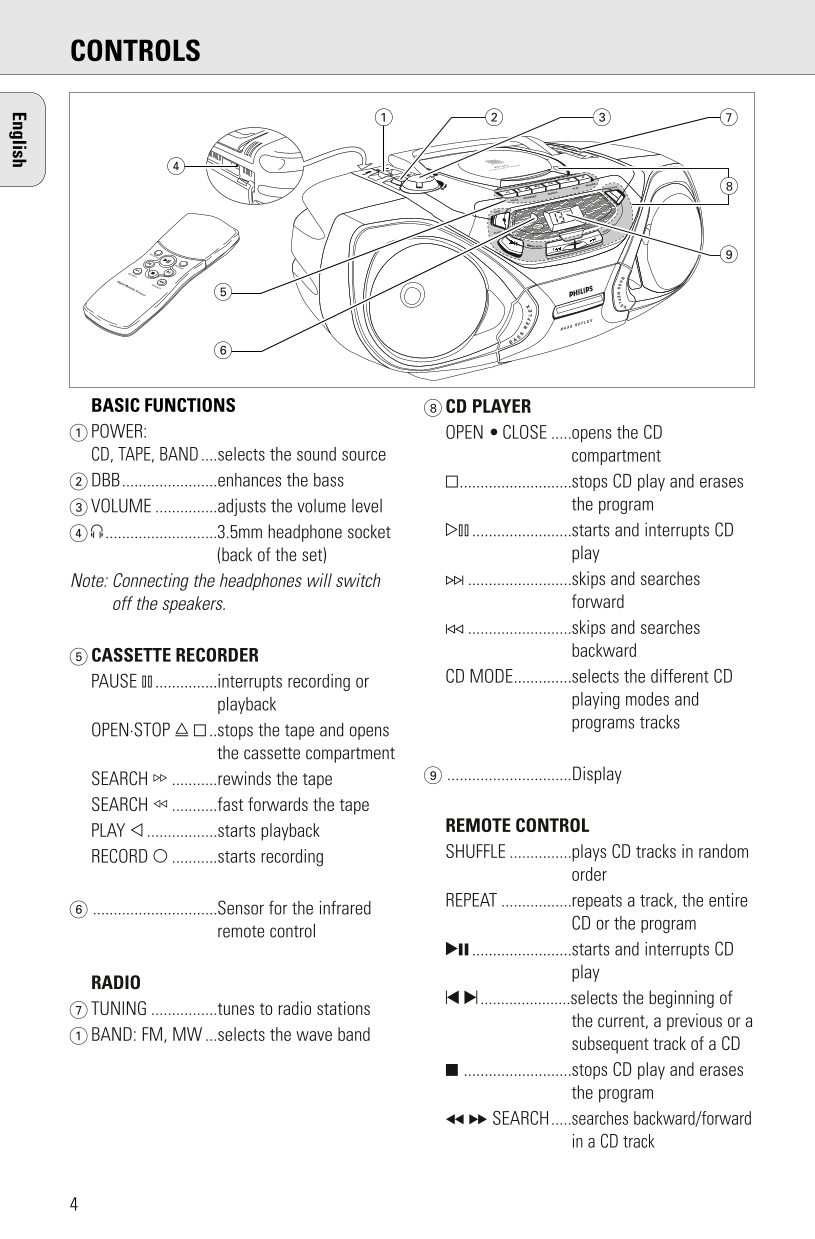
CONTROLS
COMPACT DIGITAL AUDIO
VOLU PLAY RECORD CD MODE
SEARCH
PAUSE OPEN¥STOP
STOP PROGRAM
REMOTE SENSOR
PLAY¥ SE ARCH¥¥¥
PAUSE
¥¥¥SEA RCH
SHUFFLE
REPEAT
SEARCH
SEARCH
BASIC FUNCTIONS 8CD PLAYER POWER: OPEN • CLOSE .....opens the CD CD, TAPE, BAND....selects the sound source compartment 2DBB.......................enhances the bass 9...........................stops CD play and erases
3VOLUME ...............adjusts the volume level the program
4p ...........................3.5mm headphone socket 2; ........................starts and interrupts CD
(back of the set) play
Note: Connecting the headphones will switch .........................skips and searches
off the speakers. forward
.........................skips and searches
backward
5CASSETTE RECORDER
CD MODE..............selects the different CD
PAUSE ; ...............interrupts recording or
playing modes and
playback
programs tracks
OPEN·STOP / ..stops the tape and opens
the cassette compartment
..............................Display
SEARCH 6 ...........rewinds the tape English SEARCH 5 ...........fast forwards the tape
REMOTE CONTROL
PLAY 1 .................starts playback
SHUFFLE ...............plays CD tracks in random
RECORD 0 ...........starts recording
order
REPEAT .................repeats a track, the entire
..............................Sensor for the infrared
CD or the program
remote control
2; ........................starts and interrupts CD
RADIO
......................selects the beginning of
TUNING ................tunes to radio stations
the current, a previous or a
1BAND: FM, MW ...selects the wave band
subsequent track of a CD
..........................stops CD play and erases
the program
SEARCH.....searches backward/forward
in a CD track
Page Summary Contents For PHILIPS Radio User Guide
Manual Details
| Brand | Philips |
|---|---|
| Pages | 20 |
| File Size | 2.23 MB |
| Published | July 16, 2026 |
Enter the captcha to get the download link:

Frequently Asked Questions
What do I do if my local mains voltage is different from what is shown on the unit?
Check your type plate for the correct voltage and, if equipped with a VOLTAGE selector, set it to match your local source before connecting the main cable.
Why is there no sound coming from the system?
You should check that the volume is properly adjusted. If you have headphones connected, unplug them. Also verify all batteries are properly installed and charged.
How can I improve weak FM radio reception?
Pull out the telescopic antenna and adjust its angle (incline or turn it) to optimize the signal strength for better reception.
Which function plays CD tracks in a random sequence?
Use the SHUFFLE function; this allows you to play all recorded CD tracks in a randomized listening order.