# A B C D E F G H I J K L M N O P Q R S T U V W X Y Z

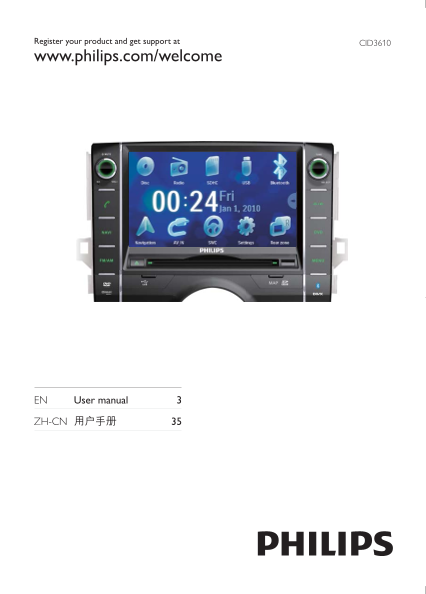
Philips CID3610 User Guide

Summary

Explore a comprehensive multimedia experience with this advanced audio and connectivity hub. This manual is designed to guide new and existing users through every feature, ensuring you can maximize your entertainment potential. It provides detailed instructions on utilizing robust sources, including Bluetooth 4.0, USB drives, SD/SDHC cards, FM radio, and various input options like CD and RCA jacks. Ideal for home theater enthusiasts or travelers seeking a versatile system capable of streaming, recording, and playing diverse media formats with ease.
📄 Preview PAGE OF 34

Page 1 Text Content

CID3610Register your product and get support at

www.philips.com/welcome

EN User manual 3

ZH-CN

Page Summary Contents For Philips CID3610 User Guide

Page 1 CID3610Register your product and get support at www.philips.com/welcome EN User manual 3 ZH-CN
Page 2 CN 35ZH
Page 3 Philips ZH CN
Page 4 Div X Div X Div X Inc Div X® Div X® Div X® Div X® Bluetooth SIG Inc Philips Dolby Koninklijke Philips Electronics Koninklijke Philips Electronics Philips ZH CN
Page 5 Philips Philips www philips com welcome • JPEG • DVD VCD CD • USB • SD SDHC MMC • FM AM MW MZ TFT ZH CN
Page 6 SELECTMICl TUNE SELECT FM AM • FM AM NAVI • GPS DVD • DVD m /MUTE/VOL+ SD SDHC MMC • MAP • GPS USB • USB ZH CN
Page 7 Philips ZH CN
Page 8 CN 41ZH
Page 9 OFF ON ZH CN
Page 10 12Hr 24Hr ZH CN
Page 11 ZH CN
Page 12 FM AM • FM FM1 FM2 FM3 • AM AM1 AM2 FM AM ZH CN
Page 13 ZH CN
Page 14 • DVD Video DVD DVD RW USB USB • VCD • Audio CD CD CD RW USB SD MMC SD MMC SD MMC SD MMC ZH CN
Page 15 USB SD MMC DVD VCD ZH CN
Page 16 VCD OK CD MP3 WMA ZH CN
Page 17 VCD Stereo Div X ZH CN
Page 18 CID3610 ZH CN
Page 19 • Sim AVRCP AVRCP ZH CN
Page 20 /MUTE/VOL+ • /MUTE/VOL+ /MUTE/VOL+ /MUTE/VOL+ ZH CN
Page 21 • DBB 10K 5K 15K 5K • DBB ZH CN
Page 22 ZH CN
Page 23 120Hz 160Hz DBB DBB SECAM ZH CN
Page 24 Div X Div X OSD English DVD English DVD DVD English DVD English DVD ZH CN
Page 25 Kid safe PG PG PG • DVD • USB • SDHC • AV IN DVD DVD ZH CN
Page 26 USB SDHC AV IN USB SD USB SDHC AV IN ZH CN
Page 27 USB USB AV IN AV IN ZH CN
Page 28 Philips ZH CN
Page 29 SBC SBC FM MHz AM MW KHz FM u V AM u V USB • USB USB USB1 • USB USB USB1 DVD CD MP3 • SD MMC SDHC Hz 20k Hz 75d B • USB FAT16 FAT32 • MP3 Kbps 55d B NTSC • WMA v9 • 8 • 99 • 999 • ID3 v2 • Unicode UTF...
Page 30 • DVD • Divx • MP4 • Xvid Philips www philips com welcome Philips ZH CN
Page 31 DVD DVD DVD ERR USB USB ZH CN
Page 32 MP3 Motion Picture Experts Group MPEG Audio Layer MP3 CD CD RW 4GHz www bluetooth com SDHC Secure Digital High Capacity SDHC SDA SDA SD 4GB 32GB WMA Windows Media Microsoft Microsoft Windows Media Mic...
Page 33 Hazardous/toxic Substance Name of the (Hg, (Cd, Parts (Pb, Lead) Mercury) cadmium) (Chromium 6+) (PBB) (PBDE) Housing DVD/CD loader DVD/CD LCD Panel Accessories (Remote control & cables) Batteries...
Page 34 © 2011 Koninklijke Philips Electronics N.V. All rights reserved. CID3610_00_UM_V1.0

Manual Details

Brand Philips
Pages 34
File Size 1.40 MB
Published June 06, 2026
65 views

Enter the captcha to get the download link:

captcha

Frequently Asked Questions

What primary connectivity methods are supported by this device?

It supports multiple inputs including HDMI, USB, Optical Audio, Bluetooth, Wi-Fi, RCA cables, and SDHC cards.

How do I control the volume or mute audio output?

The unit features dedicated physical controls (VOL+ and MUTE) for adjusting sound levels and muting the signal.

What is the main power requirement for operation?

The device requires a constant voltage input of 12V, with an operating current of up to 2 V A.

What does the environmental protection logo signify regarding longevity?

It ensures that toxic or hazardous substances contained in the product will not leak or mutate during its use life, preventing severe pollution.