# A B C D E F G H I J K L M N O P Q R S T U V W X Y Z

Philips LFH3220 LFH3225 User Guide

Summary

This comprehensive user manual details the operation of your Philips SpeechMike dictation device (LFH3220/LFH3225). Designed for professionals, it provides step-by-step guidance on setup, basic usage, advanced features like customization, firmware updates, and hands-on dictionary recording. Learn how to maximize productivity and ensure optimal performance with expert support regarding installation, operation, and maintenance.
📄 Preview PAGE OF 18

Page 1 Text Content

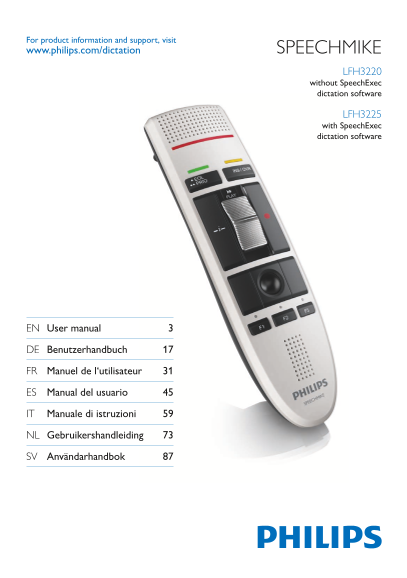
For product information and support, visit www.philips.com/dictation SPEECHMIKE

LFH3220 without Speech Exec dictation software

LFH3225 with Speech Exec dictation software

EN User manual 3

DE Benutzerhandbuch 17

FR Manuel de l‘utilisateur 31

ES Manual del usuario 45

IT Manuale di istruzioni 59

NL Gebruikershandleiding 73

SV Användarhandbok 87

Page Summary Contents For Philips LFH3220 LFH3225 User Guide

Page 1 For product information and support, visit www.philips.com/dictation SPEECHMIKE LFH3220 without Speech Exec dictation software LFH3225 with Speech Exec dictation software EN User manual 3 DE Benutzerh...
Page 3 User manual 1 Important 4 2 Your Speech Mike 6 2.1 What’s in the box 6 2.2 Overview 7 3 Get started 8 3.1 Installation 8 4 Use your Speech Mike 9 4.1 Create a recording 9 5 Use more of your Speech Mik...
Page 4 Important1 Philips reserves the right to change products at handled properly for their intended use, they any time without being obliged to adjust earlier are safe to use according to scientific evide...
Page 5 LI SH 5User manual
Page 6 Your Speech Mike2 Congratulations on your purchase and welcome to Philips! To fully benefit from the service that Philips offers, visit our Website for support information such as user manuals, softwa...
Page 7 Overview2.2 Microphone Record indicator light • EOL end-of-letter key, •• PRIO priority key INS/OVR Insert/overwrite key d Record key Slide switch (fast forward, play/record, stop, rewind) Instruction...
Page 8 Get started3 Installation3.1 Recording and playback of dictations with the Speech Mike requires dictation software such as Philips Speech Exec to be installed on the computer. When third-party dictati...
Page 9 Use your Speech Mike4 This chapter describes how to use the D Note Speech Mike with Philips Speech Exec dictation For best results, speak clearly and keep the software. If the Speech Mike is used with...
Page 10 Use more of your 5 Speech Mike Customize the Speech Mike5.1 Use the Device Control Center software to customize the Speech Mike to suit individual user needs. The software allows to assign different f...
Page 11 Use application shortcuts5.1.2 Speech Mike key Assigned shortcut The Device Control Center software allows to d Record Record (push to dictate) start and control other applications with the PLAY Play ...
Page 12 Dragon Naturally Speaking command• Delay• You can add one operation or a sequence of 7 On the tab 3 Application control, click the operations for every shortcut. button to create a new profile. Click ...
Page 13 Windows task bar. To manually start the program, open the Windows start menu in Windows and select All Programs > Philips Speech Control > Philips Device Control Center. On the 4 Device tab, cli...
Page 14 Technical data6 Connectivity Green specifications USB: Mini-USB 2.0• Compliant to 2002/95/EC (Ro HS)• Lead-free soldered product• Audio recording Microphone type: electret condenser • Operation condit...
Page 15 Frequently asked questions7 The operating system stops responding The Speech Mike is connected to the after restart computer but sound will play on the Using the Philips Speech Mike together computer’...
Page 16 User manual
Page 17 Federal Communications Commission Declaration of Conformity Notice This equipment has been tested and found Model Number: LFH3200, LFH3205, to comply with the limits for a Class B digital LFH3210, LFH...
Page 18 Discover the comprehensive range of professional dictation products from Philips www.philips.com/dictation Specifications are subject to change without notice. Trademarks are the property of Royal Phi...

Manual Details

Brand Philips
Pages 18
File Size 761.96 KB
Published June 19, 2026
1 views

Enter the captcha to get the download link:

captcha

Frequently Asked Questions

How should I protect the SpeechMike from damage?

Avoid water exposure, excessive heat, and pinch cables at connection points.

What is the approved cleaning method for the SpeechMike?

Unplug first, use soft cloth with mild soap or surface disinfectant wipes. Do not use harsh chemicals.

What type of USB cable should be used with the SpeechMike?

Shielded cables with metallic RFI/EMI connectors are required to comply with FCC regulations.

What accessories come with the SpeechMike in the box?

Includes dictation microphone, USB cable, CD-ROM with software/manual, and a quick start guide.