PHILIPS DCD132 User Guide (2) Specification Sheet
Summary
The Philips DCD132 component is a versatile multimedia player designed to enhance your home entertainment setup. This quick start and user manual provides comprehensive, step-by-step guidance for all new users. Learn how to properly set up the device, configure language settings, and operate key functions including DVD, VCD, and USB connectivity. Easily master playback of multiple media formats and maximize your viewing experience with our detailed instructions.
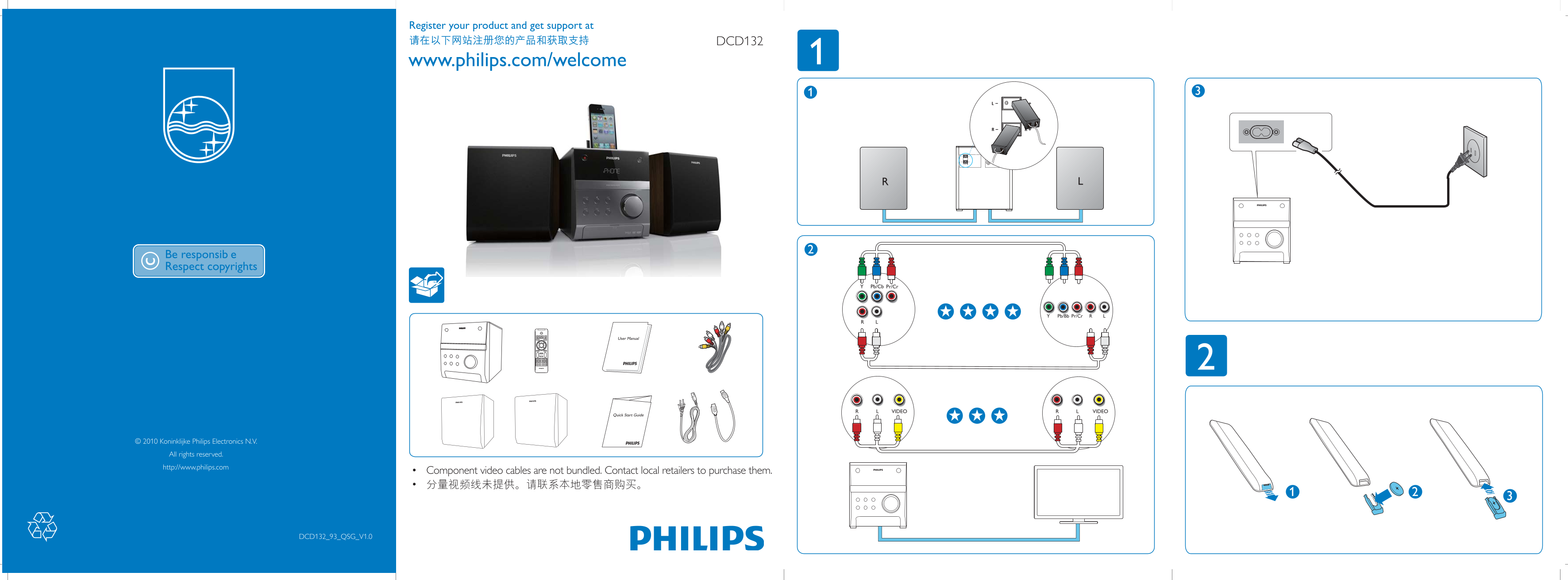
Page 1 Text Content
Register your product and get support at
DCD132
www.philips.com/welcome
Pb/Cb Pr/Cr
Pb/Bb Pr/Cr LY
User Manual
VIDEOR VIDEOL
Quick Start Guide
© 2010 Koninklijke Philips Electronics N.V.
All rights reserved. http://www.philips.com
• Component video cables are not bundled. Contact local retailers to purchase them. • 1
DCD132_93_QSG_V1.0
Page Summary Contents For PHILIPS DCD132 User Guide (2) Specification Sheet
Manual Details
| Brand | Philips |
|---|---|
| Pages | 2 |
| File Size | 524.95 KB |
| Published | July 04, 2026 |
Enter the captcha to get the download link:

Frequently Asked Questions
What video formats does the DCD132 support?
It supports DVD, VCD, SVCD, VIDEO formats, and can process DIVX subtitles.
Are component video cables included with this device?
No; component video cables are not bundled. Contact local retailers to purchase them.
How do I receive technical support for the DCD132 model?
Register your product online at www.philips.com/welcome to get support.