Page 1
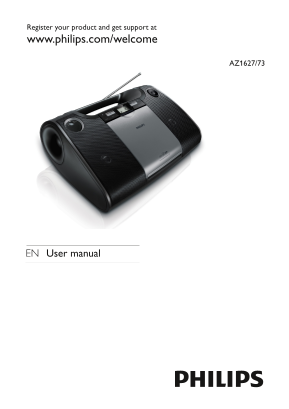
Register your product and get support at www.philips.com/welcome AZ1627/73 EN User manual
Page 3
1 Important Safety Important Safety Instructions a Read these instructions. b Keep these instructions. c Heed all warnings. d Follow all instructions. e Do not use this apparatus near water. f Clean o...
Page 4
l Unplug this apparatus during lightning storms or when unused for long periods of time. m Refer all servicing to qualified service personnel. Servicing is required when the apparatus has been damaged...
Page 5
Warning Never remove the casing of this apparatus. • Never lubricate any part of this apparatus. • Never place this apparatus on other electrical equipment. • Keep this apparatus away from direct sunl...
Page 6
Your product is designed and manufactured with high quality materials and components, which can be recycled and reused. When this crossed-out wheeled bin symbol is attached to a product it means that ...
Page 7
The making of unauthorized copies of copy-protected material, including computer programs, files, broadcasts and sound recordings, may be an infringement of copyrights and constitute a criminal offenc...
Page 8
2 Your CD Soundmachine Introduction With the CD Soundmachine, you can: play CDs, MP3/wma discs• play mp3/wma files on USB devices• listen to FM/MW radio• program the play sequence of tracks.• What’s i...
Page 9
TUNER CD USB OFF TUNING MW FM KHz x10 MHz VOL MODE ALBUMPROG D S AC E A Z1627 LIFT TO OPEN a Source selector: CD,TUNER, USB, OFF. Select CD, tuner, or USB source or turn off the unit• USB socket.• c V...
Page 10
Stop play• Erase a program• j / Select the previous/next track• Search backward/forward• k TUNING+/- Tune to radio stations• l FM/MW selector Select the FM or MW source.• m Telescopic antenna Adjust F...
Page 11
3 Get started Caution Use of controls or adjustments or performance of procedures other • than herein may result in hazardous radiation exposure or other unsafe operation. Always follow the instructio...
Page 12
You can use both batteries and AC power as power supply of this • apparatus. Batteries are not supplied with the accessories. • 1 Open the battery compartment. 2 Insert 6 x 1.5V R14/UM-2/C-cell batter...
Page 13
Install the apparatus near the power supply socket and where the AC • power plug can be easily reached. 1 Connect the power cord to the AC~ MAINS socket on the apparatus and to the power supply socket...
Page 14
4 Use your CD Soundmachine Play a CD Note You cannot play CDs encoded with copyright protection • technologies. You can play commercially available audio CDs: CD-Recordables (CD-R)• CD-Rewritables (CD...
Page 15
Ensure that the USB device contains playable audio contents for supported formats. (see ‘USB playability information’ on page 19) Insert the USB connector on the device into the socket. 2 Select USB s...
Page 16
When search reaches the end of the last track, the CD stops. • Select play modes 1 Press MODE repeatedly to select a play mode: ] (repeat) – repeat a track ALL] (repeat all) - repeat an entire CD/prog...
Page 17
When all 20 tracks are stored, no more tracks can be » selected and the display shows [FUL]. 5 To play program, press . In stop mode, press and hold • PROG to browse programmed tracks. 6 To delete pro...
Page 18
5 Product information Note Product information is subject to change without prior notice. • Dimensions 348 x 127 x 238 mm (W x H x D) Weight 1.7 kg 3.75 pound Power supply DC 9V 1.5 A AC 220-240V Powe...
Page 19
WMA v9 or earlier• Directory nesting up to a maximum of 8 levels• Number of albums/ folders: maximum 99• Number of tracks/titles: maximum 999• ID3 tag v2.0 or later• File name in Unicode UTF8 (maximum...
Page 20
6 Troubleshooting Troubleshooting Warning Never remove the casing of this apparatus. • To keep the warranty valid, never try to repair the system yourself. If you encounter problems when using this ap...
Page 21
This disc may be defective. Play another disc. • Ensure that the CD is a finalised CD/CD-R/CD-RW. • Ensure that the laser lens is clean. • Ensure that the CD is not encoded with copyright protection •...
Page 22
© 2009 Koninklijke Philips Electronics N.V. All rights reserved. PDCC-PENG-0913