Panasonic SC-BT228 Easy Setting Guide
Summary
Elevate your entertainment experience with this comprehensive guide for your Home Theater Sound System. The manual details every step of setup, from properly wiring multi-speaker setups (front, center, surround) using color-coded cables, to utilizing digital connections like HDMI and Optical audio for superior sound quality. It walks the user through powering up, connecting sources, and running the guided 'Easy Setup' process straight from your main unit. Perfect for homeowners looking to build a high-fidelity, immersive surround stereo experience in their living room.
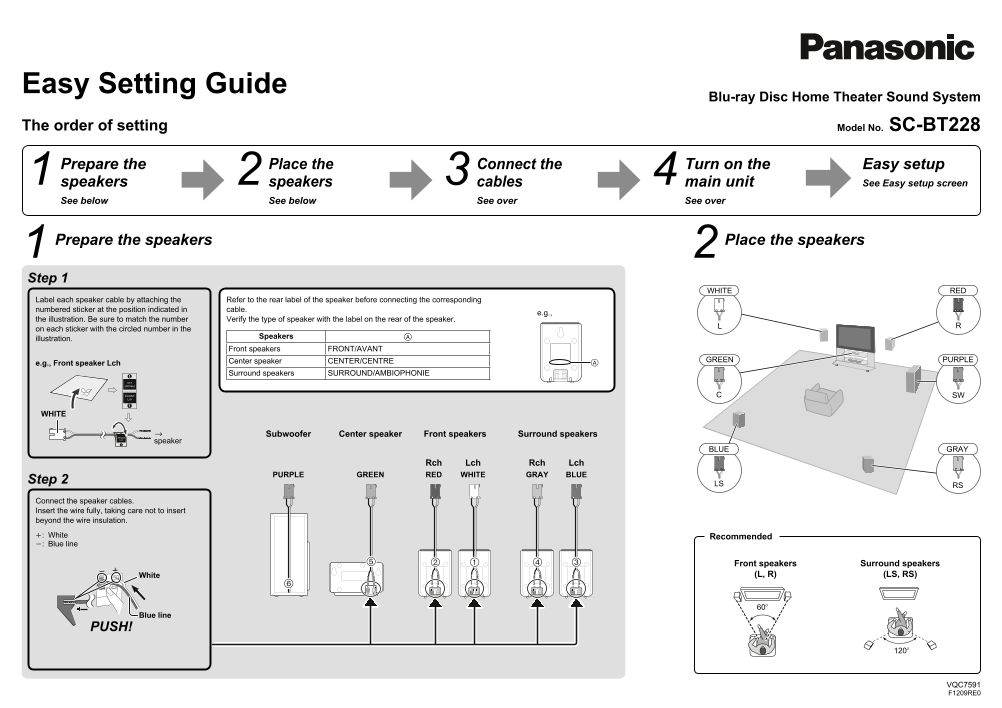
Page 1 Text Content
Easy Setting Guide
Blu-ray Disc Home Theater Sound System
The order of setting Model No. SC-BT228
Prepare the Place the Connect the Turn on the Easy setup
speakers speakers cables main unit See Easy setup screen
See below See below See over See over
Prepare the speakers Place the speakers
Step 1
WHITE RED
Label each speaker cable by attaching the Refer to the rear label of the speaker before connecting the corresponding numbered sticker at the position indicated in cable.
the illustration. Be sure to match the number Verify the type of speaker with the label on the rear of the speaker. on each sticker with the circled number in the
Speakers
illustration.
Front speakers FRONT/AVANT
Center speaker CENTER/CENTRE GREEN PURPLE
e.g., Front speaker Lch
Surround speakers SURROUND/AMBIOPHONIE
WHITE
Front speakers Surround speakers Center speaker Subwoofer
speaker
BLUE GRAY
Rch Lch Rch Lch
PURPLE GREEN RED WHITE GRAY BLUE
Step 2
LS RS
Connect the speaker cables. Insert the wire fully, taking care not to insert beyond the wire insulation. : White Recommended : Blue line
Front speakers Surround speakers White (L, R) (LS, RS)
Blue line
PUSH!
VQC7591 F1209RE0
VQC7591_eng.indd 2-3 2009/12/08 11:53:34
Page Summary Contents For Panasonic SC-BT228 Easy Setting Guide
Manual Details
| Brand | Panasonic |
|---|---|
| Pages | 2 |
| File Size | 595.95 KB |
| Published | June 17, 2026 |
Enter the captcha to get the download link:

Frequently Asked Questions
Which input method offers the highest quality picture?
Using the HDMI cable (video AV IN connection) is recommended for the highest quality picture.