Panasonic RXD23 RX- D20 Portable Stereo CD System Operating Instructions
Summary
Experience crystal clear sound with this Portable Stereo CD System. This comprehensive operating manual provides essential instructions for new owners, detailing every aspect of setup, operation, and maintenance. Learn how to use both the main unit and the included remote control for playing CDs and tuning FM radio stations. The guide covers power options (AC cord or batteries), memory battery care, and offers crucial troubleshooting steps, ensuring you keep your system running perfectly over time.
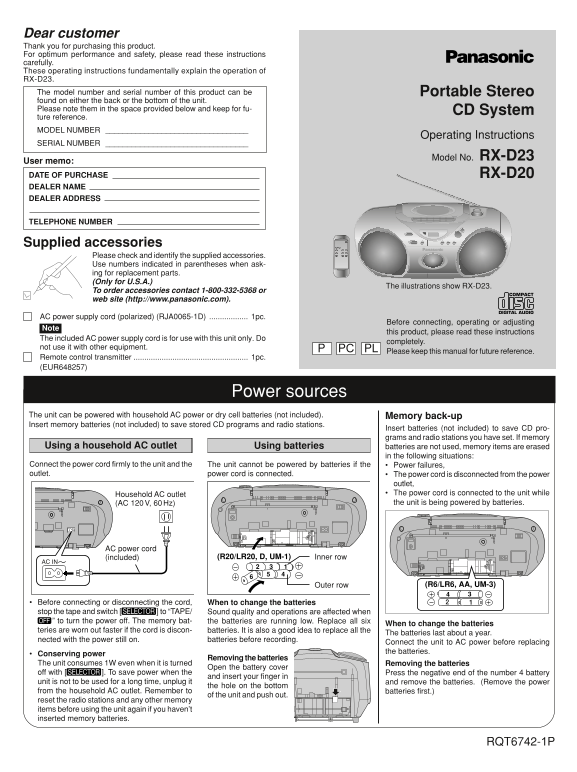
Page 1 Text Content
Dear customer Thank you for purchasing this product. For optimum performance and safety, please read these instructions carefully. These operating instructions fundamentally explain the operation of RX-D23. The model number and serial number of this product can be Portable Stereo found on either the back or the bottom of the unit. Please note them in the space provided below and keep for fu- CD System ture reference. MODEL NUMBER
Operating Instructions
SERIAL NUMBER
Model No. RX-D23
User memo: DATE OF PURCHASE RX-D20 DEALER NAME DEALER ADDRESS
TELEPHONE NUMBER
Supplied accessories
Please check and identify the supplied accessories. Use numbers indicated in parentheses when ask- ing for replacement parts. (Only for U.S.A.)
The illustrations show RX-D23.
To order accessories contact 1-800-332-5368 or web site (http://www.panasonic.com).
AC power supply cord (polarized) (RJA0065-1D) 1pc.
Before connecting, operating or adjusting
this product, please read these instructions
The included AC power supply cord is for use with this unit only. Do
completely.
not use it with other equipment. PC PL
Please keep this manual for future reference.
Remote control transmitter 1pc. (EUR648257)
Power sources
The unit can be powered with household AC power or dry cell batteries (not included). Memory back-up Insert memory batteries (not included) to save stored CD programs and radio stations.
Insert batteries (not included) to save CD pro- grams and radio stations you have set. If memory
Using a household AC outlet Using batteries batteries are not used, memory items are erased
in the following situations:
Connect the power cord firmly to the unit and the The unit cannot be powered by batteries if the Power failures, outlet. power cord is connected. The power cord is disconnected from the power
outlet, Household AC outlet The power cord is connected to the unit while (AC 120 V, 60 Hz) the unit is being powered by batteries.
AC power cord
(included) (R20/LR20, D, UM-1) Inner row
Outer row (R6/LR6, AA, UM-3)
Before connecting or disconnecting the cord, When to change the batteries
stop the tape and switch [ ] to “TAPE/ Sound quality and operations are affected when
” to turn the power off. The memory bat- the batteries are running low. Replace all six
When to change the batteries
teries are worn out faster if the cord is discon- batteries. It is also a good idea to replace all the
The batteries last about a year.
nected with the power still on. batteries before recording.
Connect the unit to AC power before replacing the batteries.
Conserving power
Removing the batteries
The unit consumes 1W even when it is turned Removing the batteries
Open the battery cover
off with [ ]. To save power when the Press the negative end of the number 4 battery
and insert your finger in
unit is not to be used for a long time, unplug it and remove the batteries. (Remove the power
the hole on the bottom
from the household AC outlet. Remember to batteries first.)
of the unit and push out.
reset the radio stations and any other memory items before using the unit again if you haven’t inserted memory batteries.
RQT6742-1P
D1 12/16/02, 1:19 PM1
Page Summary Contents For Panasonic RXD23 RX- D20 Portable Stereo CD System Operating Instructions
Manual Details
| Brand | Panasonic |
|---|---|
| Pages | 8 |
| File Size | 589.04 KB |
| Published | June 21, 2026 |
Enter the captcha to get the download link:

Frequently Asked Questions
How can I preserve my stored radio stations and CD programs?
Insert memory batteries to save set data. The unit needs power to maintain memory.
What should I do if the unit is powered by dry cell batteries, but doesn't work?
Check that the battery poles (+ and –) are correctly aligned. If issues persist, replace the batteries or use household AC power.
When can I safely change the batteries in the main unit?
Stop the tape, switch the unit off, and replace all six batteries before recording to ensure optimal performance.
What should I do if I need to permanently store the unit for a long time?
Unplug the unit from the AC outlet, remove the batteries; remember to reset station memory first.