# A B C D E F G H I J K L M N O P Q R S T U V W X Y Z

Panasonic AW-PB506AL User Guide and Manual

Summary

This essential broadcast connectivity unit, featuring a dedicated SDI card and interface bracket, is designed for professional studio environments. It provides robust signal handling with outputs for both standard definition and advanced view-finder integration (EVF). The manual offers comprehensive guidance on setting up NTSC/PAL formats, customizing brightness levels, and managing various video modes (Y/CVBS). It is intended for broadcast technicians, equipment operators, and engineering professionals who require reliable, high-quality signal connectivity in demanding production settings. Note that the documentation provides critical safety warnings and detailed operational procedures.
📄 Preview 📖 Table of Contents Contents PAGE OF 17

Page 1 Text Content

Studio SDI Card

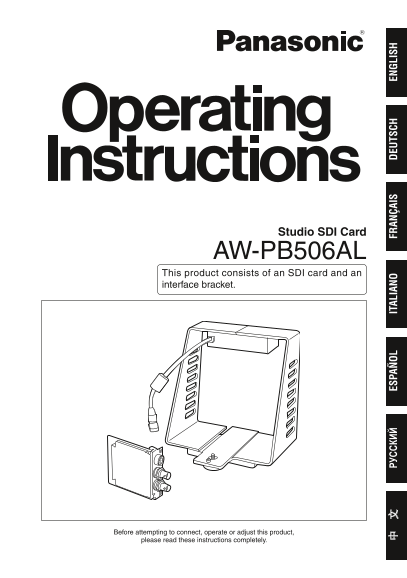
AW-PB506AL This product consists of an SDI card and an interface bracket.

松下电器产业株式会社 Web Site: ht tp: /panasonic.net

РУ СС КИ ES PA IT AL IA FR AN ÇA IS EU TS CH EN LI SH

Matsushita Electric Industrial Co., Ltd. Web Site: ht tp: /panasonic.net

Printed in Japan Gedruckt in Japan Imprimé au Japon Stampato in Giappone Impreso en Japón Напечатано в Японии 在日本印制

VQTB0137 F0806Y1116 D Before attempting to connect, operate or adjust this product,

please read these instructions completely.

Page Summary Contents For Panasonic AW-PB506AL User Guide and Manual

Page 1 Studio SDI Card AW-PB506AL This product consists of an SDI card and an interface bracket. 松下电器产业株式会社 Web Site: ht tp: /panasonic.net РУ СС КИ ES PA IT AL IA FR AN ÇA IS EU TS CH EN LI SH Matsushita El...
Page 2 ENGLISH VERSION Safety precautions  DO NOT REMOVE PANEL COVERS BY UNSCREWING. To reduce the risk of electric shock, do not remove the covers. No user serviceable parts inside. Refer servicing to qual...
Page 3 Information on Disposal for Users of Waste Electrical & Electronic Equipment (private households) This symbol on the products and/or accompanying documents means that used electrical and electroni...
Page 4 Contents Configuration ........................................ Connections .......................................... When configuring a system Accessories .............................................
Page 5 Introduction Installing the SDI card in a convertible Notes camera (such as the AW-E50, AW-E650,  The AW-PB506A cannot be installed AW-E655, AW-E750 and AW-E860) and to the following models; mountin...
Page 6 Major operating controls and their functions SDI card  EVF I/F connector [EVF I/F] 2: Model selection <E350/E860> The EVF I/F cable 9 from the interface (Factory setting: E50) bracket is conn...
Page 7 Major operating controls and their functions Interface bracket  EVF connector 1 [EVF1] 7 Inter-communications level control The viewfinder (WV-VF65B, AW-VF80) [LEVEL] is connected here. This adjusts...
Page 8 Installing the SDI card Always ask your local dealer to install the SDI card. Before installing the SDI card:  Release the static carried in the body of the person to perform the installation. Instal...
Page 9 Interface bracket mountings  Mounting the bracket  Mounting the viewfinder on a tripod on a bracket Mount the interface bracket on the Mount the mounting base that is tripod. (Screw: 1/4 – 0UNC) su...
Page 10 Connections When configuring a system with the remote control unit Convertible camera: Inter-communications headset AW-E50, AW-E650, AW-E655, Video monitor AW-E750, AW-E860, etc. SDI monitor Viewfin...
Page 11 Connections When configuring a system with the remote operation panel Convertible camera:  Use the control cable (AW-CA50T8G) to AW-E50, AW-E650, AW-E655, connect the remote operation panel to AW-E...
Page 12 Setting and changing of menu items  Camera settings to match the system configuration and filming conditions can be made using the menu screens. See the convertible camera operating instructions for ...
Page 13 Setting and changing of menu items Select “Option Card 1” to display the Return to filming mode. submenu. When performing the settings with When performing the settings with the convertible camera: th...
Page 14 Setting and changing of menu items Optional card settings submenu  Safety zone (1 to 4, OFF) This selects the type of safety zone that is displayed in the viewfinder. If “OFF” is selected, a safety ...
Page 15 Appearance Unit: mmSDI card EN LI SH
Page 16 Appearance Unit: mmInterface bracket
Page 17 Specifications Power requirements: DC 1 V (supplied from convertible camera) Power consumption: 15 W (When WV-VF65B, AW-VF80 is connected) indicates safety information. Ambient operating temperature:...

Manual Details

Brand Panasonic
Pages 17
File Size 1.23 MB
Published June 20, 2026
3 views

Enter the captcha to get the download link:

captcha

Frequently Asked Questions

What should I do if the equipment gets wet or moist?

Do not expose this equipment to rain or moisture, as it reduces the risk of fire or shock hazard.

Who should handle internal switch settings changes?

Refer changes of switch settings inside the unit to qualified service personnel.

How is the SDI card rated for disposal?

It cannot be mixed with general household waste and must be taken to designated collection points for proper recycling.

What are the operating temperature ranges?

The ambient operating temperature range is specified as –10°C to +45°C.