Nikon HL-CP10 User Manual
Summary
This essential LCD Hood Attachment is designed specifically for the Nikon COOLPIX4500 digital camera. It functions by blocking ambient light from hitting the screen, significantly improving image visibility even in bright daylight conditions. This manual provides comprehensive instructions on proper attachment, safe removal, folding processes, and critical safety warnings to ensure optimal performance and prevent damage to your device's LCD monitor.
Page 1 Text Content
LCDフードアタッチメント(固定用両面テープ付き)/ Hood attachment (attachment tape pre-applied)/ 日本語 English
HL-CP10
Lichtschachthalter (Rückseite mit Klebeband)/ Accessoire de fixation de l’abat-jour (Application préalable
LCDフード d’une bande adhésive)/ Thank you for purchasing the LCD Hood HL-CP10. Designed Jp このたびは、LCDフードHL-CP10(以 窓を閉め切った自動車の中や直射日光
Accesorio del parasol (adhesivo del accesorio aplicado for use only with the Nikon COOLPIX4500 Digital Camera,
(ニコンデジタルカメラCOOLPIX4500専用)
previamente)/ 下液晶モニタフード)をお買い上げいた が当たる場所など、異常に温度が高く
使用説明書 it surrounds the LCD monitor to block out light, offering a
Bevestiging voor lichtschacht (montagetape al aangebracht)/
なる場所に放置しないでください。変 clear view of the monitor even in bright daylight. When not in
Cornice paraluce (con nastro biadesivo preapplicato) だき、ありがとうございます。本製品は、
use, it can be easily detached and folded for compact storage.
LCD Hood
En ニコンデジタルカメラCOOLPIX4500 色、変形の原因となります。
(For Nikon COOLPIX4500 Digital Camera)
Safety precautions
Instruction Manual 専用の液晶モニタフードです。 長期間折りたたんだ状態で保管しない
To ensure proper operation, read this leaflet before using
Monitor-Lichtschacht this product, and be sure to keep it where it can be seen by
De を防ぐので、屋外の明るい場所でも液晶 all those who use the product. (Für die Nikon COOLPIX4500 Digitalkamera)
■LCD フードアタッチメントの
Bedienungsanleitung モニタの画像をはっきりと見ることがで
Warning
Abat-jour pour écran à Keep out of reach of children
Fr ご購入時、LCDフードのアタッチメン
取り外すことができ、コンパクトに折り Particular care should be taken to prevent infants from
cristaux liquides (LCD)
図1/Figure 1/Abbildung 1/Figure 1/ トの裏側にはあらかじめ固定用両面 putting small parts of the product in their mouths.
(Pour la caméra numérique COOLPIX4500 de たためるので、携帯に便利です。
Figura 1/Figuur 1/Figura 1
Nikon.) テープが貼ってあります。固定用両面
Precautions in use
Manuel d’utilisation
安全上のご注意 テープの台紙をはがし、LCDフードア
Always hold the camera by its body, never by the hood.
Ridge (Top and bottom)/ The hood may accidentally separate from the camera body,
Tapa de LCD ご使用の前に「安全上のご注意」をよくお読 タッチメント溝部が液晶モニタの上下
Es Wulst (Ober- und Unterseite)/ allowing the camera to fall and suffer possible damage. (Para cámara digital Nikon COOLPIX4500)
Ergot (en haut et en bas)/ みの上、正しくお使いください。 になるように、液晶モニタの周囲に固 Do not walk around holding the camera with the hood
Manual de instrucciones
Lengüeta (Superior e Inferior)/
attached. The hood may fall from the camera and be
Nokje (boven en onder)/ この「安全上のご注意」は、製品を安全に正 定してください(図1)。
damaged. Always remove the hood from the camera
LCD-Lichtschacht Rilievo (superiore e inferiore)
Nl しく使用していただき、あなたや他の人々 when the camera is not in use.
(Voor Nikon COOLPIX4500 Digitale Camera) ■液晶モニタフードの取り付け方
への危害や財産への損害を未然に防止する Do not store the hood in areas exposed to extreme
Gebruiksaanwijzing
液晶モニタフードの印字されている面を temperatures, for example, near a space heater or in a
closed vehicle on a hot day, or it may become discol-
LCD Hood 上に向け、イラストの矢印が示す部分を
It みになった後は、お使いになる方がいつで ored or deformed.
(Per la camera digitale Nikon COOLPIX4500)
押さえながら、カメラに取り付けます Do not store the hood folded for long periods of time,
Manuale istruzioni も見られるところに必ず保管してください。
or it may become deformed.
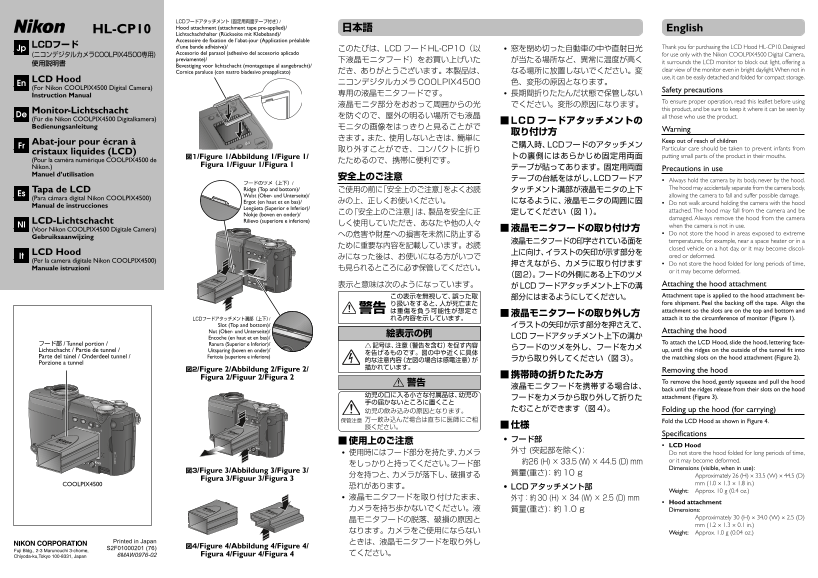
表示と意味は次のようになっています。 Attaching the hood attachment
がLCDフードアタッチメント上下の溝
この表示を無視して、誤った取 Attachment tape is applied to the hood attachment be-
り扱いをすると、人が死亡また fore shipment. Peel the backing off the tape. Align the 警告 は重傷を負う可能性が想定さ attachment so the slots are on the top and bottom and
LCDフードアタッチメント溝部(上下)/ れる内容を示しています。 attach it to the circumference of monitor (Figure 1).
Slot (Top and bottom)/ イラストの矢印が示す部分を押さえて、 Nut (Ober- und Unterseite)/ Attaching the hood
Encoche (en haut et en bas)/ LCDフードアタッチメント上下の溝か
フード部 / Tunnel portion / Ranura (Superior e Inferior)/ To attach the LCD Hood, slide the hood, lettering face-
Lichtschacht / Partie de tunnel / Uitsparing (boven en onder)/ up, until the ridges on the outside of the tunnel fit into
Parte del túnel / Onderdeel tunnel / Feritoia (superiore e inferiore) the matching slots on the hood attachment (Figure 2).
Porzione a tunnel
図2/Figure 2/Abbildung 2/Figure 2/ Removing the hood
Figura 2/Figuur 2/Figura 2 ■携帯時の折りたたみ方
警告 To remove the hood, gently squeeze and pull the hood
back until the ridges release from their slots on the hood
幼児の口に入る小さな付属品は、幼児の attachment (Figure 3).
幼児の飲み込みの原因となります。 たむことができます(図4)。 Folding up the hood (for carrying)
保管注意 万一飲み込んだ場合は直ちに医師にご相 Fold the LCD Hood as shown in Figure 4.
Specifications
LCD Hood
外寸 (突起部を除く): Do not store the hood folded for long periods of time,
約26 (H) × 33.5 (W) × 44.5 (D) mm or it may become deformed.
Dimensions (visible, when in use):
図3/Figure 3/Abbildung 3/Figure 3/
分を持つと、カメラが落下し、破損する Approximately 26 (H) × 33.5 (W) × 44.5 (D)
Figura 3/Figuur 3/Figura 3
COOLPIX4500 mm (1.0 × 1.3 × 1.8 in.)
恐れがあります。 LCDアタッチメント部
Weight: Approx. 10 g (0.4 oz.)
液晶モニタフードを取り付けたまま、 外寸:約30 (H) × 34 (W) × 2.5 (D) mm
Hood attachment
カメラを持ち歩かないでください。液 質量(重さ):約1.0 g Dimensions:
Approximately 30 (H) × 34.0 (W) × 2.5 (D)
mm (1.2 × 1.3 × 0.1 in.)
なります。カメラをご使用にならない Weight: Approx. 1.0 g (0.04 oz.)
Printed in Japan ときは、液晶モニタフードを取り外し
S2F01000201 (76) 図4/Figure 4/Abbildung 4/Figure 4/
6MAW0976-02 Figura 4/Figuur 4/Figura 4 てください。
Page Summary Contents For Nikon HL-CP10 User Manual
Manual Details
| Brand | Nikon |
|---|---|
| Pages | 2 |
| File Size | 375.03 KB |
| Published | June 01, 2026 |
Enter the captcha to get the download link:

Frequently Asked Questions
What precautions should I take with this hood?
Always hold the camera by its body, never by the hood. Also, keep it out of reach of children.
How do I attach or detach the LCD Hood?
To attach, slide the hood up until the ridges fit into the matching slots on the attachment. To remove it, gently squeeze and pull down.
Can this hood be stored folded for a long time?
No, do not store the hood folded for long periods of time, as it risk becoming discolored or deformed.
Which specific camera model is this LCD Hood designed for?
This product is exclusively intended for use only with the Nikon COOLPIX4500 Digital Camera.