Lexmark X94x User Guide
Summary
This essential guide provides comprehensive troubleshooting support for your Lexmark multifunction printer. Designed for end-users and IT support staff, it resolves common operational challenges including paper jams, connectivity errors (USB/Network), print job failures, and complex color settings. Follow detailed steps to diagnose symptoms ranging from unresponsive displays to improper printing, ensuring maximum uptime and reliable performance for all your documents.
Page 1 Text Content
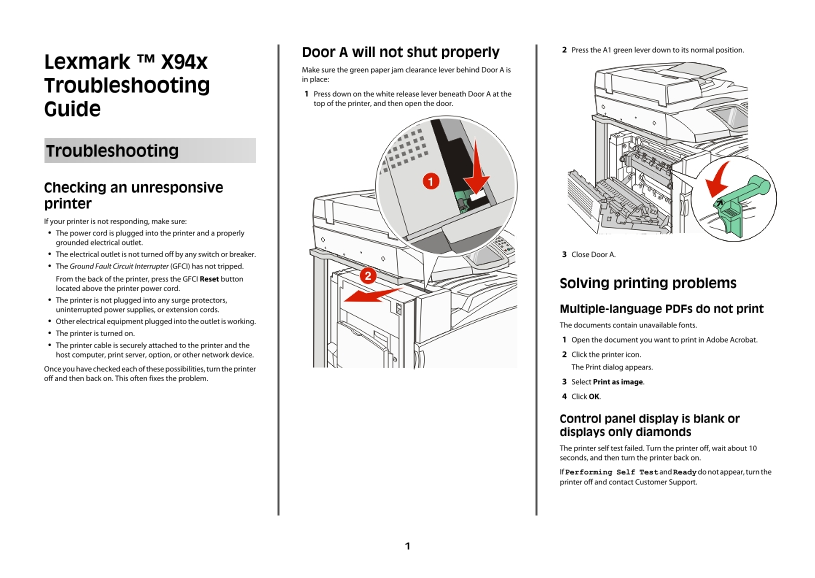
Press the A1 green lever down to its normal position.
Door A will not shut properly
Lexmark ™ X94x
Make sure the green paper jam clearance lever behind Door A is in place:
Troubleshooting
Press down on the white release lever beneath Door A at the top of the printer, and then open the door.
Guide
Troubleshooting
Checking an unresponsive printer If your printer is not responding, make sure: The power cord is plugged into the printer and a properly grounded electrical outlet. The electrical outlet is not turned off by any switch or breaker. Close Door A. The Ground Fault Circuit Interrupter (GFCI) has not tripped. From the back of the printer, press the GFCI Reset button
Solving printing problems
located above the printer power cord. The printer is not plugged into any surge protectors, uninterrupted power supplies, or extension cords. Multiple-language PDFs do not print Other electrical equipment plugged into the outlet is working.
The documents contain unavailable fonts.
The printer is turned on.
Open the document you want to print in Adobe Acrobat.
The printer cable is securely attached to the printer and the
host computer, print server, option, or other network device. Click the printer icon. Once you have checked each of these possibilities, turn the printer The Print dialog appears.
off and then back on. This often fixes the problem.
Select Print as image. Click OK.
Control panel display is blank or displays only diamonds The printer self test failed. Turn the printer off, wait about 10 seconds, and then turn the printer back on. If Performing Self Test and Ready do not appear, turn the printer off and contact Customer Support.
Page Summary Contents For Lexmark X94x User Guide
Manual Details
| Brand | Lexmark |
|---|---|
| Pages | 13 |
| File Size | 527.85 KB |
| Published | May 29, 2026 |
Enter the captcha to get the download link:
