Kodak EasyShare Camera Dock II User's Manual
Summary
Effortlessly connect, charge, and transfer your memories with the Kodak EasyShare Camera Dock II. This comprehensive guide details how to dock multiple compatible cameras, fully recharge Ni-MH batteries, and automatically move digital photos directly from your camera to your computer using included software. Designed for amateur photographers and owners of Kodak EASYSHARE systems, this manual provides clear instructions on setup, managing battery levels, understanding status lights, and maximizing your photo workflow right out of the box.
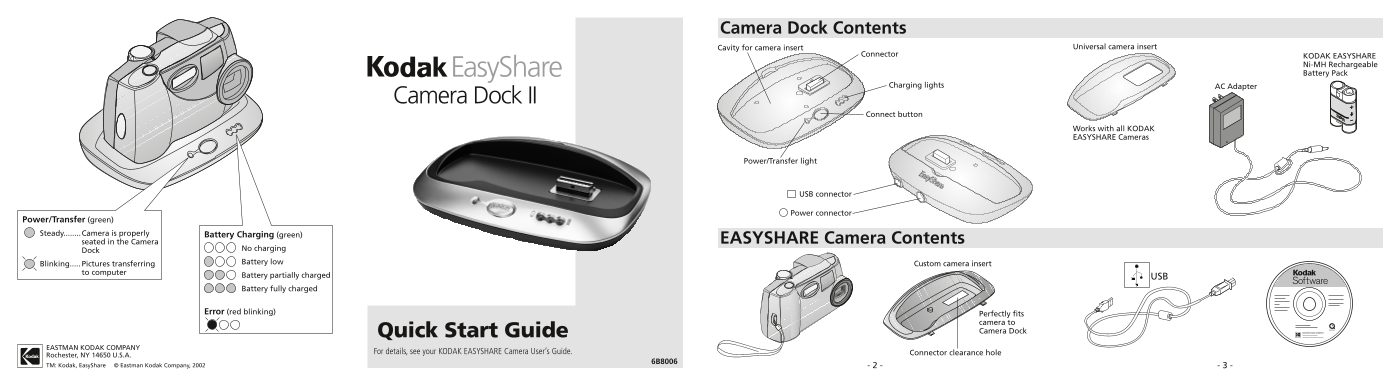
Page 1 Text Content
Camera Dock Contents
Cavity for camera insert Universal camera insert
Connector KODAK EASYSHARE
Ni-MH Rechargeable Easy Share Battery Pack
Charging lights AC Adapter
Camera Dock II
Connect button
Works with all KODAK EASYSHARE Cameras
Power/Transfer light
USB connector
Power connector
Power/Transfer (green) Steady........Camera is properly Battery Charging (green)
seated in the Camera EASYSHARE Camera Contents
No charging
Battery low Custom camera insert
Blinking..... Pictures transferring
to computer
Battery partially charged USB Battery fully charged
Error (red blinking)
Perfectly fits camera to Quick Start Guide Camera Dock
EASTMAN KODAK COMPANY
For details, see your KODAK EASYSHARE Camera User’s Guide. Connector clearance hole
Rochester, NY 14650 U.S.A.
TM: Kodak, Easy Share © Eastman Kodak Company, 2002 - 2 - - 3 -
Page Summary Contents For Kodak EasyShare Camera Dock II User's Manual
Manual Details
| Brand | Kodak |
|---|---|
| Pages | 2 |
| File Size | 1.18 MB |
| Published | May 24, 2026 |
Enter the captcha to get the download link:

Frequently Asked Questions
Can I recharge the battery pack?
Only the KODAK EASYSHARE Ni-MH Rechargeable Battery Pack can be recharged, and it is included with the Camera Dock.
What steps should I follow to transfer pictures from the camera?
Turn off the camera, place it in the Camera Dock, press the Connect button, connect the USB cable, and then connect the Camera Dock to power/wall outlet.
How long does the battery charge fully?
It takes approximately 2.5 hours for charging to be complete.
When is the camera ready for picture transfer?
The indicators show 'Pictures transferring' when a blinking green light is displayed and pictures are being moved to the computer.