Kodak C1450 User Guide
Summary
Master your camera's full potential with this comprehensive guide. This manual provides detailed instructions on core functionalities, including operating shooting modes, utilizing advanced features like 'Smart Capture Scenes,' and managing media via the USB port. It covers everything from basic controls (shutter button, flash settings) to sophisticated processes such as photo/video sharing using the external Share function app. Perfect for new users or those looking to master every aspect of their digital camera system.
Page 1 Text Content
Use other modes For complete information about your
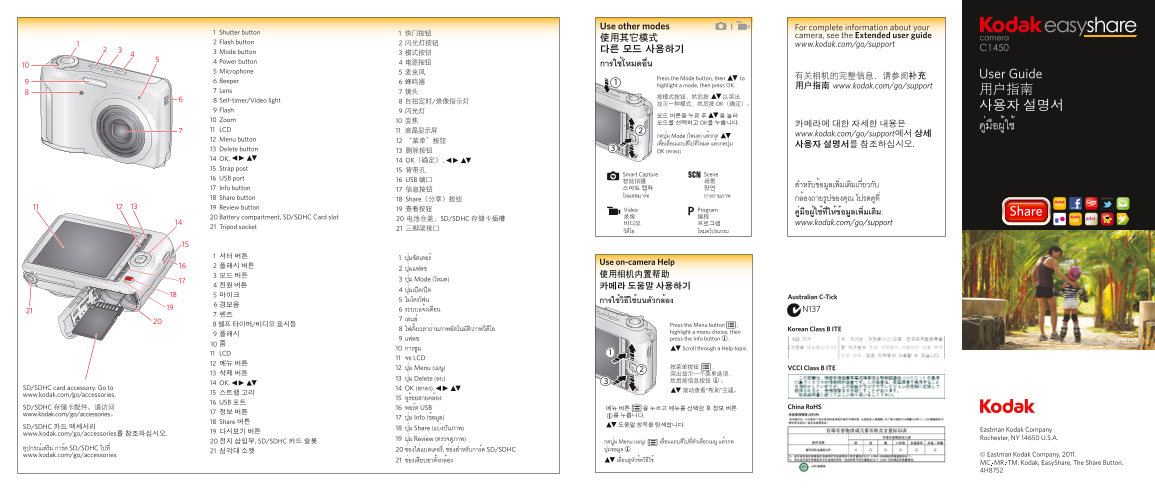
1 Shutter button 1 快门按钮
camera, see the Extended user guide
2 Flash button 2 闪光灯按钮
www.kodak.com/go/support
3 Mode button 다른 모드 사용하기
4 Power button 4 电源按钮 การใช้โหมดอื่น 5 Microphone 5 麦克风
有关相机的完整信息,请参阅补充 User Guide
Press the Mode button, then to
6 Beeper 6 蜂鸣器
highlight a mode, then press OK. 用户指南 www.kodak.com/go/support
7 Lens 7 镜头 用户指南
8 Self-timer/Video light 8 自拍定时/录像指示灯
显示一种模式,然后按 OK(确定)。
9 Flash 9 闪光灯
10 Zoom 10 变焦
모드를 선택하고 OK를 누릅니다. 카메라에 대한 자세한 내용은
11 LCD 11 液晶显示屏
กดปุ่ม Mode (โหมด) แล้วกด www.kodak.com/go/support에서 상세
12 Menu button 12 “菜单”按钮
13 Delete button 13 删除按钮
OK (ตกลง)
14 OK, 14 OK(确定), 15 Strap post 15 背带孔
Smart Capture Scene
16 USB port 16 USB 端口
17 Info button 17 信息按钮 스마트 캡쳐 장면 โหมดสมาร์ท การถ่ายภาพ
18 Share button 18 Share(分享)按钮 กล้องถ่ายรูปของคุณ โปรดดูที่ 19 Review button 19 查看按钮
Video Program
20 Battery compartment, SD/SDHC Card slot 录像 编程
20 电池仓盖,SD/SDHC 存储卡插槽
비디오 프로그램 www.kodak.com/go/support
21 Tripod socket 21 三脚架接口
Use on-camera Help
3 ปุ่ม Mode (โหมด)
8 셀프 타이머/비디오 표시등 Press the Menu button ,
highlight a menu choice, then
9 แฟลช press the Info button . การซูม Scroll through a Help topic.
11 LCD
11 จอ LCD
12 ปุ่ม Menu (เมนู) 按菜单按钮 ,
13 ปุ่ม Delete (ลบ)
14 OK,
SD/SDHC card accessory. Go to 14 OK (ตกลง),
www.kodak.com/go/accessories.
16 USB 포트
SD/SDHC 存储卡配件。请访问 16 พอร์ต USB 메뉴 버튼 을 누르고 메뉴를 선택한 후 정보 버튼
www.kodak.com/go/accessories。 를 누릅니다.
17 ปุ่ม Info (ข้อมูล)
18 Share 버튼
SD/SDHC 카드 액세서리 18 ปุ่ม Share (แบ่งปันภาพ)
www.kodak.com/go/accessories를 참조하십시오.
19 ปุ่ม Review (ตรวจดูภาพ)
20 전지 삽입부, SD/SDHC 카드 슬롯 กดปุ่ม Menu (เมนู) เลื่อนแถบสีไปที่ตัวเลือกเมนู แล้วกด
อุปกรณ์เสริม การ์ด SD/SDHC ไปที่ 20 ช่องใส่แบตเตอรี่, ช่องสำหรับการ์ด SD/SDHC ปุ่มข้อมูล
www.kodak.com/go/accessories
Page Summary Contents For Kodak C1450 User Guide
Manual Details
| Brand | Kodak |
|---|---|
| Pages | 2 |
| File Size | 4.76 MB |
| Published | May 24, 2026 |
Enter the captcha to get the download link:
