HP Healthcare HC271pClinical Review Monitor Quick Install Guide
Summary
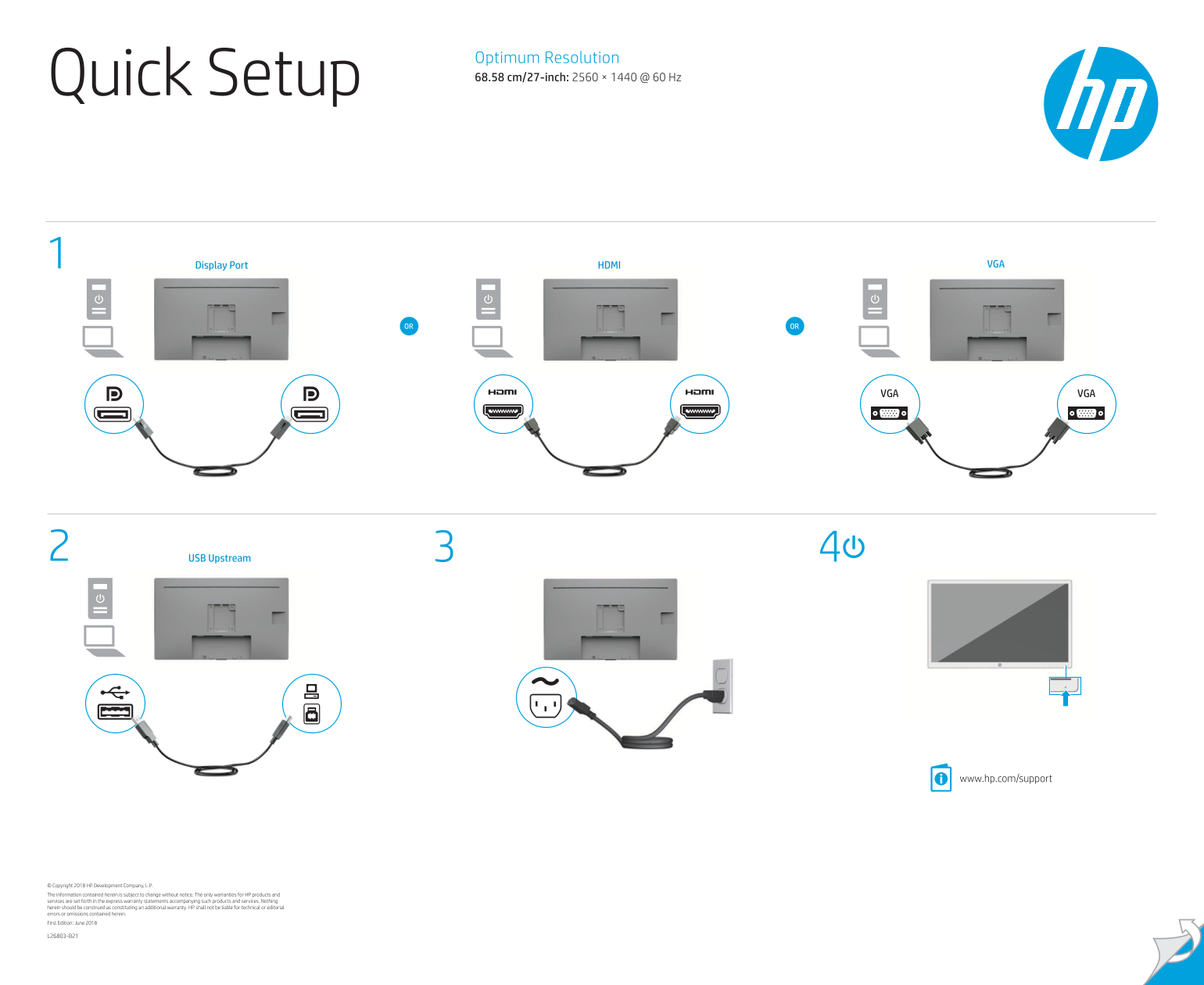
*Optimize your workspace with this high-resolution monitor featuring multiple connectivity options like HDMI, DisplayPort, and USB.* This guide provides comprehensive setup instructions and critical safety warnings, ensuring safe operation by detailing procedures for power connection and proper grounding use in all regions. It is essential reading for any user assembling or maintaining the unit, covering everything from initial setup to warranty claims and accessing driver updates at www.hp.com/support.
Manual Details
| Brand | HP |
|---|---|
| Pages | 2 |
| File Size | 2.02 MB |
| Published | June 18, 2026 |
Enter the captcha to get the download link:

Frequently Asked Questions
What are the recommended display inputs for this unit?
It supports VGA 1, Display Port, HDMI, VGA 2, and USB Upstream.
What resolution should I use for optimal performance?
The optimal resolution is 2560 × 1440 at 60 Hz on the 27-inch screen.
How do I safely power down or unplug the monitor?
To disconnect, unplug the power cord from the AC outlet. Never just turn off the display via controls.
What is a critical safety measure regarding the power cable?
If you have a 3-pin plug, it must be connected to a grounded (earthed) 3-pin outlet to maintain safety.