HP USB HD 720p v2 Commercial Network Camera Quick Install Guide
Summary
Enhance your digital meetings with the HP USB HD 720P v2 Business Webcam. Designed for professionals, this high-definition webcam delivers clear video quality for seamless conferencing. This manual provides comprehensive setup instructions, technical guidance, and necessary information to ensure optimal performance alongside your devices. Use this guide for easy installation, software management, and accessing essential support resources like drivers and regulatory notices.
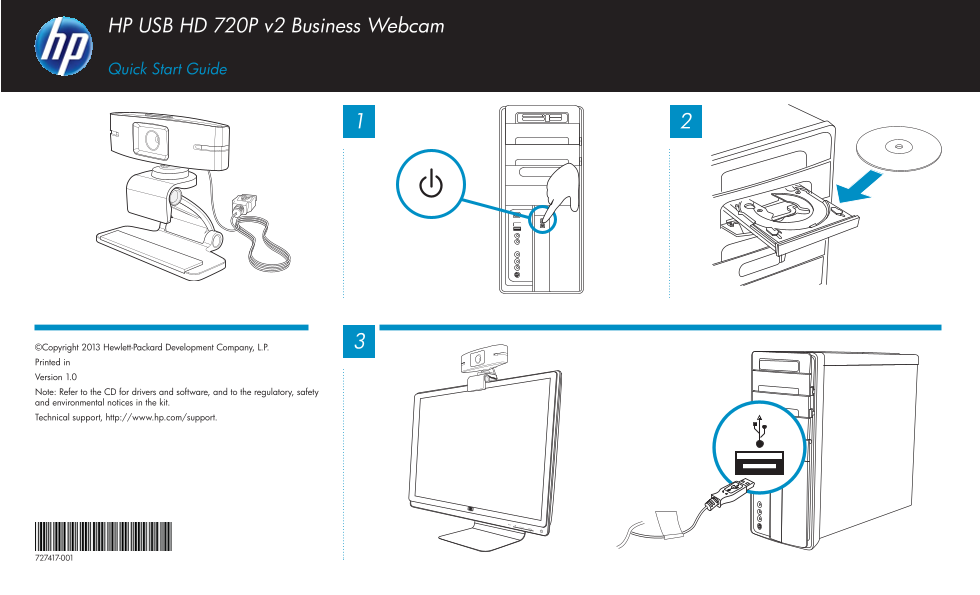
Page 1 Text Content
HP USB HD 720P v2 Business Webcam
Quick Start Guide HP 1910m LCD Monitor
©Copyright 2013 Hewlett-Packard Development Company, L.P. Printed in Version 1.0 Note: Refer to the CD for drivers and software, and to the regulatory, safety and environmental notices in the kit. Technical support, http://www.hp.com/support.
Page Summary Contents For HP USB HD 720p v2 Commercial Network Camera Quick Install Guide
Manual Details
| Brand | HP |
|---|---|
| Pages | 1 |
| File Size | 341.57 KB |
| Published | June 17, 2026 |
Enter the captcha to get the download link:

Frequently Asked Questions
Where can I find recommended drivers and software updates?
Refer to the CD provided with your system for all necessary drivers and software.
What documentation should I review regarding product safety?
You must read the regulatory, safety, and environmental notices included in the kit.
How do I get technical assistance or support for this product?
Technical support is available online at http://www.hp.com/support.