HP EliteDisplay E324q 31.5-inch QHD Monitor Quick Installation Guide
Summary
Essential guide for smartphone and computing users, this manual provides critical safety protocols and setup instructions for your HP electronic peripheral. It thoroughly covers topics such as proper grounding procedures, safe power disconnection, and accessing necessary resources. Users will find clear directions on updating drivers, locating official support sites, and understanding product warranties to ensure optimum performance and safety reliability.
Manual Details
| Brand | HP |
|---|---|
| Pages | 2 |
| File Size | 1.04 MB |
| Published | May 29, 2026 |
Enter the captcha to get the download link:

Frequently Asked Questions
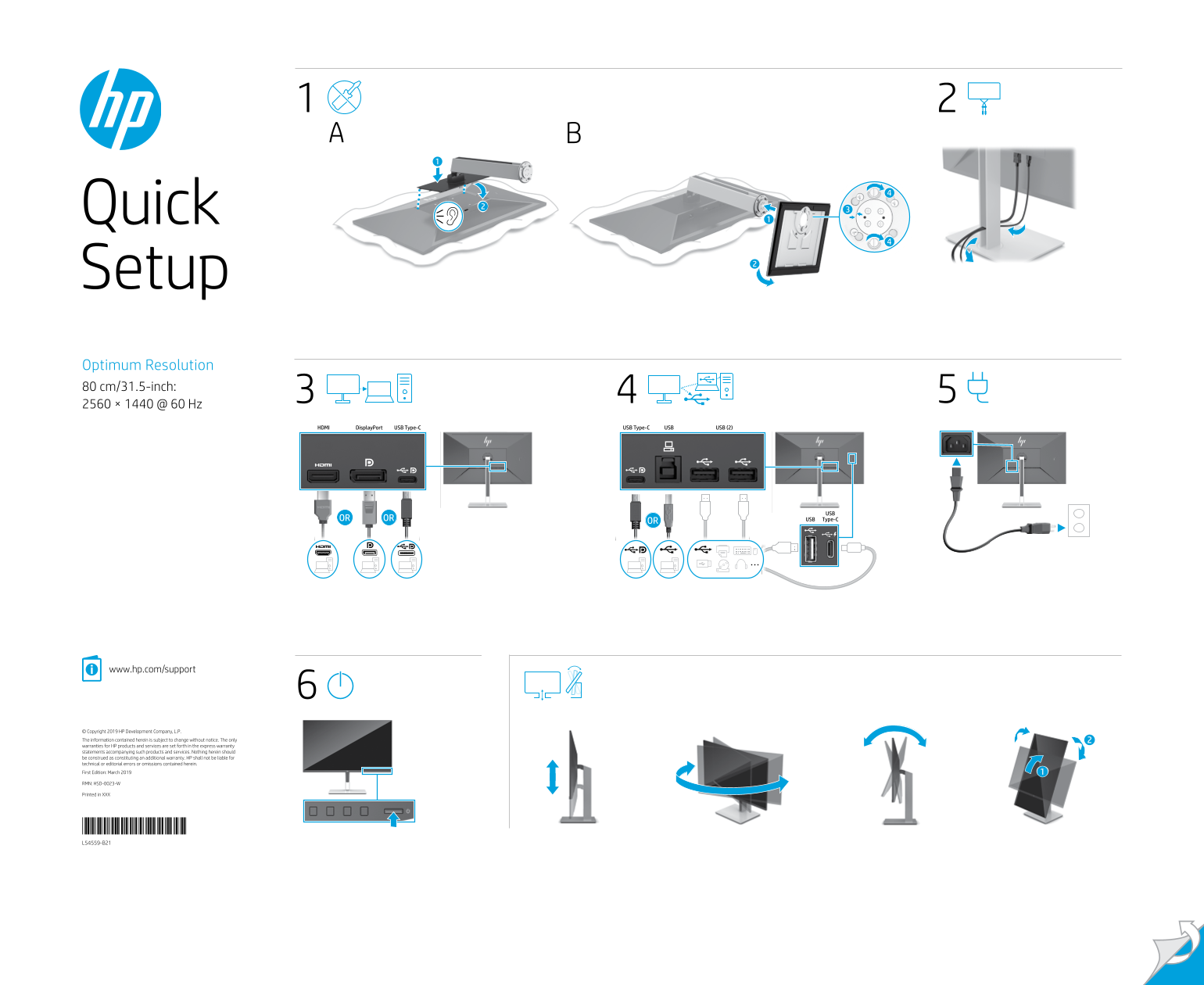
What is the optimal resolution for this display?
The setup offers a resolution of 2560 × 1440 @ 60 Hz.
How should I ensure safe power connection?
Plug the power cord into a grounded (earthed) 3-pin outlet. Do not use adapters that block the grounding pin.
Where can I find drivers and technical support?
Visit www.hp.com/support to locate your user guide, drivers, and software.
What must I do when connecting or disconnecting power?
Always disconnect power by unplugging the power cord from the AC outlet.