Honeywell AML51 Series Manual
Summary
Designed for industrial automation professionals, this guide details the customizable AML51 and AML52 series pushbuttons, lenses, and switches. These components provide reliable controls and indicators for building sophisticated control panels. The manual serves as a comprehensive order guide, detailing compatibility across various indicator types (LED, incandescent) and offering technical specifications for every display option—from simple transmission colors to multi-legend digital displays. Essential for engineers and system builders designing durable, specialized hardware interfaces.
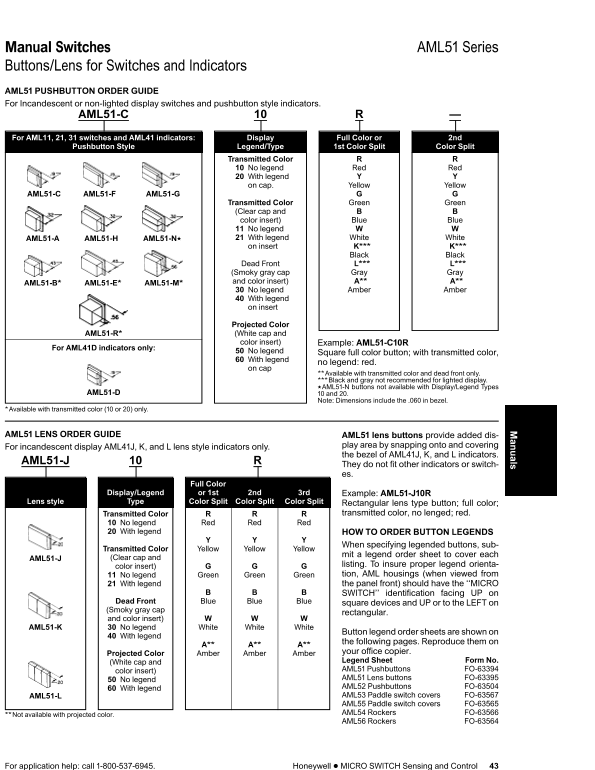
Page 1 Text Content
Manual Switches AML51 Series Buttons/Lens for Switches and Indicators
anuals
AML51 PUSHBUTTON ORDER GUIDE For Incandescent or non-lighted display switches and pushbutton style indicators.
AML51-C
For AML11, 21, switches and AML41 indicators: Display Full Color or 2nd
Pushbutton Style Legend/Type 1st Color Split Color Split
Transmitted Color No legend Red Red With legend on cap. Yellow Yellow
AML51-C AML51-F AML51-G
Transmitted Color Green Green (Clear cap and color insert) Blue Blue No legend AML51-A AML51-H AML51-Nu With legend White White on insert K*** K***
Black Black
Dead L*** L*** (Smoky gray cap Gray Gray AML51-B* AML51-E* AML51-M* and color insert) A** A** No legend Amber Amber With legend on insert
Projected Color AML51-R* (White cap and color insert) Example: AML51-C10R
For AML41D indicators only:
No legend Square full color button; with transmitted color, With legend
no legend: red.
on cap
**Available with transmitted color and dead only. ***Black and gray not recommended for lighted display. u AML51-N buttons not available with Display/Legend Types
AML51-D and 20.
Note: Dimensions include the .060 in bezel.
*Available with transmitted color (10 or 20) only.
AML51 LENS ORDER GUIDE AML51 lens buttons provide added dis-
For incandescent display AML41J, K, and lens style indicators only. play area by snapping onto and covering the bezel of AML41J, K, and indicators.
AML51-J
They do not fit other indicators or switch- es.
Full Color
Display/Legend or 1st 2nd 3rd Example: AML51-J10R
Lens style Type Color Split Color Split Color Split Rectangular lens type button; full color;
Transmitted Color transmitted color, no lenged; red.
No legend Red Red Red With legend HOW TO ORDER BUTTON LEGENDS
When specifying legended buttons, sub-
Transmitted Color Yellow Yellow Yellow
mit legend order sheet to cover each
AML51-J (Clear cap and
listing. To insure proper legend orienta-
color insert)
No legend Green Green Green tion, AML housings (when viewed from With legend the panel front) should have the ‘‘MICRO SWITCH’’ identification facing UP on
Dead Blue Blue Blue square devices and UP or to the on (Smoky gray cap
rectangular.
and color insert) AML51-K No legend White White White
Button legend order sheets are shown on
With legend
the following pages. Reproduce them on
Projected Color Amber Amber Amber your office copier. (White cap and Legend Sheet Form No. color insert) AML51 Pushbuttons FO-63394 No legend AML51 Lens buttons FO-63395 With legend AML52 Pushbuttons FO-63504 AML51-L AML53 Paddle switch covers FO-63567 AML55 Paddle switch covers FO-63565 **Not available with projected color. AML54 Rockers FO-63566 AML56 Rockers FO-63564
For application help: call 1-800-537-6945. Honeywell MICRO SWITCH Sensing and Control
Page Summary Contents For Honeywell AML51 Series Manual
Manual Details
| Brand | Honeywell |
|---|---|
| Pages | 5 |
| File Size | 246.67 KB |
| Published | May 22, 2026 |
Enter the captcha to get the download link:

Frequently Asked Questions
How do I order a legended button?
You must use a legend order sheet to cover each designated color, specifying the desired orientation (e.g., facing UP or to the LEFT).
What are key differences between AML51 and AML52 series buttons?
AML51 covers indicators/switches up to AML41; AML52 is for LED displays on models like AML32 and AML42.
Which types of visible display do I need specialized lens buttons for?
AML51-J lenses are only for incandescent display AML41J, K, and L indicators
Are all button styles compatible with projected color inserts?
No, the AML51 'Rockers' (AML56) are not available with projected color.
What is the contact information for application help?
For assistance, call 1-800-537-6945.