EXTECH DA50 Non-Contact Current Detector Data Sheet User Guide
Summary
Use this guide for the DA50 Non-Contact Current Detector, an essential tool designed for safely identifying live AC conductors without physical contact. This manual provides detailed operating instructions for setup, sensitivity adjustment, and precise detection steps. It is mandatory reading for all users—electrical professionals or technicians—due to extensive coverage of critical safety warnings, proper battery handling, and environmental guidelines necessary for safe and accurate usage.
Page 1 Text Content
User’s Guide
DA50 Non-Contact Current Detector
Safety Description Battery Installation
WARNING: Risk of Electrocution. Before use, always test the Current 1. Unscrew the probe tip.. Detector on a known current carrying circuit to verify proper
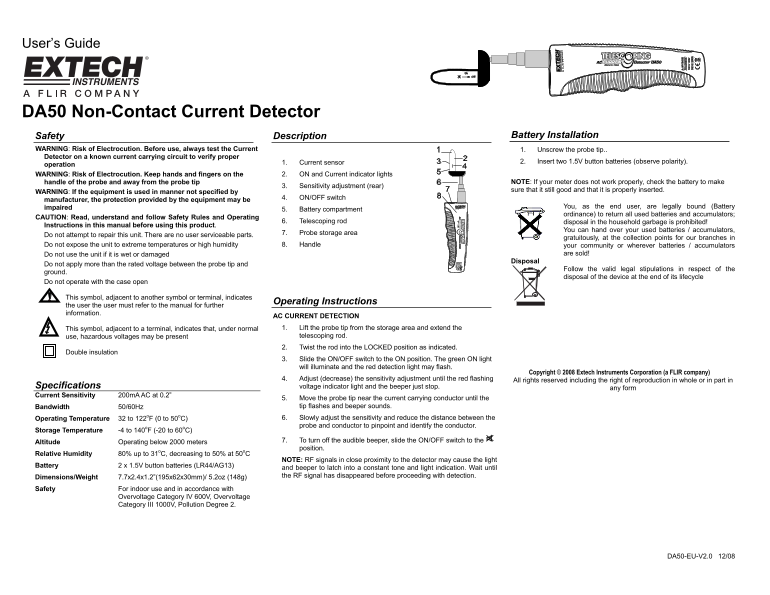
1. Current sensor 2. Insert two 1.5V button batteries (observe polarity).
operation
WARNING: Risk of Electrocution. Keep hands and fingers on the 2. ON and Current indicator lights
handle of the probe and away from the probe tip NOTE: If your meter does not work properly, check the battery to make
3. Sensitivity adjustment (rear)
sure that it still good and that it is properly inserted.
WARNING: If the equipment is used in manner not specified by
4. ON/OFF switch
manufacturer, the protection provided by the equipment may be
impaired You, as the end user, are legally bound (Battery
5. Battery compartment
ordinance) to return all used batteries and accumulators;
CAUTION: Read, understand and follow Safety Rules and Operating
6. Telescoping rod disposal in the household garbage is prohibited!
Instructions in this manual before using this product.
You can hand over your used batteries / accumulators,
7. Probe storage area
Do not attempt to repair this unit. There are no user serviceable parts.
gratuitously, at the collection points for our branches in
Do not expose the unit to extreme temperatures or high humidity 8. Handle your community or wherever batteries / accumulators
Do not use the unit if it is wet or damaged are sold!
Disposal
Do not apply more than the rated voltage between the probe tip and
Follow the valid legal stipulations in respect of the
ground.
disposal of the device at the end of its lifecycle
Do not operate with the case open
This symbol, adjacent to another symbol or terminal, indicates
Operating Instructions
the user the user must refer to the manual for further information.
AC CURRENT DETECTION This symbol, adjacent to a terminal, indicates that, under normal 1. Lift the probe tip from the storage area and extend the use, hazardous voltages may be present telescoping rod. 2. Twist the rod into the LOCKED position as indicated.
Double insulation
3. Slide the ON/OFF switch to the ON position. The green ON light will illuminate and the red detection light may flash.
Copyright © 2008 Extech Instruments Corporation (a FLIR company)
4. Adjust (decrease) the sensitivity adjustment until the red flashing All rights reserved including the right of reproduction in whole or in part in
Specifications voltage indicator light and the beeper just stop. any form Current Sensitivity 200m A AC at 0.2”
5. Move the probe tip near the current carrying conductor until the Bandwidth 50/60Hz tip flashes and beeper sounds. Operating Temperature 32 to 122o F (0 to 50o C) 6. Slowly adjust the sensitivity and reduce the distance between the probe and conductor to pinpoint and identify the conductor.
Storage Temperature -4 to 140o F (-20 to 60o C)
Altitude Operating below 2000 meters 7. To turn off the audible beeper, slide the ON/OFF switch to the position.
Relative Humidity 80% up to 31o C, decreasing to 50% at 50o C
NOTE: RF signals in close proximity to the detector may cause the light
Battery 2 x 1.5V button batteries (LR44/AG13)
and beeper to latch into a constant tone and light indication. Wait until Dimensions/Weight 7.7x2.4x1.2”(195x62x30mm)/ 5.2oz (148g) the RF signal has disappeared before proceeding with detection.
Safety For indoor use and in accordance with
Overvoltage Category IV 600V, Overvoltage Category III 1000V, Pollution Degree 2.
DA50-EU-V2.0 12/08
Page Summary Contents For EXTECH DA50 Non-Contact Current Detector Data Sheet User Guide
Manual Details
| Brand | Current |
|---|---|
| Pages | 1 |
| File Size | 92.90 KB |
| Published | May 28, 2026 |
Enter the captcha to get the download link:

Frequently Asked Questions
What is the required battery type for the DA50?
It requires two 1.5V button batteries (LR44/AG13).
How do I adjust the sensitivity of the detector?
Adjust the rear sensitivity adjustment until the red flashing voltage indicator light and beeper stop after moving the probe tip near a current conductor.
What safety precautions must I follow when using the device?
Keep hands away from the probe tip, ensure you are on a known current carrying circuit, and avoid use if the unit is wet or damaged.
Where should used batteries be disposed of?
They must be returned to collection points for authorized branches; disposal in household garbage is prohibited.