Dell Wyse 3030 LT Quick User Guide
Summary
This Quick Start Guide for the Dell Wyse 3030 LT Cloud Client (Regulatory Model N06D, Type N06D001) provides multilingual setup instructions covering vertical stand installation, keyboard and mouse connection, network connectivity, display connection via DisplayPort, and power cable connection for the client device and display. It documents hardware features including optional wireless antenna port, USB 2.0 and USB 3.0 ports, network port, headset jack, and lock receptacle. Taiwan RoHS complianc
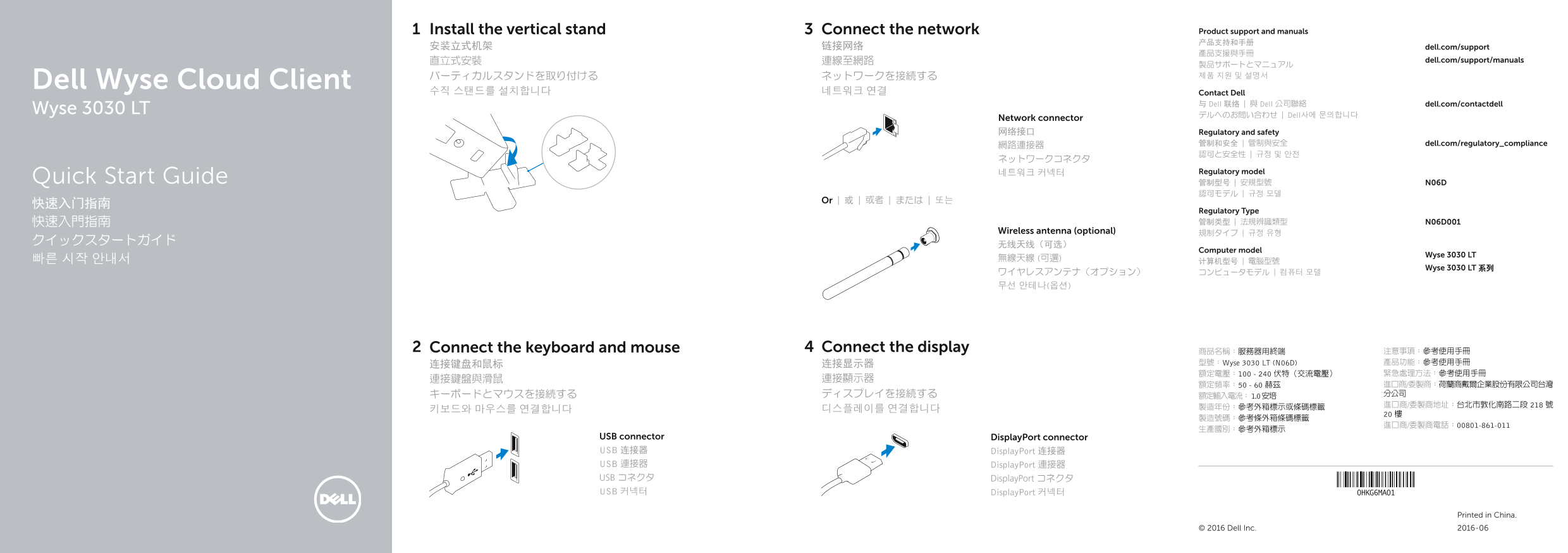
Page 1 Text Content
Install the vertical stand Connect the network Product support and manuals 产品支持和手册
安装立式机架 链接网络 dell.com/support
直立式安裝 連線至網路 dell.com/support/manuals
Dell Wyse Cloud Client
수직 스탠드를 설치합니다 네트워크 연결 Contact Dell
与 Dell 联络 | 與 Dell 公司聯絡 dell.com/contactdell
Wyse 3030 LT
デルへのお問い合わせ | Dell사에 문의합니다
Network connector 网络接口 Regulatory and safety
網路連接器 管制和安全 | 管制與安全 dell.com/regulatory_compliance 認可と安全性 | 규정 및 안전
네트워크 커넥터 Regulatory model
Quick Start Guide 管制型号 | 安規型號 N06D
Or | 或 | 或者 | または | 또는
Regulatory Type 快速入門指南 管制类型 | 法規辨識類型 N06D001
Wireless antenna (optional) 規制タイプ | 규정 유형
Computer model
Wyse 3030 LT
Wyse 3030 LT 系列
Connect the keyboard and mouse Connect the display 商品名稱:服務器用終端 注意事項:參考使用手冊
连接键盘和鼠标 连接显示器 型號:Wyse 3030 LT (N06D) 產品功能:參考使用手冊 額定電壓:100 - 240 伏特(交流電壓) 緊急處理方法:參考使用手冊
USB connector Display Port connector USB 连接器 Display Port 连接器 USB 連接器 Display Port 連接器 USB コネクタ Display Port コネクタ USB 커넥터 Display Port 커넥터
Printed in China.
© 2016 Dell Inc. 2016-06
Page Summary Contents For Dell Wyse 3030 LT Quick User Guide
Manual Details
| Brand | Dell |
|---|---|
| Pages | 2 |
| File Size | 309.22 KB |
| Published | July 02, 2026 |
Enter the captcha to get the download link:

Frequently Asked Questions
What are the key ports available on the Wyse 3030 LT?
It includes multiple connectivity options such as USB (2.0 and 3.0), DisplayPort, a headset jack, and a dedicated network port (10/100/1000 Base-T).
What indicates that the client device is ready for use?
The user should check that the client device activity light has gone off.
What are the power specifications needed?
The unit supports an AC voltage range of 100 - 240 Volts and a frequency range of 50 - 60 Hz. It also accepts a +12V power adapter input.