Dell Wyse Cloud Client - Wyse 5010 Quick Start Guide
Summary
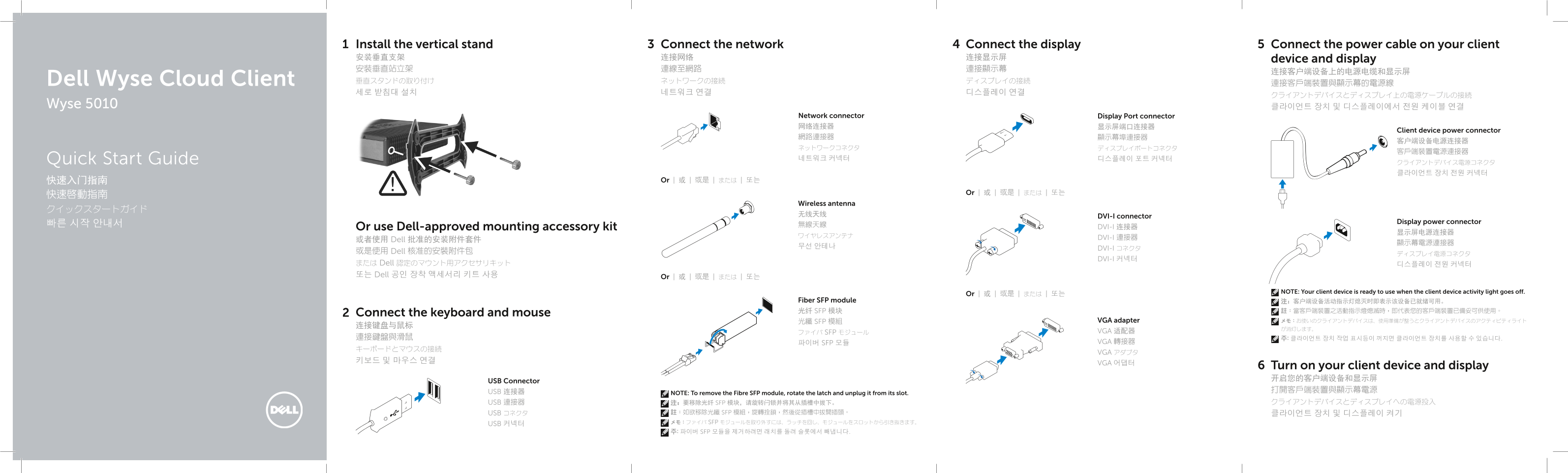
This Quick Start Guide for the Dell Wyse Cloud Client Wyse 5010 thin client provides multilingual setup instructions covering vertical stand installation, keyboard and mouse connection, network cable connection, display connection via DisplayPort or DVI-I connectors with VGA adapter and fiber SFP module options, power cable connection to both client device and display, wireless antenna setup, and optional Dell-approved mounting accessory kit usage. Designed for IT administrators deploying VDI thin client solutions.
Page 1 Text Content
Install the vertical stand Connect the network Connect the display Connect the power cable on your client 安装垂直支架 连接网络 连接显示屏 device and display 安裝垂直站立架 連線至網路 連接顯示幕
Dell Wyse Cloud Client 垂直スタンドの取り付け ネットワークの接続 ディスプレイの接続
Wyse 5010 클라이언트 장치 및 디스플레이에서 전원 케이블 연결
Network connector Display Port connector 网络连接器 显示屏端口连接器
Client device power connector
Quick Start Guide 네트워크 커넥터 디스플레이 포트 커넥터
快速入门指南 Or | 或 | 或是 | または | 또는
Or | 或 | 或是 | または | 또는
Wireless antenna
无线天线 DVI-I connector
Display power connector
Or use Dell-approved mounting accessory kit DVI-I 连接器
ワイヤレスアンテナ DVI-I 連接器
或者使用 Dell 批准的安装附件套件
무선 안테나 DVI-I コネクタ
或是使用 Dell 核准的安裝附件包
DVI-I 커넥터
または Dell 認定のマウント用アクセサリキット 디스플레이 전원 커넥터 또는 Dell 공인 장착 액세서리 키트 사용 Or | 或 | 或是 | または | 또는
NOTE: Your client device is ready to use when the client device activity light goes off.
Or | 或 | 或是 | または | 또는
Fiber SFP module 注:客户端设备活动指示灯熄灭时即表示该设备已就绪可用。
光纤 SFP 模块 註:當客戶端裝置之活動指示燈熄滅時,即代表您的客戶端裝置已備妥可供使用。
Connect the keyboard and mouse
光纖 SFP 模組 VGA adapter メモ:お使いのクライアントデバイスは、使用準備が整うとクライアントデバイスのアクティビティライト
ファイバ SFP モジュール VGA 适配器
파이버 SFP 모듈 VGA 轉接器
VGA アダプタ
VGA 어댑터
Turn on your client device and display 开启您的客户端设备和显示屏
USB Connector
USB 连接器 打開客戶端裝置與顯示幕電源
NOTE: To remove the Fibre SFP module, rotate the latch and unplug it from its slot.
USB 連接器 注:要移除光纤 SFP 模块,请旋转闩锁并将其从插槽中拔下。 クライアントデバイスとディスプレイへの電源投入
USB コネクタ 註:如欲移除光纖 SFP 模組,旋轉拴鎖,然後從插槽中拔開插頭。 클라이언트 장치 및 디스플레이 켜기 USB 커넥터 メモ:ファイバ SFP モジュールを取り外すには、ラッチを回し、モジュールをスロットから引き抜きます。 주: 파이버 SFP 모듈을 제거하려면 래치를 돌려 슬롯에서 빼냅니다.
Page Summary Contents For Dell Wyse Cloud Client - Wyse 5010 Quick Start Guide
Manual Details
| Brand | Dell |
|---|---|
| Pages | 2 |
| File Size | 994.19 KB |
| Published | July 02, 2026 |
Enter the captcha to get the download link:

Frequently Asked Questions
How do I know if my client device is operational and ready to use?
The device is ready when the client device activity light goes off.
What must I connect besides powering on the unit?
You need to connect a keyboard and mouse via a VGA adapter, along with necessary display cables.
What steps are needed to remove the Fiber SFP module?
To remove the module, you must first rotate the latch and then unplug it from its slot.
What types of display ports are available on this client device?
The model features a Display Port connector, a DVI-I port (DVI-D/VGA), and dedicated USB 2.0 ports.